One Calculator, Four Front Doors: Building an AI‑Native TCO Tool for Databricks on Google Cloud
How I turned a spreadsheet into a chat agent, an interactive form, and a live dashboard — using open agent standards on Google Cloud.
I’m an ISV Partner Engineer at Google Cloud. My job is to work shoulder‑to‑shoulder with independent software vendors and help their products run — and sell — better on Google Cloud. One of the partners I work with is Databricks.
Databricks on Google Cloud is a genuinely better‑together story: it plugs into Google Cloud’s first‑party data and AI services, runs on the same global infrastructure customers already trust, and the pricing math frequently lands in the customer’s favor when you actually model it out. The catch is that word — model. Before a customer can appreciate any of that, someone has to sit down and estimate the total cost of ownership (TCO) of moving a Databricks footprint from another cloud onto Google Cloud. That estimate is fiddly, workload‑by‑workload work, and it’s exactly the kind of thing that should be automated.
So we built a TCO calculator. What started as a spreadsheet became a small study in modern agent architecture, because I ended up delivering the same calculation through four different front doors. This post walks through all four, why each exists, and how they authenticate safely — all at the architecture level, using only publicly documented building blocks.
The core idea: one engine, many experiences
The most important design decision was boring on purpose: there is exactly one place where the math happens, and everything else is just a different way to drive it. That single engine keeps every experience consistent — the chat answer, the form, and the dashboard all produce identical numbers, because they call the same calculator. Everything that follows is about how a user reaches that engine, not about re‑implementing it.
A quick glossary (so nothing below is mysterious)
- Agent — an LLM given a goal plus a set of tools it can call to get real work done.
- Google Agent Development Kit (ADK) — an open framework for building agents, their tools, and multi‑step workflows.
- Vertex AI Agent Engine — a fully managed runtime where an agent can live without you operating any servers.
- Cloud Run — Google Cloud’s serverless container platform, for when you do want to run your own server code.
- Gemini Enterprise — the enterprise assistant surface where users actually chat with, and see, these agents.
- Agent2Agent (A2A) — an open protocol for a client and an agent to talk to each other.
- A2UI / generative UI — a way for an agent to send interface (forms, cards) that the client renders natively, instead of only text.
- Model Context Protocol (MCP) — an open standard for exposing tools and interactive apps to any compatible AI host.
- OAuth 2.0 — the industry‑standard way a user grants an application scoped, revocable permission to act on their behalf.
Front door #1 — The spreadsheet
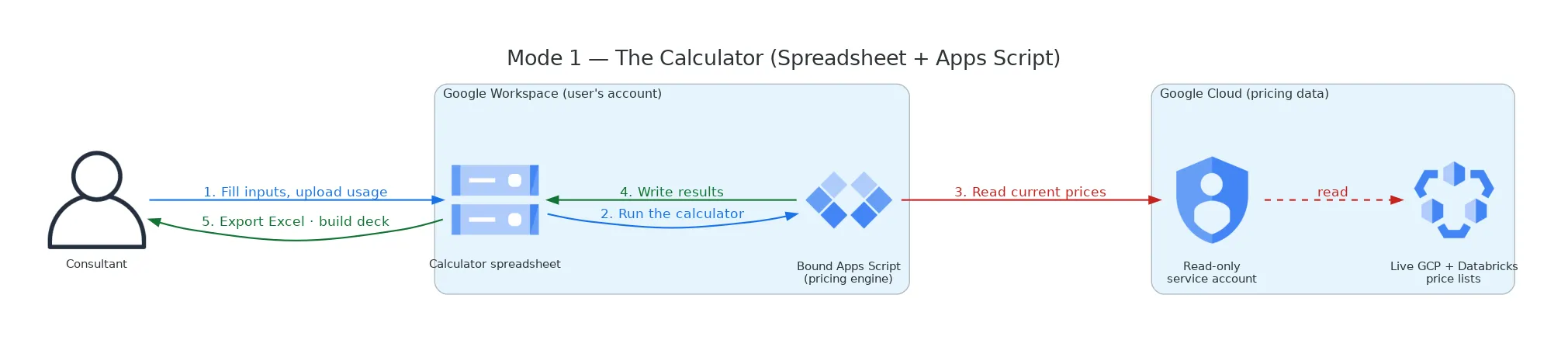
The foundation is a spreadsheet with a bound script that holds the entire pricing engine. A background job keeps live price lists fresh; a user fills in their inputs, runs the calculation, and reads the results. No AI, no servers — just the source of truth for the math. Every “smarter” front door below exists to automate the steps a person otherwise does by hand here.
Front door #2 — The chat agent
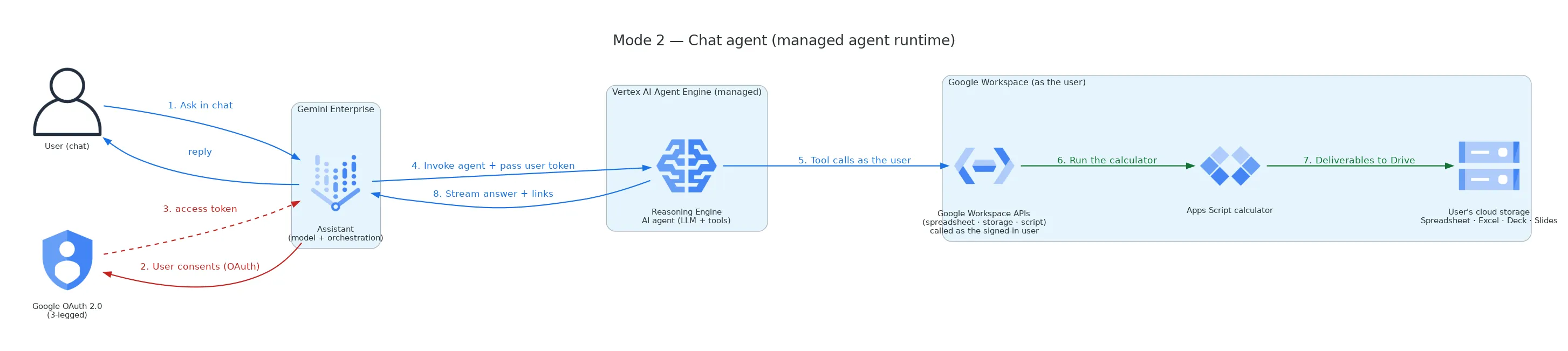
The first automation wraps the engine in an ADK agent running on Vertex AI Agent Engine — a fully managed runtime, so there’s no infrastructure to operate. The user simply talks to it inside Gemini Enterprise: the agent asks for the inputs conversationally, kicks off the calculation, and hands back a shareable spreadsheet, an Excel export, and an executive slide deck. This is the lowest‑friction experience, and it’s the one that feels the most like magic — but a wall of chat text isn’t always the best way to fill in twenty fields.
Front door #3 — The interactive form (generative UI)
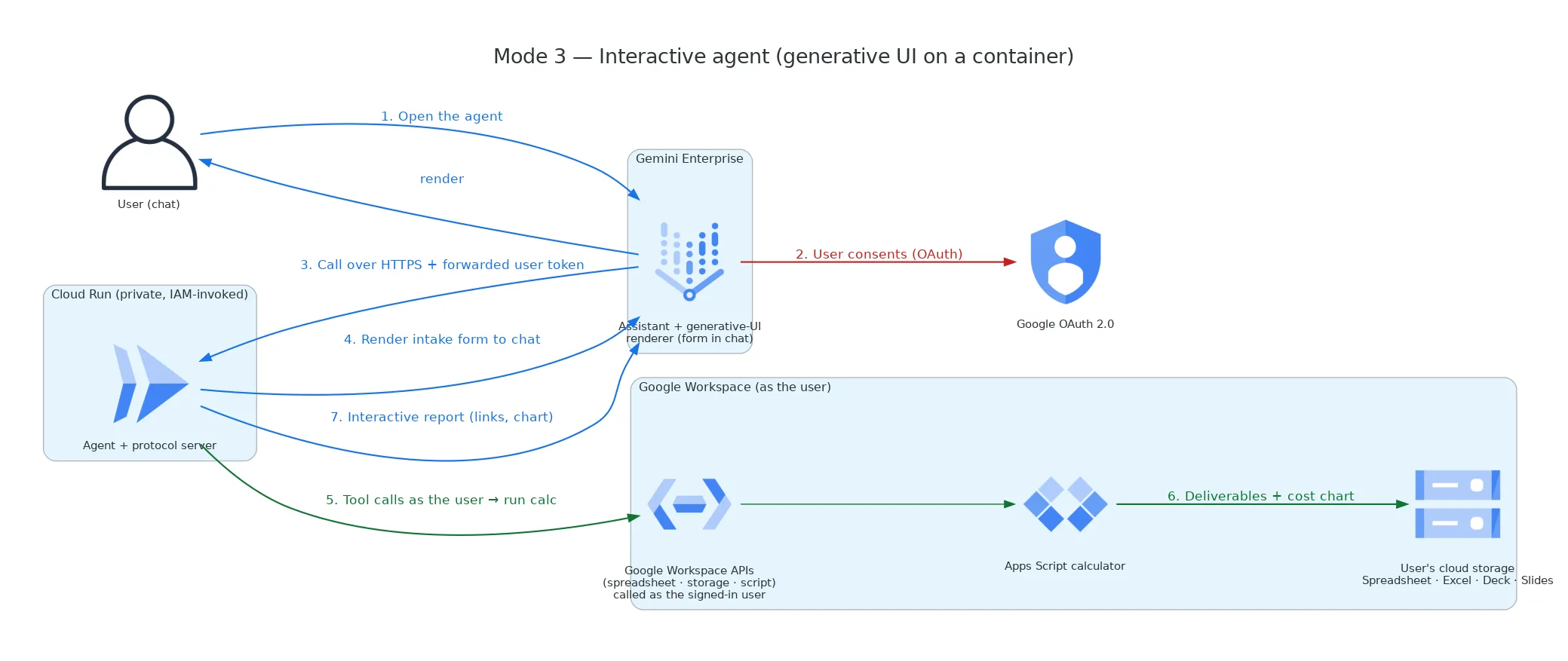
For structured input, typing answers one at a time is clumsy. So the third front door uses generative UI over the A2A protocol: the agent sends an actual form that Gemini Enterprise renders natively in the chat. The user fills it out, submits once, and gets an interactive report back — complete with a cost‑comparison chart. Because this needs a custom protocol server and the user’s session to stay warm across the “here’s the form → form submitted” round‑trip, it runs as a container on Cloud Run rather than on the managed runtime.
Front door #4 — The live dashboard (MCP Apps)
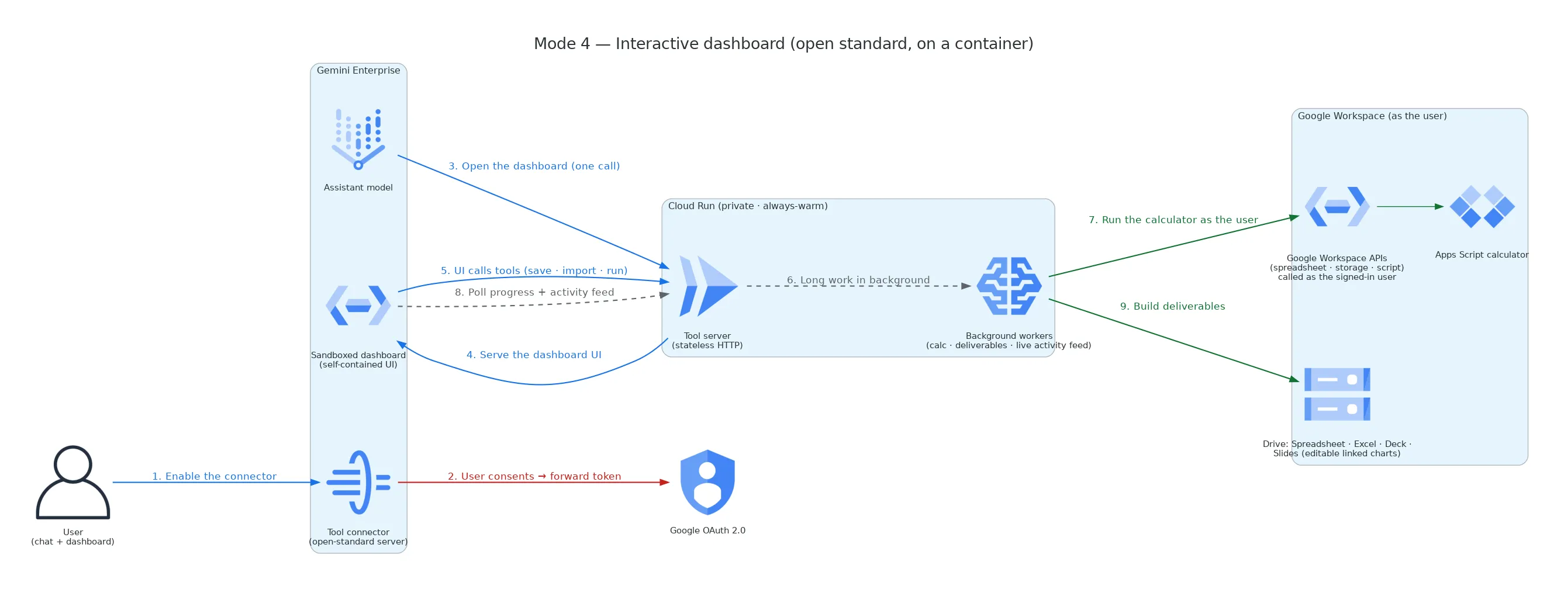
The fourth front door goes furthest. It uses MCP Apps — the interactive‑app extension of the Model Context Protocol (MCP) — so the agent serves a genuine dashboard: a self‑contained interface that Gemini Enterprise renders in a sandboxed frame. Because MCP is an open standard, the same dashboard would render in any MCP‑compatible host, not just Gemini Enterprise. The user gets the full input form, runs the calculation, and watches a live activity feed narrate each step as it happens, before landing on a results panel with links and an editable chart. Because a real calculation takes minutes, the heavy work runs in the background while the dashboard politely polls for progress. Like #3, it lives on Cloud Run.
The anatomy of an agent — and what each piece became in my build
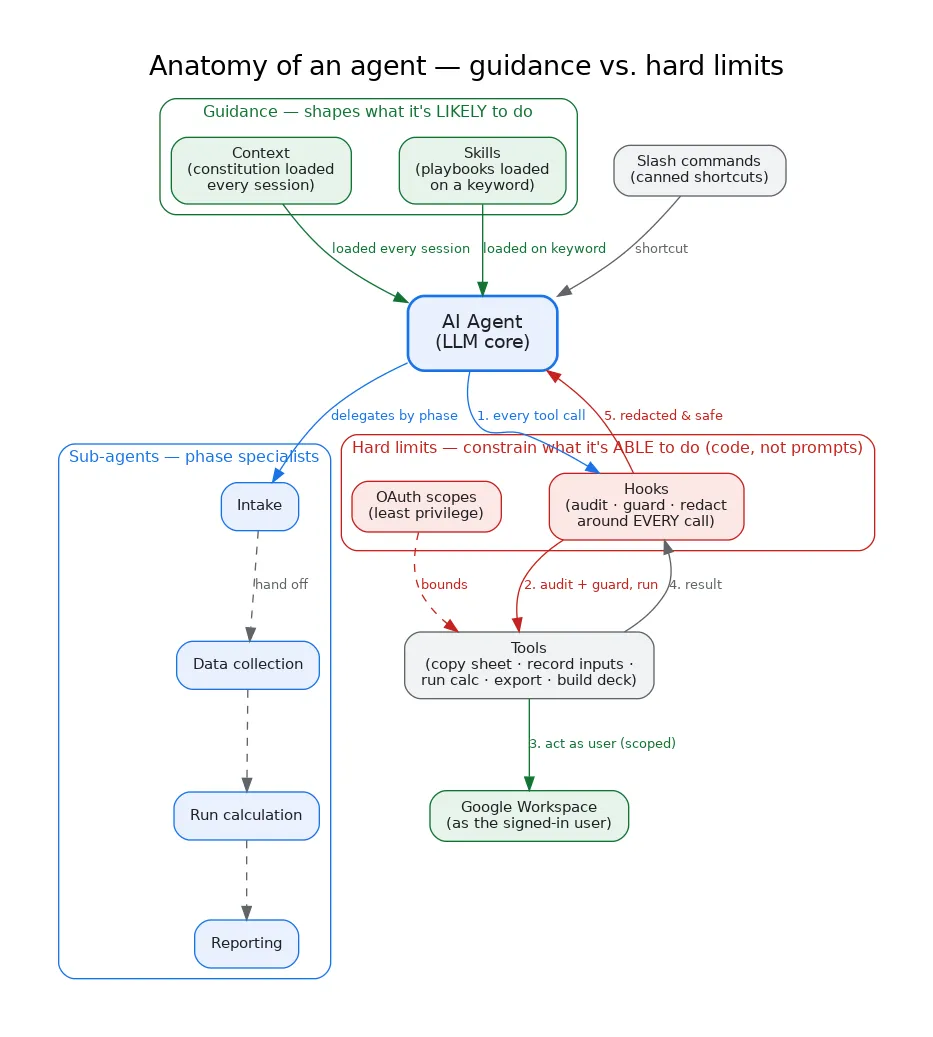
A production agent is more than “an LLM that calls an API.” The open frameworks converge on a handful of parts, and building all four front doors forced me to be deliberate about each one. Here’s the generic anatomy, and the concrete (non-confidential) form each part took in my project:
-
Tools — the functions the agent is allowed to invoke to do real work. In my build: discrete actions like “make a private copy of the calculator,” “record the inputs,” “run the calculation,” “export Excel,” and “build the deck.” The agent orchestrates; the tools touch the world.
-
Context — a persistent instruction file loaded at the start of every session that gives the agent its standing rules and identity, so behavior is consistent across conversations. In my build: a small “constitution” the agent reads every time — encoding principles like always act on the user’s behalf, never invent numbers, and keep changes to the shared engine backward-compatible. It’s the difference between an agent that re-negotiates its own values each turn and one that has them.
-
Skills — packaged, reusable instructions the agent pulls in only when relevant, usually triggered by keywords, so the base prompt stays lean. In my build: when the conversation reaches the reporting stage, a “deck” skill loads the presentation playbook so the executive slides come out consistent every time — without that guidance cluttering the agent during data collection.
-
Hooks — deterministic code that runs around every tool call, independent of whatever the model decides. This is where you put guarantees, not suggestions. In my build: before/after each tool call, a hook chain (1) writes an audit line, (2) enforces guardrails, and (3) redacts any sensitive value from the result before it can leave the process. Because it’s code, not a prompt, it holds even if the model is confused or adversarially steered — for example, a secret can never be returned in a tool result, full stop.
-
Sub-agents — specialist agents that own one phase each, so no single prompt has to be good at everything. In my build: separate agents for intake, data collection, running the calculation, and reporting — each focused, each handing off cleanly.
-
Slash commands — quick, canned shortcuts for common operations. In my build: one-word actions like re-running a calculation, so power users don’t have to re-type a paragraph.
What that looks like concretely. None of this is abstract, so here’s an illustrative (public, generic) picture of the pieces in plain language:
- Context (loaded every session): a short list of standing rules the agent always reads — e.g. “You help estimate total cost of ownership on Google Cloud. Always act as the signed-in user. Never fabricate a price or a total — if a number wasn’t computed, say so. Treat the shared calculation engine’s structure as read-only; never rename or remove its fields.”
- A skill (loaded on a trigger): the word “deck” or “presentation” in the conversation pulls in the slide-building playbook (layout, section order, tone) just for that stage.
- A hook (always runs, in code): a fixed rule such as “after every tool call, remove any field that looks like a token, key, or secret before the result leaves the process” — plus an audit line and a guardrail check. The model can’t opt out of it, because it isn’t a prompt; it’s code wrapped around the call.
- A tool call, end to end: the agent decides to “run the calculation” → the hook logs and guards it → the tool executes as the user → the hook redacts the result → the agent sees a clean, safe output.
The distinction matters: context and skills shape what the model is likely to do; hooks and scopes constrain what it is able to do. Good agents use both — guidance for quality, hard limits for safety.
The honest, and instructive, part: not every front door needs all of these. The chat agent uses the full anatomy. The live dashboard (front door #4) has no LLM inside it at all — it’s a deterministic program — so it deliberately uses only tools and hooks and skips context, skills, and sub-agents, because there’s no model to steer. Matching the anatomy to the runtime, rather than cargo-culting every layer everywhere, is part of the engineering.
Authentication: acting as the user, safely
A theme runs through all four automated front doors: the tool should act as the person using it, so every file it creates belongs to that user and nothing runs with more privilege than it needs. Two publicly documented ideas make this clean.
OAuth 2.0 is how a user grants scoped, revocable permission. When someone first uses an agent, Gemini Enterprise runs the standard 3‑legged consent flow; the user approves a specific, least‑privilege set of permissions (read/write their spreadsheets and files, run the calculator — nothing more), and the assistant receives a short‑lived access token on their behalf. Every action the agent takes then rides on that token, which is why the resulting documents are owned by the user, not by some shared robot account. Scopes are chosen deliberately and granted once, at setup.
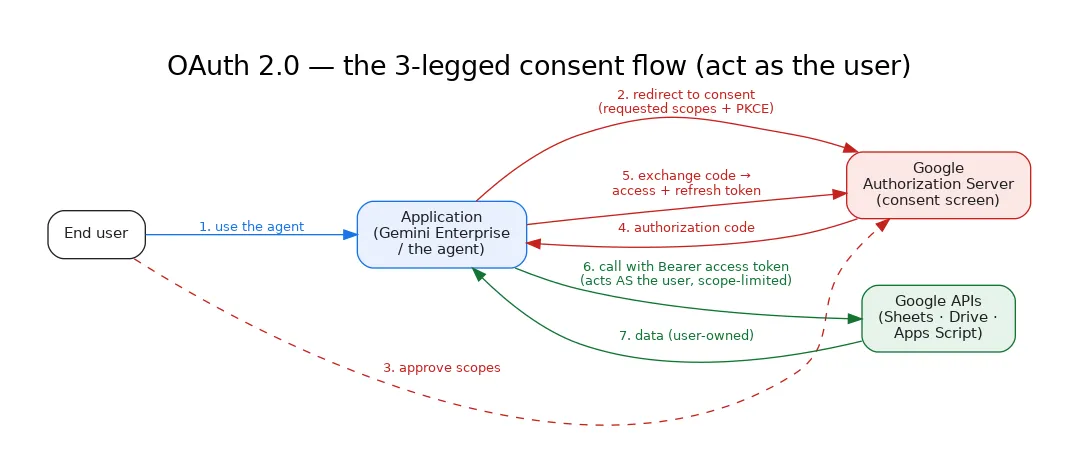
There’s a subtle but important second layer, best shown as a two‑token model:
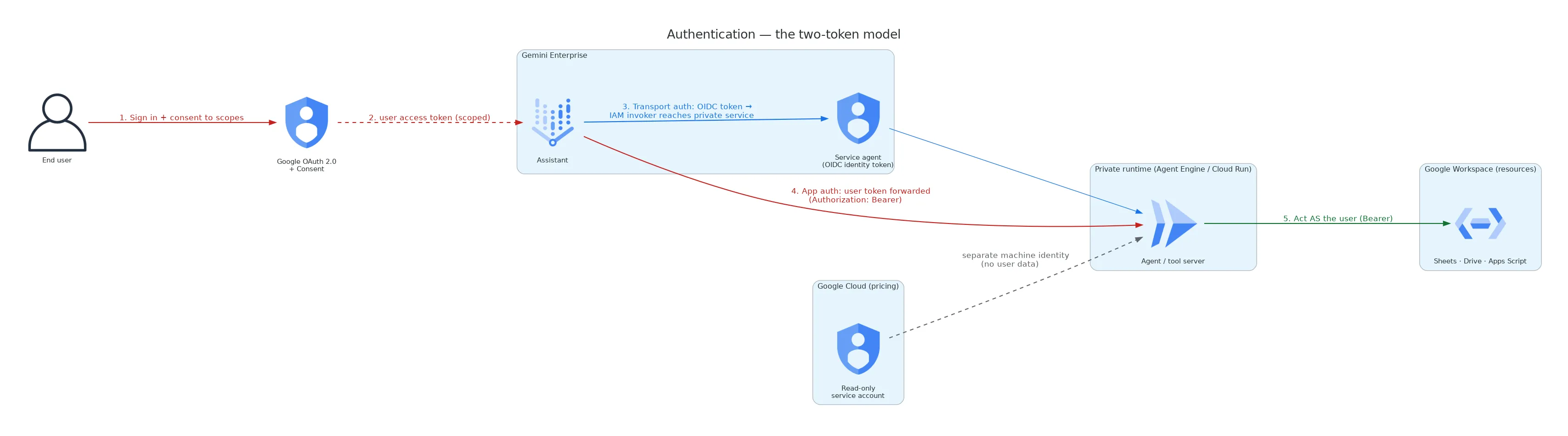
- Transport‑layer authentication answers “is this caller even allowed to reach the service?” The container front doors are deployed privately — the public internet can’t call them. Gemini Enterprise reaches them using its own managed service identity (an OpenID Connect token) that has been granted the invoke permission. This is machine‑to‑machine authentication and has nothing to do with the end user.
- Application‑layer authentication answers “on whose behalf is this work being done?” Once the call is safely inside the private service, the user’s OAuth token — forwarded along with the request — is what the tools use to act as that specific person.
Keeping these two separate is what lets the system be both locked‑down (no public endpoints) and personal (everything happens as the real user). Meanwhile, the one component that touches no user data — the background job that refreshes public price lists — uses a plain, read‑only machine identity, completely isolated from the user path. Authorization, in short, is least‑privilege by construction: narrow user scopes for user work, a narrow service identity for reaching private services, and a separate read‑only identity for public data.
Why this matters beyond one calculator
The interesting part isn’t the TCO numbers — it’s that the same engine reached users four different ways with almost no duplication. Chat, generative UI, and an open‑standard dashboard are not competing choices; they’re a spectrum, and different customers and moments want different points on it. Building on open standards — ADK, A2A, generative UI, and MCP — meant I could offer that whole spectrum on Google Cloud without betting everything on a single interaction style.
For anyone doing partner or platform engineering, that’s the takeaway I’d underline: separate your engine from your experience, lean on the open agent standards, and let authentication be boring and least‑privilege. Do that, and turning any internal tool into a chat agent, an interactive form, or a live dashboard stops being a rewrite and becomes a choice.
Views are my own. Everything described here is built from publicly documented Google Cloud and open‑standard components.