Databricks on Google Cloud, Part 2: Identity and access, IAM, service accounts, single sign-on and automation
Who is allowed to do what, and how do they prove it? Every identity a Databricks workspace uses on Google Cloud, two deployment paths side by side (console and keyless Terraform from CI), single sign-on and SCIM from Entra ID, where each kind of role lives, which federation to use when, and where a key is still needed today.
Read this chapter as 5 illustrated mini-books
Flip pages horizontally like a hardcover book, or swipe up like a reel to move through all 5 topics (20 animated pages).
In Part 1 we built the house: a Databricks control plane in Databricks’ own account, a classic compute plane in your Google Cloud project, a serverless compute plane run by Databricks, and the buckets that hold workspace data. We left one question open on purpose. Who is allowed to touch each of those pieces, and how do they prove who they are?
a reminder of Part 1: the control plane and the serverless compute plane run in Databricks' account; the classic compute plane and the workspace storage buckets run in Acme's project acme-dbx-prod; this post asks which identity may touch each piece
Part 1 explains each of these pieces in detail.
That question is where Databricks people and Google Cloud people misunderstand each other most. A Databricks architect from AWS thinks in IAM roles and instance profiles. An Azure architect thinks in managed identities and the Access Connector. A Google Cloud architect thinks in projects, allow policies and service accounts, and has usually been told by the security team that service account keys are banned. All three are right in their own cloud. This post maps them onto each other.
It is also the most tangled topic in the series, because four separate systems hand out permissions at once: Google Cloud, the Databricks account, each workspace and Unity Catalog. So this post is long, and I have tried to assume very little. The general ideas (what an identity provider is, what SAML, OAuth and OpenID Connect are, what a JSON Web Token looks like, what SCIM does) now live in Prerequisite 3: Identity and security foundations, and I link to the right section of it whenever a term first appears. Here I spend the words on how those ideas work for Databricks on Google Cloud.
I start with the key ideas and Google Cloud IAM, then the identities a Databricks workspace actually uses and what happens in IAM when a workspace is created. Then comes the heart of the post: two deployment paths side by side, a team clicking through the account console and a bank automating everything from a CI pipeline with no keys. After that: how people sign in, where every kind of role lives, how automation authenticates, which “federation” to use when, and how Databricks reaches Cloud Storage and BigQuery. I finish with a least-privilege checklist and the errors I see most often. All status claims are as of October 2026, and the ones that changed since are updated and dated (last checked 8 November 2026).
If you prefer to watch first, here is the heart of this part as a short animated explainer.
Video: who may do what in Databricks on Google Cloud, and how they prove it without keys, in three minutes. The narration is a synthetic voice; the script and animation are mine.
What are the key ideas?
Five terms carry the whole post. Each one has a fuller, general explanation in Prerequisite 3.
- An identity is a named thing that can ask for access: a person, a group of people, or a program. Authentication proves which identity is asking; authorisation decides what that identity may do. Prerequisite 3 explains both from zero.
- An identity provider (IdP) is the system that holds a company’s people and signs them in, such as Microsoft Entra ID (formerly Azure Active Directory) or Okta. Single sign-on (SSO) lets one sign-in at the identity provider open many applications. See identity providers and SSO.
- A token is a short-lived, signed piece of data that a caller sends with each request instead of a password. Two kinds matter here: an access token lets the holder call an API, and an ID token states who the holder is. Both are often JSON Web Tokens (JWTs). See tokens and JWTs.
- Provisioning means creating, updating and removing user and group records in an application so that they match the identity provider. SCIM (System for Cross-domain Identity Management) is the open standard for it. See SCIM and automated identity management.
- Federation means one system trusting identities or tokens issued by another, so nobody keeps a second copy of the account or a long-lived secret. The word means slightly different things in Google Cloud, Databricks and Microsoft, which Prerequisite 3 untangles.
The single most useful picture for this post is where permissions are granted. There are four places, and a working deployment needs grants in all of them.
A simple example: an office building shared by one company. The landlord’s building management decides who may alter the building itself: walls, wiring, locks. The company’s HR decides who is employed at all. Each floor’s reception decides who may enter that floor and use its meeting rooms. And the locks on the filing cabinets decide who may open which files. A new analyst needs to be employed, let onto a floor and given cabinet keys; she never needs permission to rewire the building. Building management is Google Cloud IAM, HR is the Databricks account, floor reception is the workspace, and the cabinet locks are Unity Catalog:
the four places a permission lives in Databricks on Google Cloud: Google Cloud IAM on Acme's projects and buckets decides who may change the platform; the Databricks account decides who exists and who administers; each workspace decides who may enter and which features they get; Unity Catalog decides who may read which data; Sam needs grants in the bottom three, the platform team and the deployer in the top one
Keep this picture in mind. How does this apply to Acme? Sam, the supply analyst, needs grants in the bottom three layers and none in Google Cloud IAM; Acme’s platform team and its deployer need the top one. Most confusion I see comes from looking for a permission in the wrong one of these four places, for example trying to give an analyst a Google Cloud role so that she can read a Unity Catalog table. We will fill in each layer in turn, and the section Where do roles live? puts all of them in one table.
What does “identity and access” mean on Google Cloud?
If cloud computing itself is new to you, my Learning Cloud series covers the basics, and Prerequisite 2 of this series explains IAM (Identity and Access Management) from scratch: an allow policy on a resource binds principals (who is asking) to roles (what they may do), a role is a bundle of permissions, and a grant made high in the hierarchy (organisation, folder, project) is inherited by everything below it. The general model behind this, role-based access control, is in Prerequisite 3. Here I go one level deeper, into the details that a Databricks deployment leans on. All of them come from the IAM overview.
- A permission is one action on one kind of resource, written as
service.resource.verb, for examplestorage.objects.getorcompute.subnetworks.use. The custom roles Databricks creates are lists of these. - Roles come in three kinds. Basic roles are very broad and best avoided, apart from the Owner
grant Databricks recommends during workspace creation. Since
29 October 2026 Google’s basic roles are
Admin, Writer and Reader (
roles/admin,roles/writer,roles/reader), and the older Owner, Editor and Viewer are called legacy basic roles; both sets still work. Predefined roles such asroles/storage.objectAdminare maintained by Google for one service. Custom roles are your own list of permissions. - A principal can be a user, a Google group, a service account (an identity for a program rather than a person), a federated identity from another identity provider, or a whole domain.
- A resource can be something inside a project, such as a bucket, a BigQuery dataset, a subnet or even a service account.
- An optional IAM Condition adds an if to a binding, such as an expiry time or a resource name prefix. Databricks uses one to scope a role to a single workspace, as we will see.
A simple example: a hotel’s master keys. A key for the whole hotel opens every floor and every room, a floor key opens every room on that floor, and a room key opens one room. Handing someone the hotel master key because they need one room is the classic over-grant. The hotel is the organisation, the floors are folders and projects, the rooms are resources such as buckets and datasets, and each key is a role binding.
How does this apply to Acme? Inheritance is the part that bites: a role granted on Acme’s data-platform folder reaches
acme-dbx-prod and every bucket in it, so grant as low in the hierarchy as you can.
Our running example is the same company as my Production-ready agents
series: Acme Consumer Brands, a fictional consumer goods firm that runs Databricks on Google
Cloud next to BigQuery. Its supply team works in Databricks; its marketing team works in BigQuery (the
data itself is described in Prerequisite 2 of that series).
Acme’s production workspace acme-prod-euw2-supply lives in acme-dbx-prod (the development
workspace in acme-dbx-dev), the Shared VPC in acme-net-host, the data lake bucket
gs://acme-lake-supply in acme-lake, and BigQuery in acme-analytics. This post adds one more
project, acme-dbx-admin, for automation. Acme staff sign in with Microsoft Entra ID. Two people
appear throughout: Sam, a supply analyst who only wants to query tables, and Priya, the
platform lead who builds workspaces.
the data behind the example: campaign_performance has one row per campaign, brand, region and week, owned by marketing in BigQuery; supply_service has one row per brand, region and week, owned by supply in Databricks; three real rows of each
That prerequisite explains every column.
How is this different from AWS and Azure?
The ideas are the same in all three clouds, but the nouns and the place you attach a grant differ. On AWS you often attach a policy to an identity. On Azure you make a role assignment at a scope. On Google Cloud you always add a binding to the allow policy of a resource.
A simple example: two ways to control who enters the rooms of a building. You can print on each
person’s badge the list of rooms it opens, or you can pin a guest list on each door naming who
may enter. An AWS identity policy is the list on the badge; a Google Cloud allow policy is the list on
the door; an Azure role assignment at a scope is one list pinned at the entrance to a whole floor.
How does this apply to Acme? To let a reader into gs://acme-lake-supply, Acme adds that reader to
the bucket’s own allow policy, the list on the bucket’s door, rather than editing anything on the
reader:
the same ideas under different names: where AWS attaches policies to identities and Azure assigns roles at a scope, Google Cloud puts an allow policy on the resource; workloads use a service account; Databricks' storage credential becomes a Databricks-generated service account
The bottom row is the one that matters for this series. A Unity Catalog storage credential on AWS wraps an IAM role, and on Azure it wraps an Access Connector’s managed identity. On Google Cloud it wraps a service account that Databricks generates for you, as the storage credential documentation describes. You never create or download a key for it.
What is a service account, and how does a program use one without a key?
A service account is Google Cloud’s kind of machine identity, the general idea that
Prerequisite 3 introduces.
Its name looks like an email address, name@project-id.iam.gserviceaccount.com. You grant it roles
exactly as you would a user. The twist is that a service account is also a resource: other
principals can be granted roles on it, such as the right to act as it. That is how keyless access
works.
A program needs a token to call a Google API as a service account. There are four ways to get one, described across the service account overview and the pages it links to:
- Attached service account. A Compute Engine VM runs as a service account. Code on the VM asks the local metadata server for a token, and ADC (Application Default Credentials, the way Google’s client libraries discover the identity of the environment, which Prerequisite 3 explains) does this automatically. No secret ever exists on disk. Databricks classic clusters work this way.
- Impersonation. A principal with the Service Account Token Creator role
(
roles/iam.serviceAccountTokenCreator) on a service account can ask the IAM Credentials API for a short-lived token for it. Access tokens last one hour by default, extendable to 12 hours only through an organisation policy, as the short-lived credentials page explains. Terraform for Databricks works this way. - Workload Identity Federation. A workload outside Google Cloud, such as a GitHub Actions job or an AWS Lambda function, swaps its own signed token for a Google token through the Security Token Service (STS), optionally then impersonating a service account. See Workload Identity Federation.
- A JSON key. You download a private key for the service account. Anyone holding the file can be that service account until the key is deleted.
A simple example: four ways to use a company pool car. A delivery van with its fuel card locked inside it, usable only by whoever drives that van (attached). Signing out the pool car’s keys at the key desk for an hour, because your name is on the desk’s approved list (impersonation). A visitor from a partner firm showing their own company’s badge at the desk and getting the keys for an hour (Workload Identity Federation). Or a spare key cut and handed around, which works for anyone who has a copy until the locks are changed (a JSON key).
How does this apply to Acme? All four appear in this post. Every classic cluster node runs as
databricks-compute, attached, like the van. Acme’s GitHub pipeline is the visitor with its own
badge, federated in, and it then signs out tf-deployer by impersonation. And the BigQuery
connection is the spare key, the one place Acme still needs one:
four ways a program gets a service account's identity: attached to a VM through the metadata server, impersonation with the Token Creator role, Workload Identity Federation from another cloud or a CI system, or a JSON key; the first three give short-lived tokens and no secret to leak, the key is a long-lived secret
The fourth way is the one security teams dislike, and Google Cloud now agrees with them by default.
For every organisation created on or after 3 May 2024, Google enforces a
security baseline
that includes Disable service account key creation
(constraints/iam.managed.disableServiceAccountKeyCreation) and Restrict identities by domain
(constraints/iam.allowedPolicyMemberDomains). Older organisations may have set the same constraints
themselves. Keep both in mind: we will meet them again in the errors section.
One more Google fact matters later. Impersonation can produce two kinds of token for a service
account. The IAM Credentials API’s generateAccessToken returns an access token for calling
Google APIs, and generateIdToken returns a Google ID token, an OpenID Connect token signed by
Google whose aud (audience) claim names the service that should accept it. Google’s
ID token guide describes both, and
warns against self-impersonation (a service account allowed to impersonate itself), because it
lets the account refresh its own tokens forever. Databricks accepts Google ID tokens, which is why
this detail matters.
What is a service agent?
A second kind of non-human identity appears in every project: the service agent, a Google-managed service account that a Google service uses to act inside your project. You never sign in as one, but you often grant it a role, typically on a Cloud KMS key. Think of the maintenance company a landlord employs to work inside your offices: you never act as that company, but you hand it the key to the plant room it needs. The service agents reference lists them. Four matter for Databricks:
- Cloud Storage:
service-PROJECT_NUMBER@gs-project-accounts.iam.gserviceaccount.com. It encrypts and decrypts objects in buckets that use a customer-managed key (CMEK), and it publishes bucket notifications to Pub/Sub for Unity Catalog file events. - Compute Engine:
service-PROJECT_NUMBER@compute-system.iam.gserviceaccount.com. It uses the key for CMEK persistent disks on cluster VMs. - BigQuery encryption:
bq-PROJECT_NUMBER@bigquery-encryption.iam.gserviceaccount.com, for CMEK tables. - Pub/Sub:
service-PROJECT_NUMBER@gcp-sa-pubsub.iam.gserviceaccount.com, for CMEK topics.
The practical consequence is pleasant. With CMEK on Cloud Storage, the service agent holds the key
role, so the identity reading the data does not need a Cloud KMS role at all. The
least-privilege workspace guide
grants roles/cloudkms.cryptoKeyEncrypterDecrypter to exactly the Compute Engine and Cloud Storage
agents for workspace storage encryption. Part 6 covers CMEK in depth.
How does this apply to Acme? If Acme encrypts its workspace storage with its own key, the Compute
Engine and Cloud Storage service agents of acme-dbx-prod are the maintenance company holding the
plant-room key: they get the Cloud KMS role, and the identity reading the data does not need one.
Here is what that looks like in a real console. These screenshots come from my own sandbox project, captured read-only on 29 October 2026, with project, account and workspace IDs, people’s names and bucket names redacted. The numbered red markers match the caption.
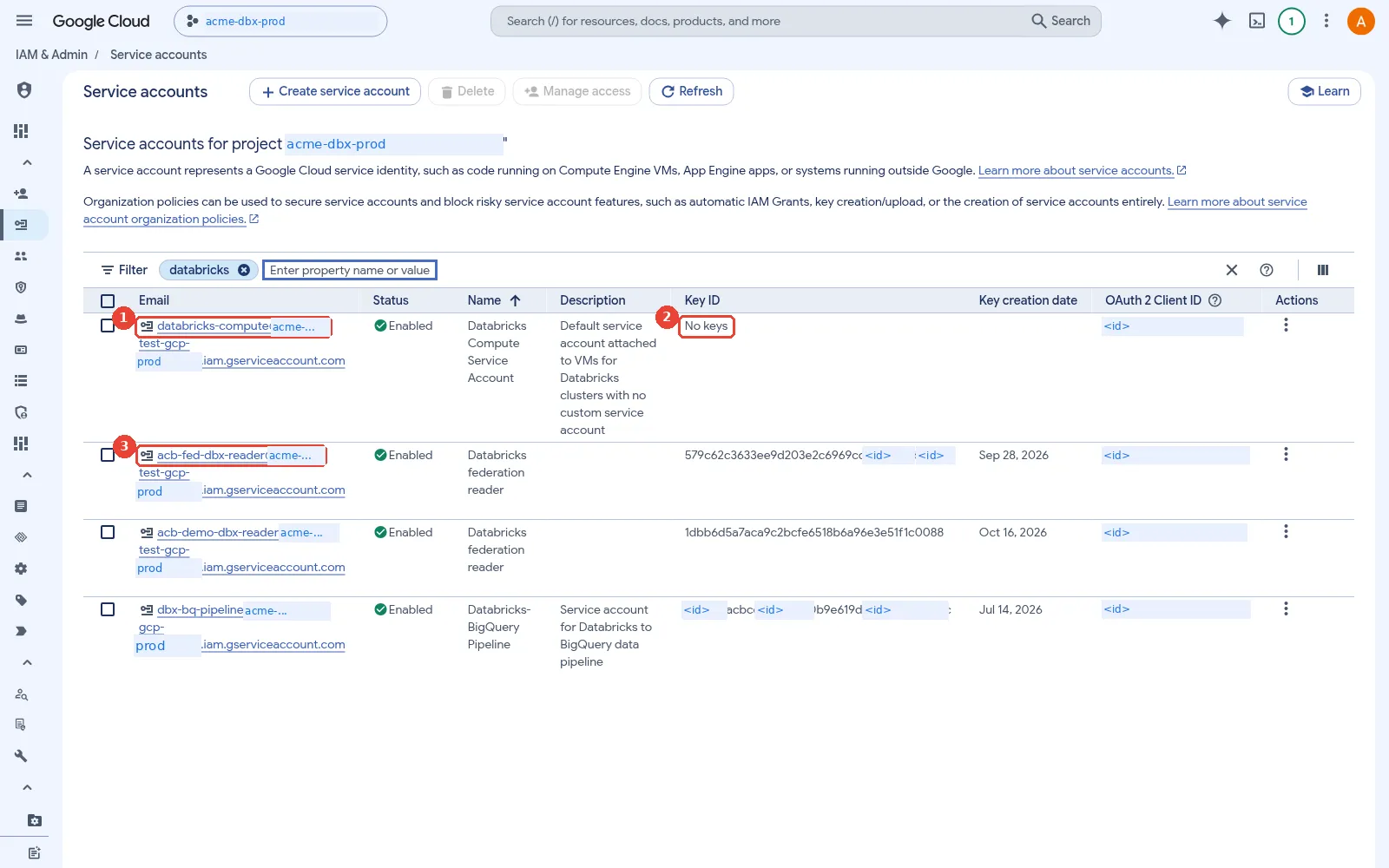
Service accounts in the workspace project. 1: databricks-compute: created by Databricks at workspace creation; 2: No user-managed keys: it gets short-lived tokens from the metadata server; 3: Other Databricks-related service accounts you create yourself.
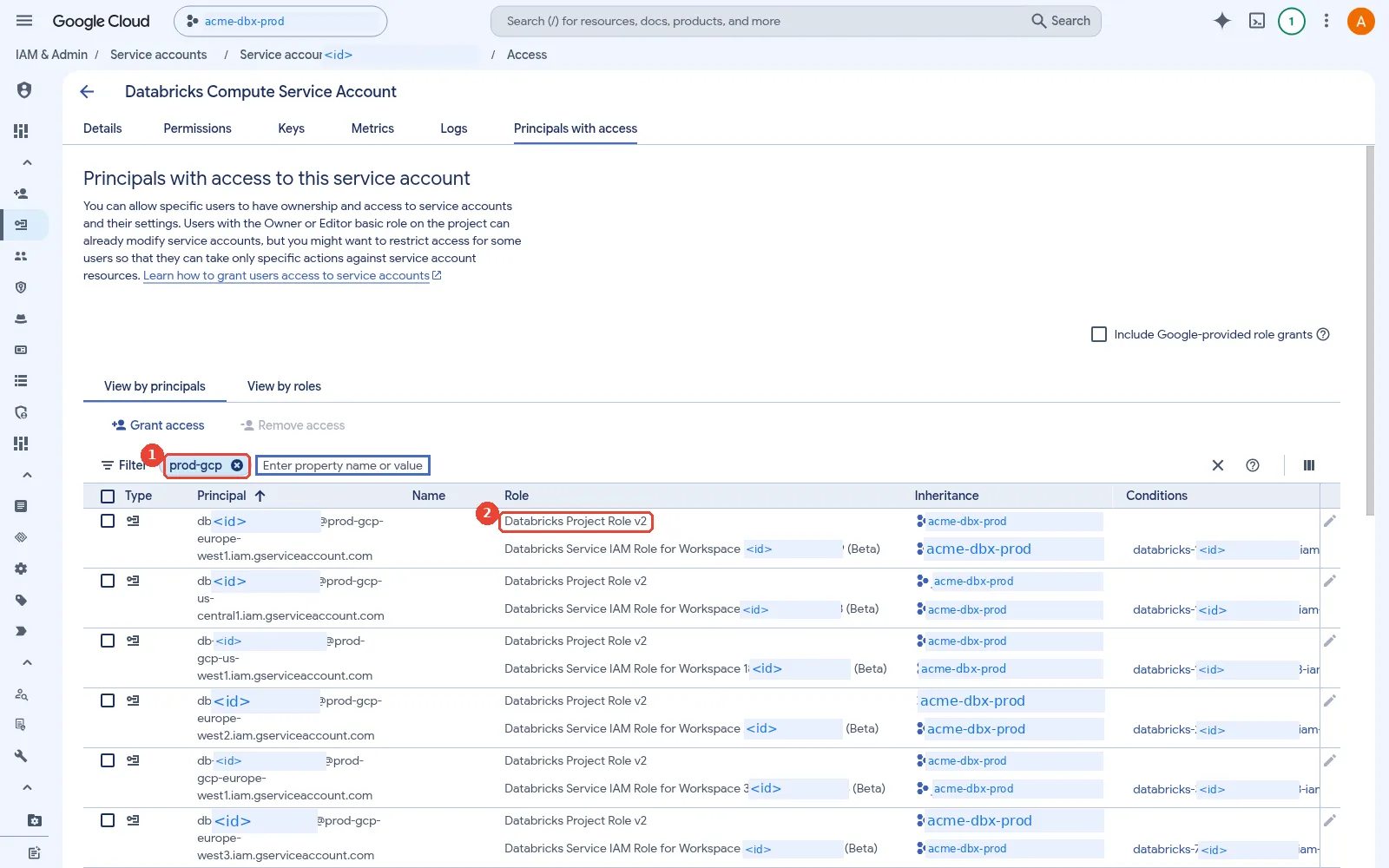
Who can act as databricks-compute. 1: The workspace service accounts, through Project Role v2 (which holds actAs); 2: Inherited from the project-level grant.
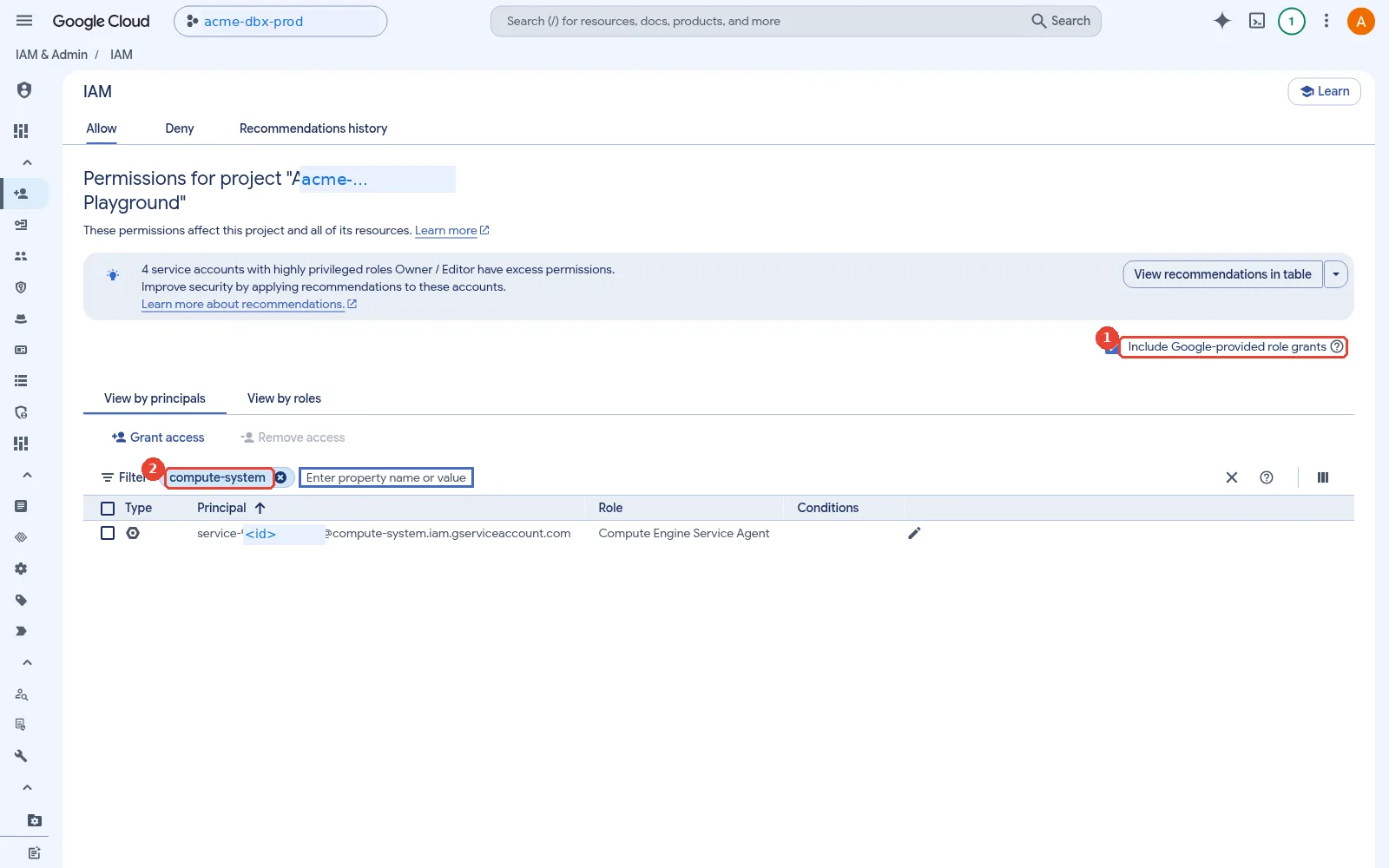
Google service agents: Google's own identities. 1: Tick this to reveal Google-managed service agents; 2: The Compute Engine service agent: service-<project-number>@compute-system.
Which identities does a Databricks workspace use?
This is the section to bookmark. A running workspace touches up to eight Google identities. Some live in Databricks’ projects and some in yours, but every grant is made on your resources.
where each Google identity in a Databricks deployment lives: the workspace service account, the Unity Catalog credential service accounts and the log delivery account live in Databricks' projects; the compute, cluster, BigQuery connection and deployer service accounts live in Acme's projects; every grant is made in Acme's projects
- Workspace service account. Databricks creates it in its own regional control plane project
when the workspace is created; the least-privilege guide writes it generically as
db-WORKSPACEID@db-regional-cp-project.iam.gserviceaccount.com, the Terraform provider reports it in the formdb-<workspace-id>@prod-gcp-<region>.iam.gserviceaccount.com(as Part 1 shows), and the Account API returns the real value. It manages the lifecycle of cluster VMs, disks and the workspace buckets in your project. databricks-compute. Created in your workspace project. It is the identity of every classic cluster VM that has no custom service account attached, and the workspace creation permissions page says its permissions are limited to logging and metrics. Keep it that way.- Custom cluster service account. One you create, set on a cluster in the Google service
account field (
gcp_attributes.google_service_account). The compute configuration reference says it is used to authenticate to GCS and BigQuery. - Storage credential service account. Generated by Databricks when you create a Unity Catalog storage credential. You grant it Storage Legacy Bucket Reader and Storage Object Admin on each bucket it should reach.
- Service credential service account. Generated by Databricks when you create a Unity Catalog service credential, for calling Google APIs such as Pub/Sub or Gemini Enterprise Agent Platform (formerly Vertex AI) from Python. You grant it roles on that service.
- BigQuery connection service account. One you create, with a JSON key, for Lakehouse Federation to BigQuery. More on this below.
- Log delivery service account.
log-delivery@databricks-prod-master.iam.gserviceaccount.com, which the audit log delivery guide asks you to grant Storage Admin on the delivery bucket, with no condition. - Deployer service account. One you create for Terraform and CI. It needs the workspace creator permissions and the Databricks account admin role. Path B below is built around it.
the service account inventory for one workspace: who owns each identity, when it is created, what it does and what you grant it; only the BigQuery connection needs a key
My view: the most common mistake in this table is the second row. Someone grants BigQuery or bucket
roles to databricks-compute “to make it work”, and every user on every cluster without a custom
service account silently inherits them.
Which roles does the workspace service account hold?
Databricks creates three custom roles for it, documented on Required permissions for the workspace service account:
- Databricks Project Role v2, granted on the project, for listing instances, disks, zones, operations, reservations and quotas.
- Databricks Resource Role v2, granted on the project but scoped to the workspace with an IAM Condition on the workspace ID. It creates and deletes instances and disks and manages the Databricks-managed buckets.
- Databricks Network Role v2, granted on the workspace subnet in the VPC host project, with only
compute.subnetworks.useandcompute.subnetworks.get.
If CMEK is enabled, it also gets Cloud KMS CryptoKey Encrypter and Decrypter on the key. The
Project Role keeps three legacy permissions, iam.serviceAccounts.actAs, getAccessToken and
getOpenIdToken, which let clusters run as Google service accounts. The documentation says you can
remove them or grant them only on the specific service accounts your clusters use. That is the main
least-privilege lever for this identity.
Here are all of them on one page, with the Cloud KMS role and the default node identity:
the IAM roles behind a classic workspace: three custom roles for the workspace service account, a Cloud KMS role when customer-managed keys are used, and the minimal databricks-compute service account that runs on every node by default
Notice what is missing. With a customer-managed VPC, the roles leave out the permissions to create, update and delete networks, routers and subnets. That is one reason security teams prefer it.
Trimming those three permissions is the most common cause of a cluster that suddenly fails to start.
Every cluster VM runs as a Google service account, databricks-compute by default or a custom one
set with google_service_account, and Google Cloud only lets a caller create a VM that runs as a
service account if the caller holds iam.serviceAccounts.actAs on it. Here the caller is the
workspace service account. If the project-level grant is removed, grant the workspace service
account the Service Account User role (roles/iam.serviceAccountUser) on each service account
your clusters run as, including databricks-compute itself; otherwise clusters fail with a
permission error, often weeks after the trim.
In the console, from the same redacted sandbox:
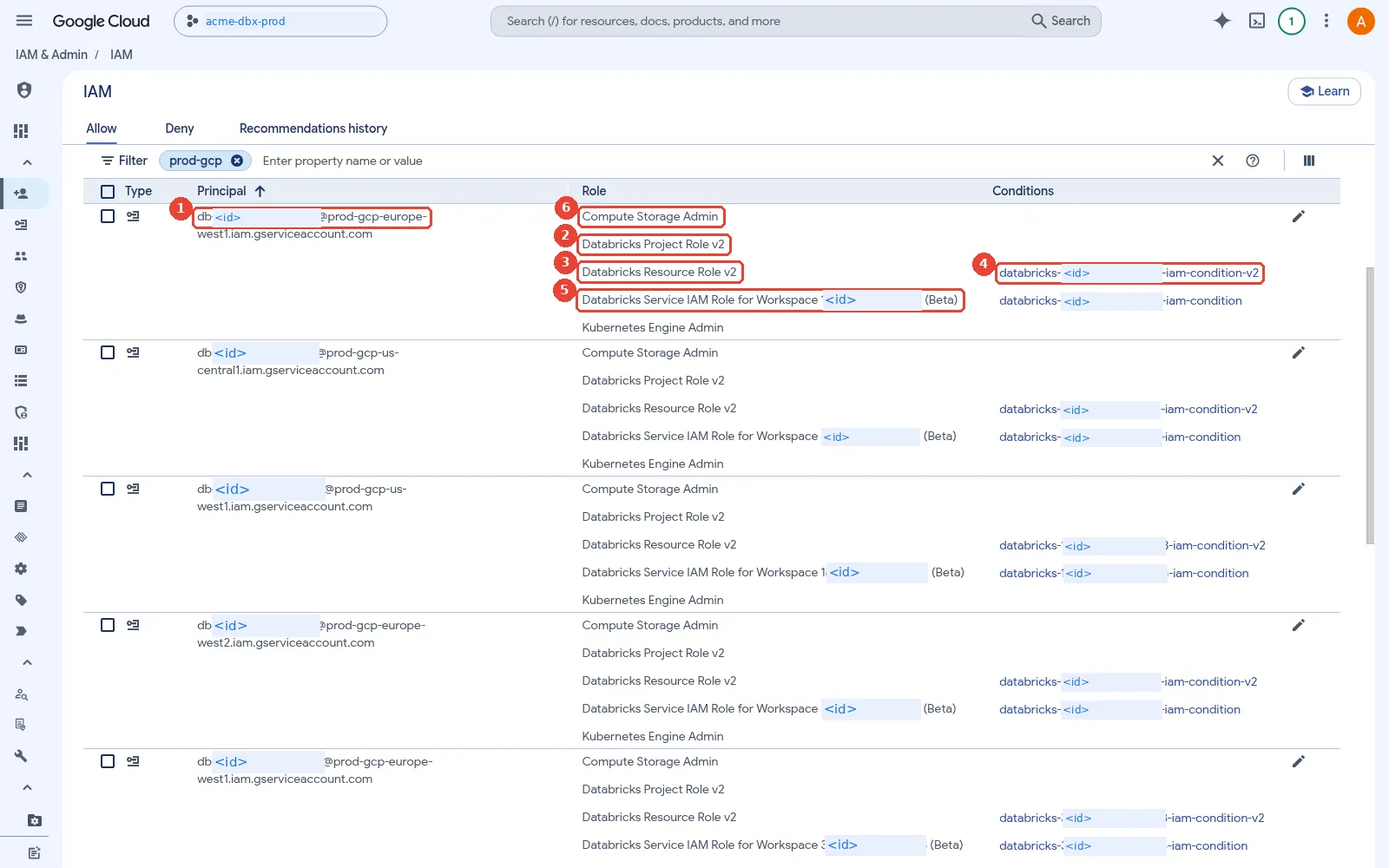
IAM: the workspace service accounts and their roles. 1: Workspace service accounts, one per workspace: db-<workspace-id>@prod-gcp-<region>. They live in Databricks' projects; 2: Databricks Project Role v2: look and plan, granted at project level; 3: Databricks Resource Role v2: create and delete VMs, disks and buckets; 4: The IAM condition limits the Resource Role to this one workspace's resources; 5: Older per-workspace role from earlier workspaces, also condition-scoped; 6: Legacy grants left over from the GKE-era classic compute.
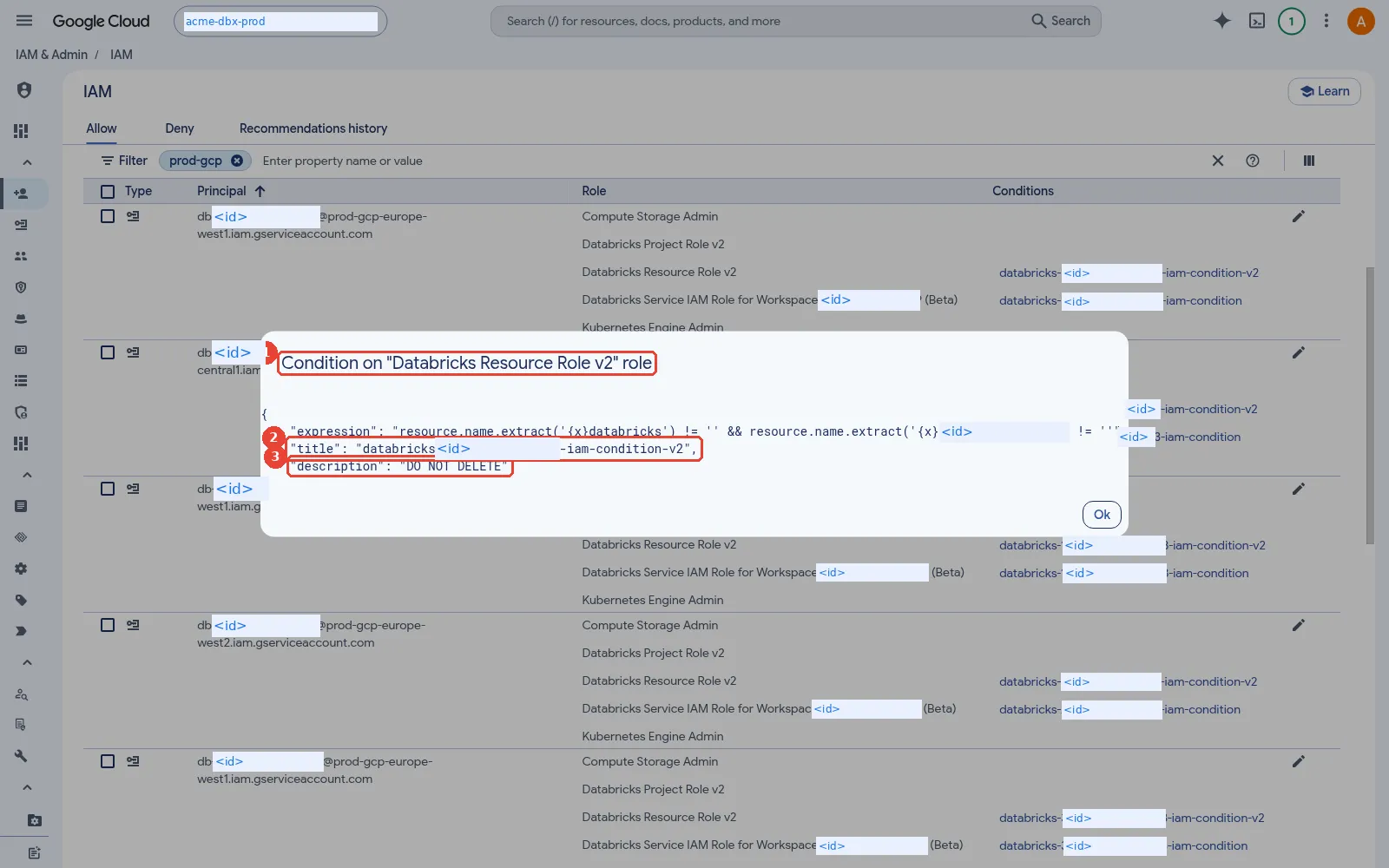
The IAM condition behind the Resource Role. 1: Read-only view of the condition on Databricks Resource Role v2; 2: Each condition is named databricks-<workspace-id>-iam-condition-v2; 3: Databricks marks it DO NOT DELETE: removing it breaks the workspace.
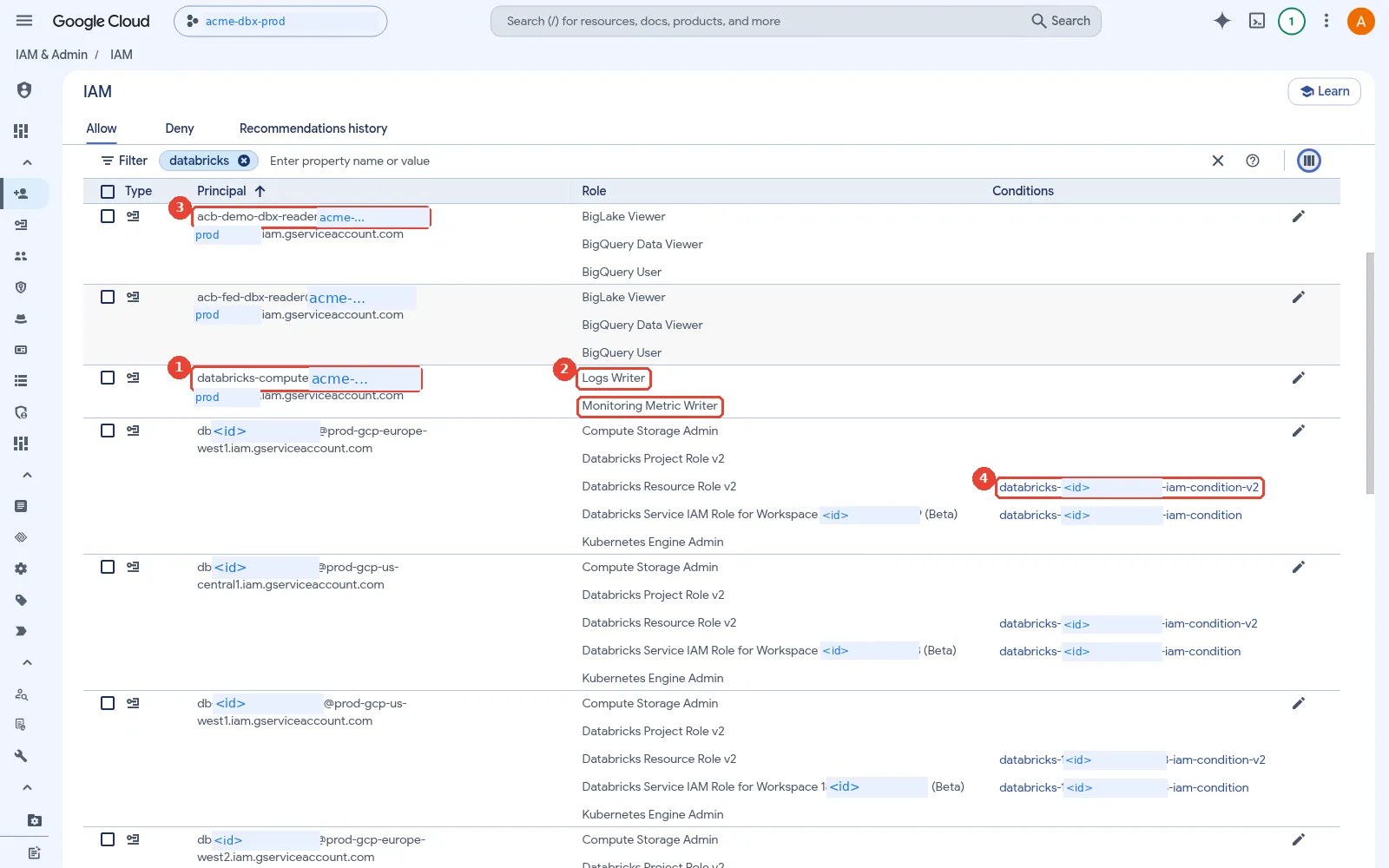
IAM filtered by databricks: compute SA and data readers. 1: databricks-compute: the default identity on every cluster node; 2: It only writes logs and metrics. No data roles, by design; 3: Service accounts used by demos to read BigQuery and BigLake data; 4: Workspace service accounts, each role scoped by a workspace condition.
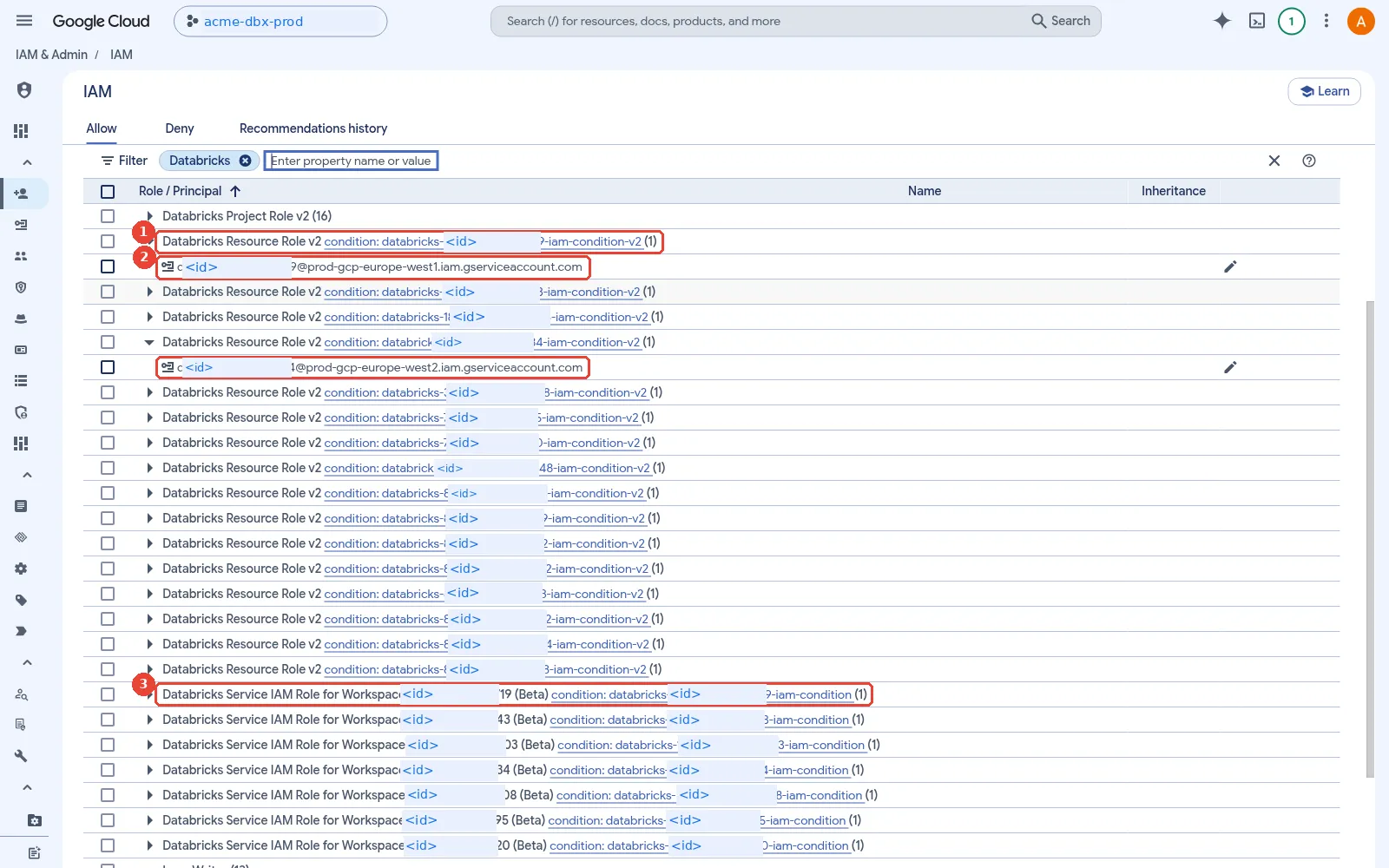
IAM by role: one condition per workspace. 1: Resource Role v2 appears once per workspace, each with its own condition; 2: Expanded rows show the workspace service account behind each grant; 3: Older per-workspace roles keep their own conditions too.
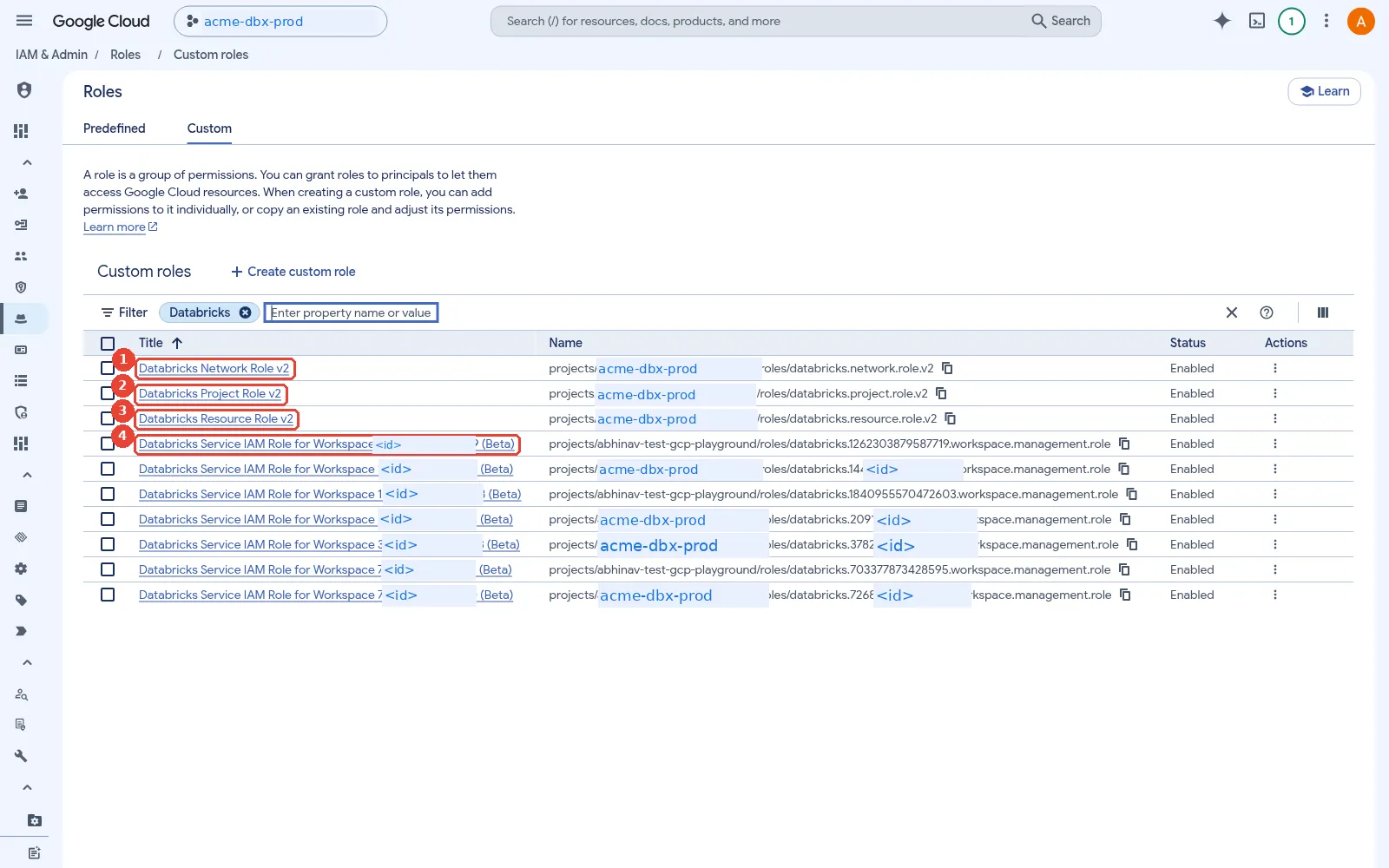
The custom roles Databricks created. 1: Network Role v2: bound on the subnet (customer-managed VPC); 2: Project Role v2: list, plan, read quotas, actAs databricks-compute; 3: Resource Role v2: create and delete the workspace's VMs, disks, buckets; 4: Older per-workspace roles from earlier workspace generations.
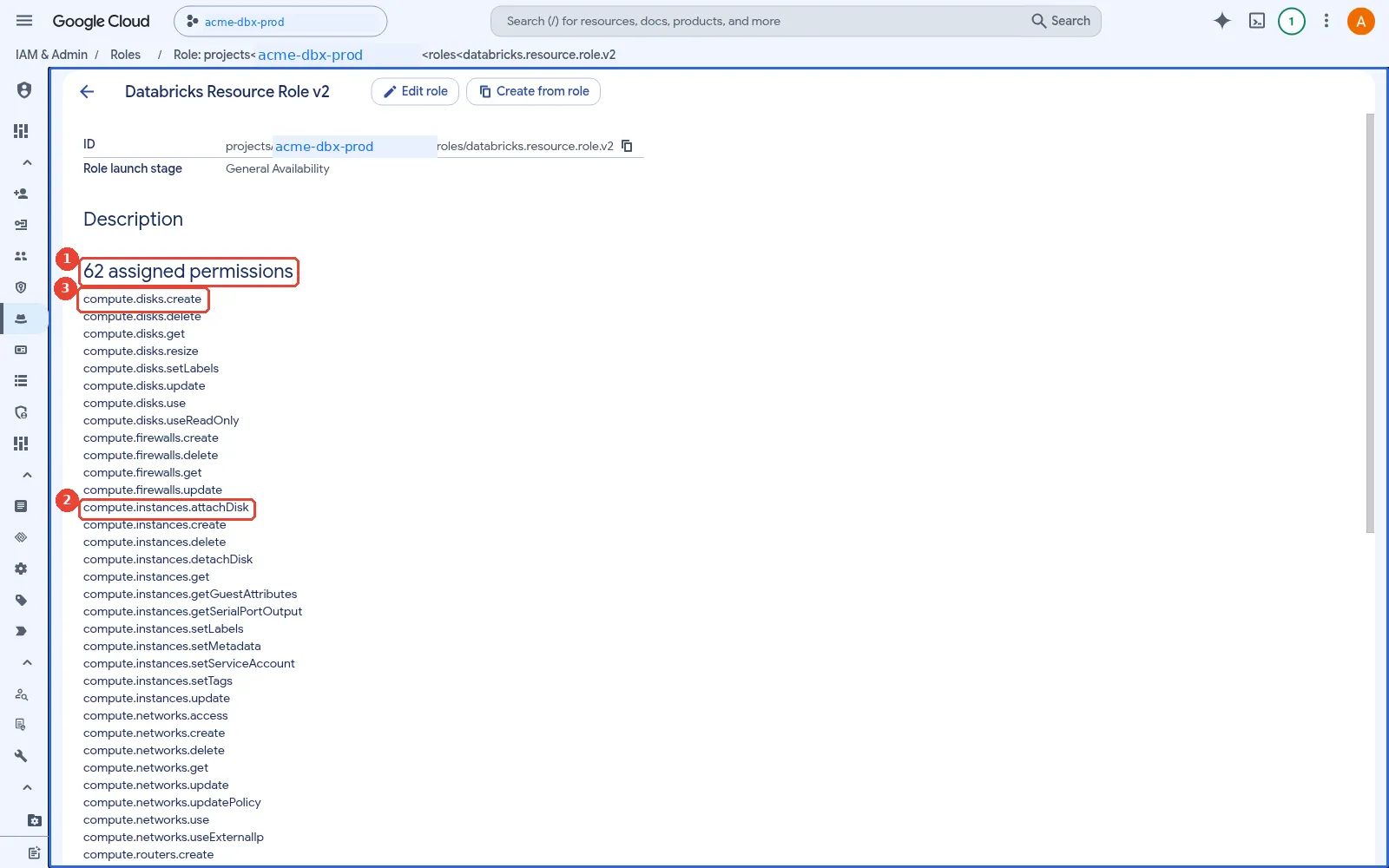
Inside Databricks Resource Role v2. 1: The number of permissions in the role; 2: Compute permissions: what lets the control plane start and stop cluster VMs; 3: Disk permissions for boot, container and data disks.
What happens in IAM when a workspace is created?
It is tempting to think that a Databricks service account reaches into your project and grants itself roles. It does not; it could not, because it has no rights in your project until someone grants them. The workspace creation permissions page describes the real order:
- You start the creation, as a person in the account console or as an automation identity
through the Account API, and Databricks works with your Google credentials, not its own. Through
the API this is explicit: the request carries a Google OAuth access token (a short-lived
token, an hour by default, that lets the holder call Google Cloud APIs as you) with the
cloud-platformscope. Databricks calls this credentials passthrough: “The Databricks server uses the Google OAuth access token to call Google Cloud APIs on behalf of the caller. Databricks doesn’t validate or preserve the access token.” - Databricks creates the workspace service account in its own project, in the form
db-<workspace-id>@prod-gcp-<region>.iam.gserviceaccount.com. - Using your token, not its own identity, Databricks creates the three custom roles in your
projects, creates
databricks-computein your workspace project, and grants the roles to the new workspace service account. In the documentation’s words, “Databricks uses the credentials of the workspace creator to grant permissions to the service account on the workspace project.” This is why the creator needs rights such asiam.roles.createand project IAM write, and why Databricks recommends Owner (roles/owner) on the workspace and VPC projects. It does not keep or reuse those rights afterwards. - From then on, the control plane acts as the workspace service account to start and stop VMs in your project.
A simple example: a locksmith working under your authority. You want a cleaning firm to have its own key to your office. You let a locksmith in and sign the work order, and the locksmith fits the lock and cuts the cleaning firm’s key using your authority: if you are a tenant who may not change the locks, the locksmith cannot change them for you either. When the job is done the locksmith keeps nothing of yours, and from then on the cleaning firm uses its own key. You are the workspace creator, the signed work order is your short-lived Google token, the locksmith is Databricks, the new key is the three custom roles, and the cleaning firm is the workspace service account. The building’s rule that keys may only be cut for staff of approved firms is domain restricted sharing, explained next.
How does this apply to Acme? In Path A below, Priya signs the work order: Databricks uses her token to
create the roles in acme-dbx-prod and grant them to the new workspace service account, then drops
the token. Because her token is the only authority it has, the work stops at any step her own roles
do not allow, which is why, as we will see further down this section, Editor is not enough.
Why C01p0oudw has to be allowed. Look again at step 3 in the list above: Databricks, using
your token, grants the three custom roles in acme-dbx-prod to the workspace service account,
db-<workspace-id>@prod-gcp-<region>.iam.gserviceaccount.com. That service account was created in
step 2 inside Databricks’ Google Cloud organisation, not Acme’s. So step 3 is a grant in Acme’s
project to an identity that belongs to another organisation.
Domain restricted sharing, the organisation policy described in
Part 1’s landing-zone section,
exists to block exactly that kind of grant. It only lets IAM roles go to identities whose
organisation’s Google customer ID is on an allow list. C01p0oudw is Databricks’ customer ID. If it
is not on Acme’s list, the role grant in step 3 is rejected and workspace creation fails part-way.
Adding it next to Acme’s own customer ID lets the grant through, and it affects only grants to
Databricks-owned identities: everything else in Acme’s organisation stays restricted.
Is it keyless? Yes. No service account key (a downloadable private key file) is created or handed over at any point: you pass a short-lived token, Databricks runs its own service account inside its own organisation, and your project holds only IAM bindings, which you can read and revoke. The other ways Databricks reaches Google Cloud differ, and How does Databricks reach Google Cloud data? explains each in full. In short:
- Unity Catalog storage credentials for Cloud Storage are keyless: Databricks generates a
service account, and you grant it roles on your bucket (Part 5 shows the setup). That service
account also belongs to Databricks’ organisation, so the same
C01p0oudwallow list applies. - Service credentials for other Google Cloud services are keyless in the same way.
- BigQuery through Lakehouse Federation (the
BIGQUERYconnection) needs a service account JSON key stored in the connection, as does the Google Cloud Lakehouse catalog federation connection. That is the one place a key is still required, and it collides with an organisation policy that bans keys. - A service account attached to a cluster is keyless, but it sits outside Unity Catalog.
So much for what happens. How the call is made matters just as much, because it decides how you can automate it.
The Google ID token authentication guide calls the mechanism credentials passthrough. Account API calls that need it send two headers:
Authorization: Bearer <Google ID token>, an OpenID Connect (OIDC) ID token signed by Google that proves who the caller is. Its audience ishttps://accounts.gcp.databricks.com, and the caller must have been added to the Databricks account as a user with the account admin role.X-Databricks-GCP-SA-Access-Token: <Google access token>, an OAuth access token with thecloud-platformscope. Databricks uses it to call Google Cloud APIs on the caller’s behalf, and the guide states that Databricks neither validates nor keeps it.
The guide also says a Google ID token is minted for one audience, so a token for the account API does not work for a workspace API and the other way round, and that the second header is used only by the account-level API methods that require credentials passthrough, such as creating a workspace. If you have not met the two token types before, Prerequisite 3 decodes a real one.
When does Databricks need each token? Not always both. The ID token is needed on every Account API call: it is how Databricks knows who is calling, and it checks that the identity in it is a user of the account with the account admin role. A call to a workspace’s REST API needs its own ID token, minted for that workspace’s audience. The access token is needed only on the calls that make Databricks act inside your Google Cloud project, such as creating a workspace. Where the tokens come from depends on who is calling:
- Automation (the Account API from a script, or Terraform) mints both itself, just before the
call:
gcloud auth print-identity-token --audiences=https://accounts.gcp.databricks.comandgcloud auth print-access-token, the matching IAM Credentials API methods, or the Databricks Terraform provider doing the same through ADC. Both expire within about an hour, so a pipeline mints fresh ones on every run. - The account console gets them from your browser. Sign in with Google is an ordinary OpenID Connect sign-in, which proves who you are. The access token arrives later, at the consent pop-up that Path A describes when you first create a workspace.
two tokens and three checks in credentials passthrough: the caller, Priya in the console or tf-deployer in CI, gets a Google ID token that proves who they are and a Google access token for Google APIs; Databricks checks the ID token on every Account API call, including that the caller is an account admin; only calls that act in your project, such as creating a workspace, forward the access token to Google, where the cloud-platform scope lets the call reach the API, which anyone can have, and then the caller's own IAM roles decide, so Owner passes and Editor fails; automation mints both tokens just before each call, while in the console Sign in with Google proves identity and the consent pop-up at Create workspace obtains the access token; both expire within about an hour
Why the caller’s own roles matter. A Google access token is limited twice, and both limits must
pass. Its scope says which APIs it may reach at all: cloud-platform
(https://www.googleapis.com/auth/cloud-platform) reaches every Google Cloud API, and anyone can get a
token with it, even a person with no roles at all. Then IAM checks the roles of the identity
behind the token on every call. So credentials passthrough hands Databricks exactly the caller’s
power, no more. If Priya cannot create a custom role in acme-dbx-prod, Databricks cannot either
while holding her token, and workspace creation stops at that step.
This is also why Editor (roles/editor) is not enough for the creator. Google’s
basic roles reserve managing roles and
permissions for a project to Owner and its newer counterpart Admin, and workspace creation
needs exactly that: it creates custom roles and changes the project’s IAM policy to grant them.
Writer, the newer counterpart of Editor, cannot do it either. One honest gap: as of 8 November
2026 the Databricks
permissions page
still names roles/owner and says nothing about roles/admin, so I keep Owner in every example
below until Databricks documents the newer role.
How much power the creator needs depends on who creates the IAM roles. In the standard flow,
Databricks creates them with the creator’s token, so the creator needs the permissions listed on the
workspace creation page:
iam.roles.*, iam.serviceAccounts.create, project IAM read and write, serviceusage.services.*,
network and firewall checks on the VPC project, plus compute.forwardingRules.* for Private Service
Connect and cloudkms.cryptoKeys.*IamPolicy for CMEK. Databricks recommends roles/owner on both
the workspace and VPC projects for the creator, says creation typically takes under a minute, and
says it does not retain or use those permissions afterwards.
For regulated estates there is a second flow, the least-privilege workspace. The guide describes it as “intended for security-conscious and regulated accounts that must minimize the permissions granted to third-party services”. You create the IAM roles yourself, give the creator only read access, and build the workspace in two phases through the Account API. The next two subsections explain the roles and then the exact steps.
In the console, from the same redacted sandbox:
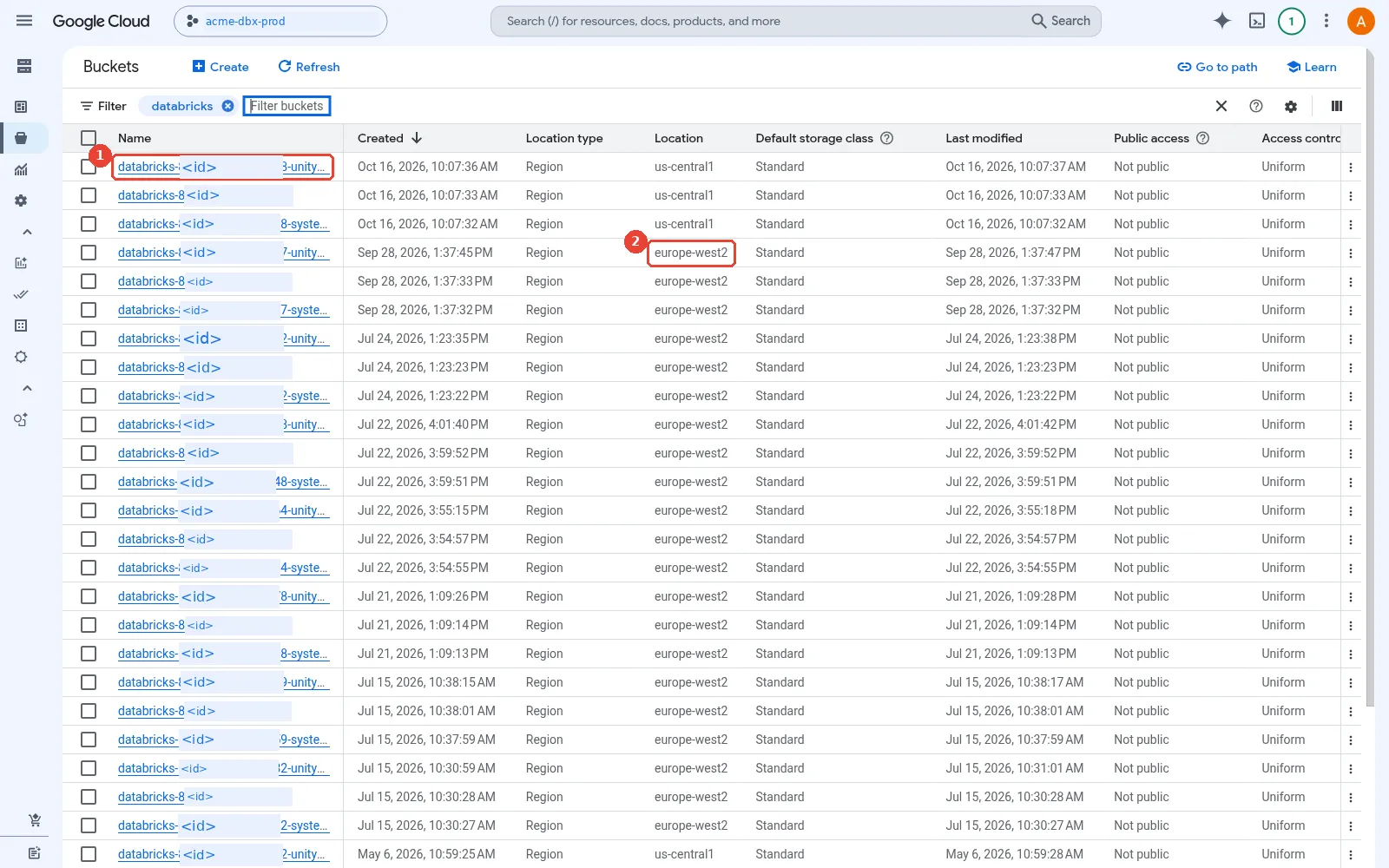
The workspace storage buckets. 1: The workspace catalog bucket, when Unity Catalog was auto-enabled; 2: Same region as the workspace. Never delete these buckets.
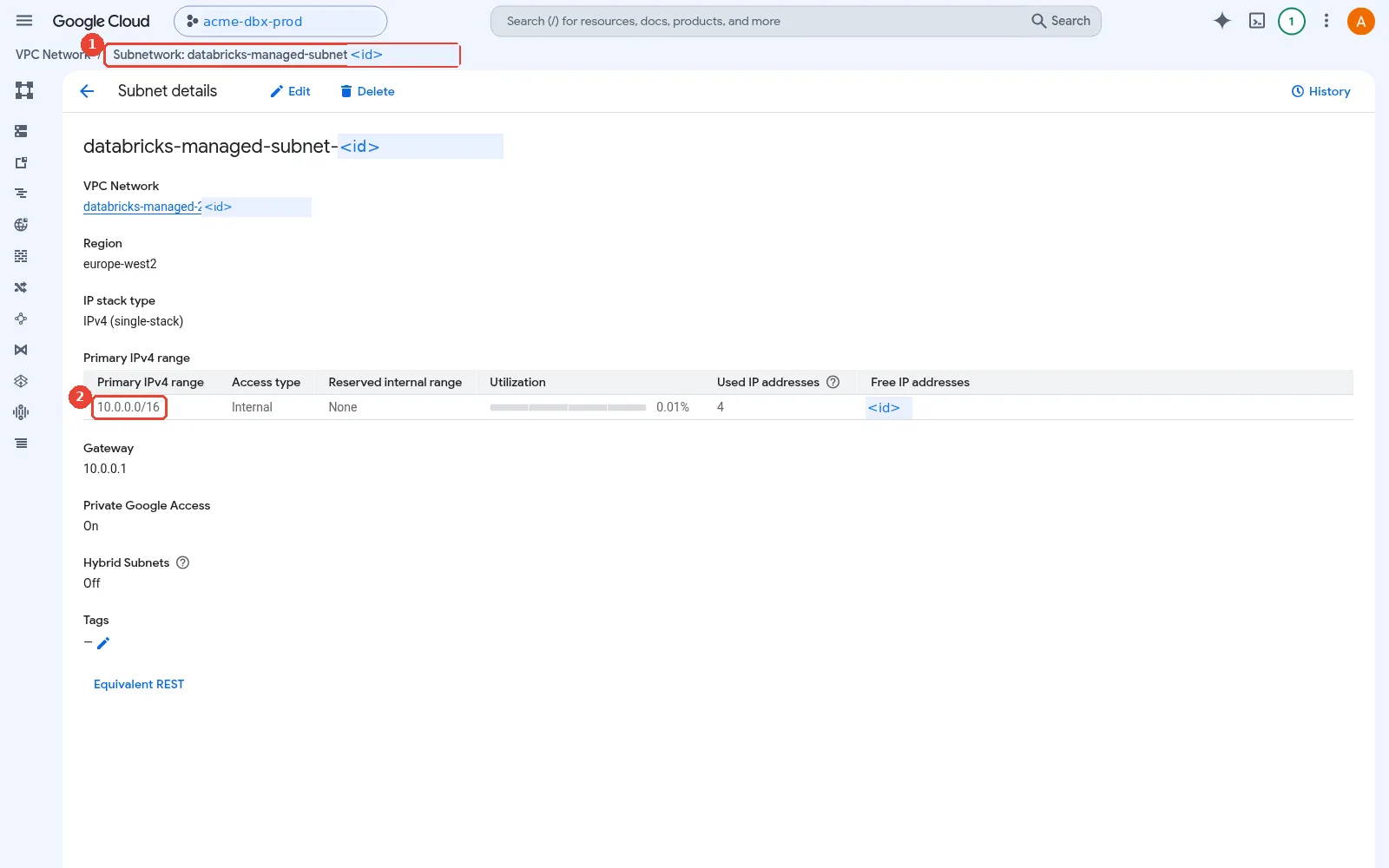
The Databricks-managed subnet. 1: Databricks-managed VPC and subnet, created for this workspace; 2: The subnet range: about two IPs per node.
Which roles does a least-privilege workspace need, and what does each one do?
The difference from the standard flow is who creates the roles. In the standard flow Databricks creates them, using the creator’s token, which is why the creator needs Owner. In a least-privilege workspace Acme’s platform team creates every custom role in advance, with its own admin rights, so neither the creator nor Databricks ever needs to create a role or change an IAM policy. There are two identities and two sets of roles, all listed on Databricks’ creator roles and operator roles pages.
a least-privilege workspace uses two identities: the workspace creator, tf-deployer, holds read-only creator roles, one role for a standalone VPC or a service and a host role for Shared VPC, that let Databricks check the project, APIs, IAM, roles, service accounts, VPC and subnet without changing anything, plus account admin in Databricks; the workspace service account receives three operator roles: the project role to list and plan and to run VMs as databricks-compute, the resource role, limited by an IAM condition to this workspace, to create and delete VMs, disks and workspace buckets, and the network role on the subnet only to place VM interfaces; the order is that the platform team creates the roles and databricks-compute, tf-deployer creates the workspace in PROVISIONING, the platform team grants the operator roles to the returned service account, and tf-deployer patches the workspace to RUNNING, with no retries
Creator roles, for tf-deployer. These let Databricks validate the set-up during the API call,
and every permission in them is a get, a list or a getIamPolicy: nothing creates or changes
anything. With a standalone VPC there is one role, databricks.lpw.workspace.creator.role, on the
workspace project. With Shared VPC it is split in two: databricks.lpw.workspace.creator.service.role
on the workspace project and databricks.lpw.workspace.creator.host.role on the host project. Grouped
by what they check:
- The project and its APIs:
resourcemanager.projects.getand.getIamPolicy,compute.projects.get,serviceusage.services.getand.list. - The identities you pre-created:
iam.roles.get,iam.serviceAccounts.getand.getIamPolicy, so Databricks can confirm the operator roles anddatabricks-computeexist. - The network, in the host project:
compute.networks.get,compute.subnetworks.getand.getIamPolicy. - Only if used:
compute.forwardingRules.getand.listfor Private Service Connect, andcloudkms.cryptoKeys.getIamPolicyfor customer-managed keys.
The same service account also needs the account admin role in the Databricks account, because it calls the Account API.
Operator roles, for the workspace service account. Databricks returns this service account part-way through creation, and you grant it three roles. Together they are what the control plane runs on for the rest of the workspace’s life.
lpw.databricks.project.role.v2, on the workspace project: look and plan. It lists VMs, disks and operations, reads zones, regions, reservations and quotas, lists buckets and enabled services, and holdsiam.serviceAccounts.actAs, which lets it start VMs that run asdatabricks-computeor a custom cluster service account. If you leaveactAsout at project level, the guide says to grant it on each of those service accounts instead, includingdatabricks-compute.lpw.databricks.resource.role.v2, on the workspace project with an IAM condition on the workspace ID: do. It creates, resizes, labels and deletes disks; creates, updates and deletes VMs, attaches disks, sets their metadata, tags and service account, and reads serial port output for diagnostics; and creates the workspace buckets, manages their IAM policy and reads and writes their objects. The condition keeps all of that to this workspace’s own resources.lpw.databricks.network.role.v2, bound on the workspace subnet in the host project only: attach. Justcompute.subnetworks.useand.get, enough to place VM network interfaces in the subnet, and nothing to create firewall rules, routes or networks.
What the platform team does that Databricks did before. It creates databricks-compute (logging
and metrics only), creates the custom roles, grants the operator roles once the workspace is in
PROVISIONING, and, with customer-managed keys, grants Cloud KMS CryptoKey Encrypter/Decrypter to the
Compute Engine and Cloud Storage service agents for workspace storage and to the workspace service
account for managed services, setting "manual": true so that Databricks does not try to grant key
access itself. The guide is explicit that this flow does not support retries, so script it end to end.
What are the exact steps, and what do PROVISIONING and PATCH mean?
The least-privilege flow builds a workspace in two phases because of a chicken-and-egg problem. The workspace service account only exists once Databricks creates the workspace, but Databricks cannot build anything in your project until that service account holds the operator roles, and in this flow only you may grant them. So you create the workspace first and leave it waiting, grant the roles to the service account it returns, and then tell Databricks to carry on. Two terms make the flow easy to follow:
PROVISIONINGis a workspace status that means “exists in the Databricks account, not usable yet”. In the standard flow a workspace passes through it in under a minute. Here you ask for it on purpose with"expected_workspace_status": "PROVISIONING", so the workspace is registered, its service account is created and returned, and then it waits for you.PATCHis the HTTP method for changing part of something that already exists: you send only the fields you want to change. Here it attaches the network configuration (and the Private Service Connect and key IDs, if any) to the waiting workspace, and that is the signal for Databricks to build it.
A simple example: a contractor’s first day at a site where only the security office may program
door badges. Reception registers the contractor, and only then does the system issue a badge number.
Security programs the doors for that number. Then reception activates the badge, and the contractor
can start work. Nobody can program the doors before the number exists, and nobody may activate the
badge before the doors are programmed. Registering is the POST with PROVISIONING, the badge number
is the returned workspace service account, programming the doors is granting the operator roles, and
activating the badge is the PATCH.
How does this apply to Acme? tf-deployer is reception: it registers acme-prod-euw2-supply and
receives the service account’s name. Acme’s platform team is the security office: it grants the
operator roles to that name. Then tf-deployer sends the PATCH, and Databricks starts building in
acme-dbx-prod.
least-privilege workspace creation step by step: in step 0 the platform team prepares the custom roles, the creator service account with account admin, the intra-subnet firewall rule and databricks-compute; in step 1 tf-deployer registers the network configuration, plus Private Service Connect endpoints and customer-managed keys if used, which only describes them to Databricks; in step 2 tf-deployer creates the workspace with expected status PROVISIONING, and Databricks creates and returns the workspace service account but builds nothing yet, so the workspace is parked; in step 3 the platform team grants the operator roles; in step 4 tf-deployer sends a PATCH that attaches the network and key IDs and starts the real build asynchronously, still PROVISIONING; in step 5 tf-deployer polls until the status is RUNNING; there are no retries, so a failed step means deleting the workspace and starting again from step 2 with the new service account it returns
Here is every step from Databricks’ least-privilege guide, with what each one does:
- Prepare, before any API call. The platform team creates the custom roles from the previous
section and
databricks-compute(logging and metrics only). It binds the creator role, or the service and host roles, totf-deployer, addstf-deployerto the Databricks account as a user and gives it the account admin role. It also checks that the VPC has the intra-subnet ingress firewall rule (default-allow-internal, priority 65534, source range set to the Databricks subnet) and creates one if not. - Register the network, and the optional extras.
tf-deployercallsPOST /networkswith the host project, VPC, subnet and region, and records the returnednetwork_id. With Private Service Connect it first registers the two endpoints withPOST /vpc-endpoints; with customer-managed keys it registers the Cloud KMS key withPOST /customer-managed-keysand"manual": true, after granting the Compute Engine and Cloud Storage service agents Encrypter/Decrypter on the key. These calls send only the ID token: they describe your resources to Databricks and change nothing in Google Cloud. - Create the workspace and park it.
tf-deployercallsPOST /workspaceswith both tokens, the workspace project, the region, the pricing tier and"expected_workspace_status": "PROVISIONING". Databricks creates the workspace record and its service account in Databricks’ regional control plane project, and returnsworkspace_idandworkspace_service_account. Record both. Nothing is built inacme-dbx-prodyet: the service account has no roles, and no network is attached. - Grant the operator roles to the returned service account. Someone with IAM admin rights on the
projects, not
tf-deployer, whose roles are read-only, grantslpw.databricks.project.role.v2andlpw.databricks.resource.role.v2on the workspace project (the second with the IAM condition on the workspace ID) and bindslpw.databricks.network.role.v2on the subnet. With customer-managed keys for managed services, it also grants Encrypter/Decrypter on the key to this service account. The guide says to stop and check every grant here, because the next step cannot be repeated. PATCHthe workspace.tf-deployercallsPATCH /workspaces/<workspace-id>with both tokens andnetwork_id, plusprivate_access_settings_idand the two customer-managed key IDs if used. A200response still saysPROVISIONING, with “Workspace resources are being set up.”, because Databricks now builds the workspace in your project asynchronously, acting as the workspace service account with the roles you granted. A400 BAD_REQUESTmeans the operator roles are missing or wrong; a404 RESOURCE_DOES_NOT_EXISTmeans a configuration ID from step 1 is wrong.- Poll until
RUNNING.tf-deployercallsGET /workspaces/<workspace-id>untilworkspace_statusisRUNNING, which the guide says typically takes a few minutes. Then finish DNS for Private Service Connect if used, start a cluster to prove the workspace works, and create a catalog backed by your own bucket: the guide notes that no default catalog is created automatically in this flow.
No retries. If any step fails, the guide’s answer is to delete the workspace and start again from step 2. The new workspace returns a new service account, so step 3 has to be repeated for it. This is why regulated teams script the whole flow, as Path B below does with Terraform, rather than running it by hand.
Here is the same sequence for Acme, with tf-deployer impersonated rather than keyed (for
production the guide recommends exactly this two-account model, where one service account
impersonates the one that owns the resources):
SA=tf-deployer@acme-dbx-admin.iam.gserviceaccount.com
API=https://accounts.gcp.databricks.com/api/2.0/accounts/$ACCOUNT_ID
ID_TOKEN=$(gcloud auth print-identity-token --impersonate-service-account=$SA \
  --audiences="https://accounts.gcp.databricks.com" --include-email)
ACCESS_TOKEN=$(gcloud auth print-access-token --impersonate-service-account=$SA)

# Step 1: describe the network to Databricks (ID token only)
curl -X POST "$API/networks" -H "Authorization: Bearer $ID_TOKEN" -H "Content-Type: application/json" \
  -d '{"network_name": "acme-prod-euw2-net", "gcp_network_info": {"network_project_id": "acme-net-host",
       "vpc_id": "acme-dbx-vpc", "subnet_id": "dbx-prod-euw2", "subnet_region": "europe-west2"}}'

# Step 2: create the workspace and park it in PROVISIONING (both tokens)
curl -X POST "$API/workspaces" \
  -H "Authorization: Bearer $ID_TOKEN" -H "X-Databricks-GCP-SA-Access-Token: $ACCESS_TOKEN" \
  -H "Content-Type: application/json" \
  -d '{"workspace_name": "acme-prod-euw2-supply", "cloud": "gcp", "location": "europe-west2",
       "pricing_tier": "ENTERPRISE",
       "cloud_resource_container": {"gcp": {"project_id": "acme-dbx-prod"}},
       "expected_workspace_status": "PROVISIONING"}'
# -> record workspace_id and workspace_service_account

# Step 3 (platform team): grant the operator roles to workspace_service_account
gcloud projects add-iam-policy-binding acme-dbx-prod --member="serviceAccount:$WS_SA" \
  --role="projects/acme-dbx-prod/roles/lpw.databricks.project.role.v2"
# ...the resource role with the guide's IAM condition on the workspace ID, then:
gcloud compute networks subnets add-iam-policy-binding dbx-prod-euw2 --project=acme-net-host \
  --region=europe-west2 --member="serviceAccount:$WS_SA" \
  --role="projects/acme-net-host/roles/lpw.databricks.network.role.v2"

# Step 4: attach the network; this starts the real build
curl -X PATCH "$API/workspaces/$WORKSPACE_ID" \
  -H "Authorization: Bearer $ID_TOKEN" -H "X-Databricks-GCP-SA-Access-Token: $ACCESS_TOKEN" \
  -H "Content-Type: application/json" -d '{"network_id": "'"$NETWORK_ID"'"}'

# Step 5: poll until workspace_status is RUNNING
curl "$API/workspaces/$WORKSPACE_ID" -H "Authorization: Bearer $ID_TOKEN"
I have not run this exact sequence; the endpoints, fields and headers come from Databricks’
least-privilege and Google ID token guides and the gcloud reference. These two flows, standard and least-privilege, map neatly onto the
two ways organisations actually deploy Databricks, which is the next section.
Which two deployment paths are there, and how do they differ?
In my work with partners I see two very different starting points. A non-regulated team, say a digital marketing group or a start-up, wants a workspace this afternoon. A person signs in to the Databricks account console with a Google identity and clicks through. A regulated organisation, say a bank or an insurer, will not let any person hold Owner on a production project, bans service account keys, and wants every change to go through code review. Everything is Terraform, run by a CI pipeline, with no keys anywhere.
A simple example: putting up a garden shed yourself on a Saturday, against building an extension under contract, with approved drawings, an inspector and a signed-off record of every change. Both give you a building. The shed is quick and fine for tools; nobody would raise a family room that way. Path A is the shed; Path B is the extension.
Both paths produce the same workspace. They differ at almost every identity step: who acts, how that identity proves itself to Google Cloud and to Databricks, who creates the IAM roles, and who manages each grant afterwards. Acme is large and regulated in parts, so it will use Path B for production; its innovation team used Path A for a sandbox last year. Here is the whole comparison first, then each path in detail.
two ways to deploy Databricks on Google Cloud, step by step: in Path A a person signed in with a Google identity uses the account console and Databricks creates the IAM roles with that person's token; in Path B a bank's CI pipeline reaches Google Cloud through Workload Identity Federation, impersonates a deployer service account, calls the Account API with a Google ID token and access token, and pre-creates least-privilege roles; single sign-on and SCIM or automatic identity management from Entra ID are set up the same way in both; the last row is the trap in each path
Three rows deserve a sentence each before the detail. The “who creates the Google IAM roles” row is the standard flow against the least-privilege flow from the previous section. The single sign-on and users rows are the same in both paths, because those are account-wide settings that nobody deploys per workspace. And the last row shows that each path has one trap, which I return to in Can you combine your own SSO with Google ID tokens?.
A quick test for choosing, in order:
Path A or Path B?                                             Ask in order; stop at the first yes.
1. Will the workspace hold production or regulated data?      yes -> Path B
2. Does policy forbid people holding Owner, ban service       yes -> Path B
   account keys, or require review of every change?
3. Sandbox, proof of concept or small team?                   yes -> Path A, then remove the
                                                                     creator's broad roles
How does this apply to Acme? Acme’s production workspace stops at question 1 and uses Path B; its innovation team’s sandbox reached question 3, which is why it was built with Path A.
Path A: how does a team create a workspace in the account console?
Path A is what the
Create a workspace guide
describes. Priya is a Databricks account admin and signs in to the account console at
accounts.gcp.databricks.com with her Google identity, priya@acme.example. She clicks Create
Workspace, enters a name, a region and the Google Cloud project ID, and picks a network
configuration. The guide then says something easy to miss: the first time, “a Google popup window
asks you to select your Google account and consent to the request for additional scopes”, and you
must sign in “with the same Google email as the one being used to sign into Databricks”. That
consent is how the console obtains the same short-lived Google access token that the API sends in a
header.
Path A, creating a workspace in the account console: Priya signs in to the account console with her Google identity and clicks Create workspace; a Google consent pop-up asks for extra scopes; the control plane uses her short-lived Google access token to create three custom roles and the databricks-compute service account in acme-dbx-prod and to grant the roles to a new workspace service account; from then on the workspace service account starts and stops VMs; nothing is kept of Priya's token
With that token, Databricks creates the three custom roles in acme-dbx-prod and the Shared VPC host
project, creates databricks-compute, and grants the roles to the new workspace service account, as
described above. The same page also notes that Databricks enables the Cloud Storage and Compute Engine APIs
on the project if they are off, and that you can create at most 200 workspaces per week in one
project.
The rest of Path A is also console work. Priya assigns groups to the workspace in the account
console, an admin grants Unity Catalog privileges in Catalog Explorer (the Unity Catalog browser
inside a workspace) or with SQL GRANT statements, and someone with rights on the bucket grants the
storage credential’s service account its two roles in the Google Cloud console. It is simple and it
works. Its weaknesses are the ones a regulator would list: a named person holds Owner-level rights on
two projects while she clicks, nothing is reviewed or repeatable, and the only record is the audit
log.
My view: Path A is right for a sandbox, a proof of concept or a small team, provided someone removes the creator’s broad roles afterwards. Do not let a sandbox built this way quietly become production.
In the console, from the same redacted sandbox:
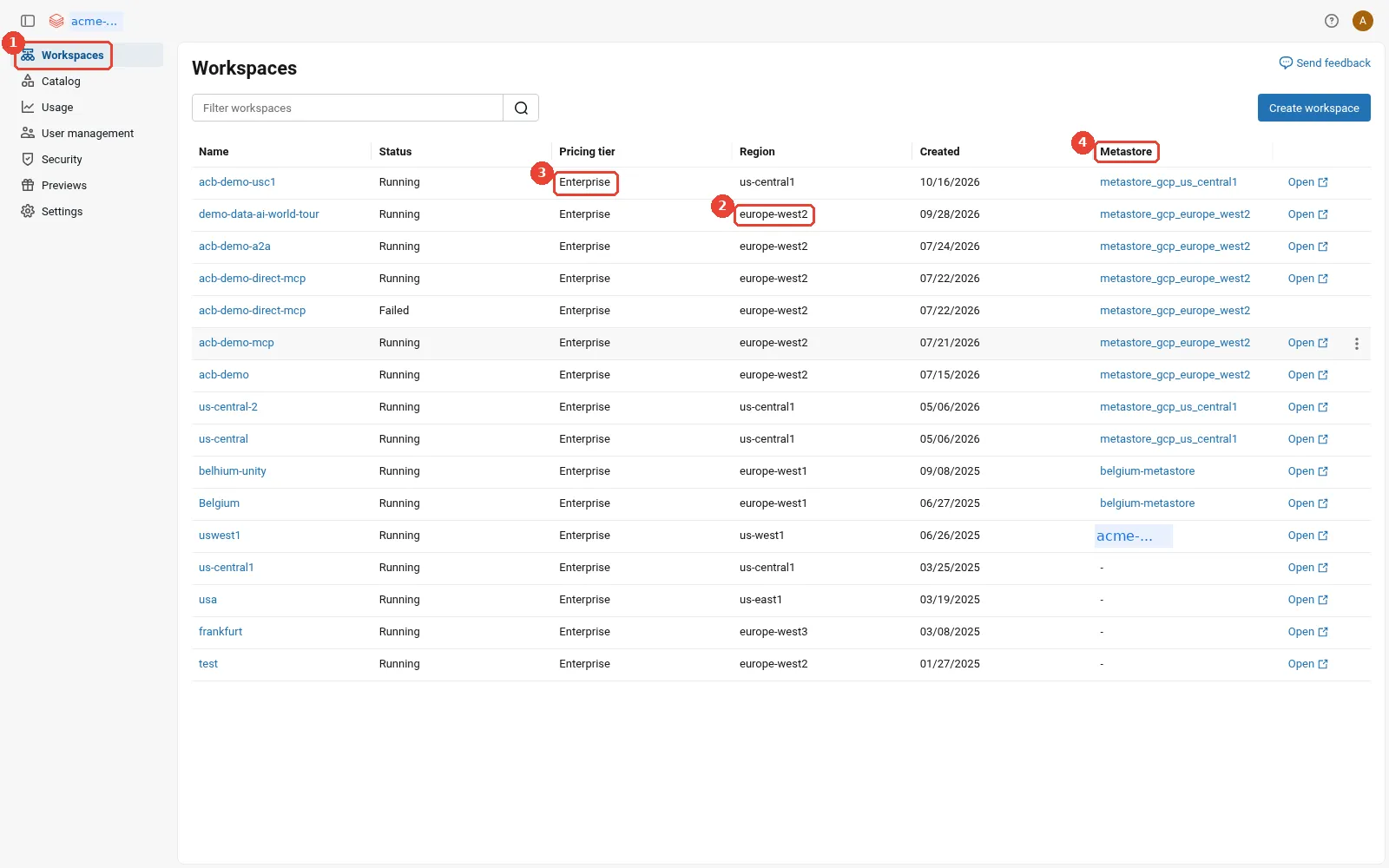
Account console: workspaces across regions. 1: The account console lists every workspace in the account; 2: Each workspace lives in one region (and one Google Cloud project); 3: Pricing tier per workspace; 4: The Unity Catalog metastore attached to each workspace.
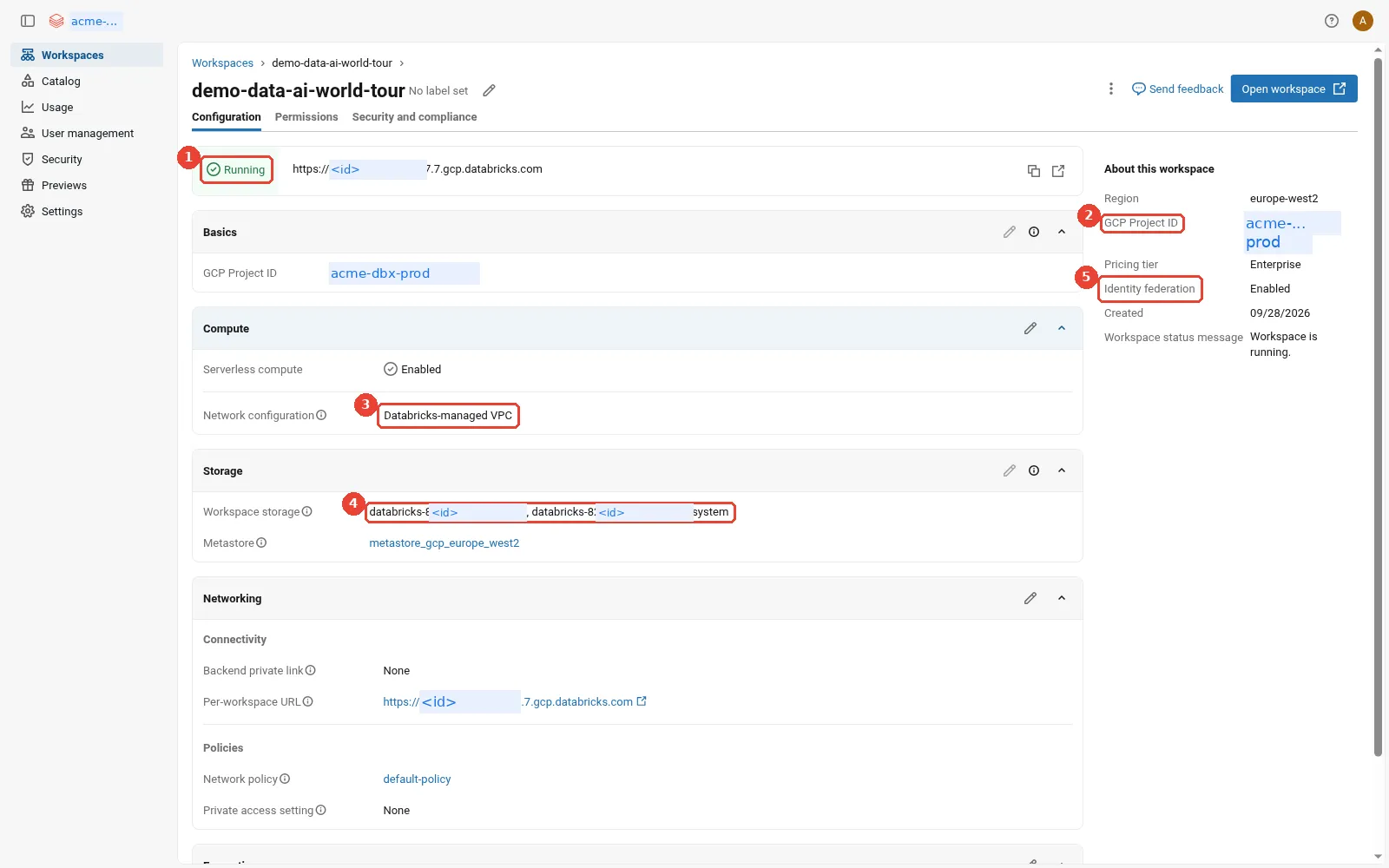
Account console: one workspace's configuration. 1: Status: Running; 2: The Google Cloud project this workspace lives in; 3: Network: Databricks-managed VPC here (customer-managed for production); 4: The workspace storage buckets in your project; 5: Identity federation: the workspace uses account-level identities.
Path B: how does a bank automate everything with Terraform from CI?
In Path B, no person creates anything in production. A CI pipeline runs Terraform, and Terraform acts
as one Google service account, tf-deployer@acme-dbx-admin.iam.gserviceaccount.com, which is a
Databricks account admin. The pipeline never holds a key for it. The chain has five links, and each
one is a standard, documented mechanism:
- The CI job proves who it is. GitHub Actions (or GitLab, or Azure DevOps) issues the job an OIDC token that names the repository, the branch and the workflow, as Google’s deployment pipelines guide explains.
- Google Cloud trusts that token. Acme has a workload identity pool (a container for
external identities) called
acme-ciwith a provider for GitHub. The provider maps token claims to Google attributes and has an attribute condition, a rule every token must pass. Google’s guide is explicit that you “must use an attribute condition that restricts access to tokens issued by your GitHub organization”, for exampleassertion.repository_owner=='acme'. The Security Token Service swaps the GitHub token for a short-lived federated Google token. - The job becomes the deployer. The pool’s principal for Acme’s platform repository holds
Service Account Token Creator on
tf-deployer, so the job impersonates it and receives a one-hour Google access token and, when asked, a Google ID token with the audiencehttps://accounts.gcp.databricks.com. - Terraform calls Databricks. The Databricks Terraform provider is configured with
google_service_account = tf-deployer@..., mints the two tokens through ADC impersonation, and calls the Account API with credentials passthrough. - Databricks creates the workspace with least privilege. Because Acme pre-created the creator and operator roles, Databricks only reads and validates; Terraform grants the operator roles to the returned workspace service account and completes the workspace.
Path B, creating a workspace from CI: a GitHub Actions job gets a GitHub OIDC token; Google's Security Token Service checks it against Acme's workload identity pool provider and its attribute condition and returns a federated token; the job impersonates tf-deployer through the IAM Credentials API and receives a Google access token and a Google ID token with the audience accounts.gcp.databricks.com; Terraform sends both to the Databricks Account API; Databricks checks the pre-created least-privilege roles, creates the workspace in a provisioning state and returns the workspace service account; Terraform grants the operator roles and finishes the workspace; no key exists anywhere
Here is what links 1 to 3 look like in a GitHub Actions workflow, following Google’s guide. The
id-token: write permission lets the job request its OIDC token, and the auth action writes a
credential configuration file (a JSON file that tells Google’s libraries how to swap tokens; it
contains no secret) that Terraform then picks up through ADC:
permissions:
  id-token: write
  contents: read
steps:
  - id: auth
    uses: google-github-actions/auth@v1
    with:
      create_credentials_file: true
      workload_identity_provider: projects/123456789/locations/global/workloadIdentityPools/acme-ci/providers/github
      service_account: tf-deployer@acme-dbx-admin.iam.gserviceaccount.com
  - run: terraform apply -auto-approve
And the Terraform that builds the trust in the first place, simplified and not run as shown. It lives in a separate, tightly held bootstrap configuration, because it is the one place that decides who may become the deployer:
resource "google_service_account" "tf_deployer" {
  project    = "acme-dbx-admin"
  account_id = "tf-deployer"
}

resource "google_iam_workload_identity_pool" "ci" {
  project                   = "acme-dbx-admin"
  workload_identity_pool_id = "acme-ci"
}

resource "google_iam_workload_identity_pool_provider" "github" {
  project                            = "acme-dbx-admin"
  workload_identity_pool_id          = google_iam_workload_identity_pool.ci.workload_identity_pool_id
  workload_identity_pool_provider_id = "github"
  attribute_mapping = {
    "google.subject"       = "assertion.sub"
    "attribute.repository" = "assertion.repository"
  }
  attribute_condition = "assertion.repository_owner == 'acme'"
  oidc { issuer_uri = "https://token.actions.githubusercontent.com" }
}

resource "google_service_account_iam_member" "ci_can_impersonate" {
  service_account_id = google_service_account.tf_deployer.name
  role               = "roles/iam.serviceAccountTokenCreator"
  member             = "principalSet://iam.googleapis.com/${google_iam_workload_identity_pool.ci.name}/attribute.repository/acme/dbx-platform"
}
The resource names and fields come from the Google provider’s pages for
google_iam_workload_identity_pool,
google_iam_workload_identity_pool_provider
and google_service_account_iam,
and the principalSet format comes from Google’s guide. Note that the binding names one repository,
not the whole pool: a different Acme repository can authenticate to the pool but cannot become the
deployer.
How does the pipeline authenticate to the Databricks Account API?
This is the step where Databricks on Google Cloud differs most from AWS and Azure, so it is worth being precise about what the public documentation says.
- Creating or updating a workspace needs Google tokens. The Terraform provider’s
databricks_mws_workspacespage says: “On GCP, the provider must be authenticated with a Google-issued OIDC token (not a Databricks OAuth token), because creating or updating this resource triggers operations against your GCP project.” The reason is credentials passthrough: Databricks needs a Google access token to act in your project, and only the Google path supplies one. - The provider’s Google Cloud guide goes further. The provisioning guide says account-level APIs “can only be authenticated using Google-issued OIDC tokens”, and tells you to add the service account to the account console as an account admin by hand.
- Other account APIs also accept Databricks OAuth. The
OAuth M2M page for Google Cloud
documents account-level OAuth tokens for a service principal with the host
https://accounts.gcp.databricks.com, and OAuth token federation lets a CI job swap its own OIDC token for a Databricks OAuth token with no Databricks secret at all.
My reading of those three statements together: use Google ID tokens through tf-deployer for the
databricks_mws_* resources that touch your Google Cloud project, and use OAuth token federation for
everything inside a workspace (jobs, Unity Catalog grants, clusters) where the CI system supports it.
Where the two documents seem to disagree about other account-level calls, test it in a lab account.
Databricks also publishes Terraform templates for a hardened deployment, the
Security Reference Architecture,
with a Google Cloud variant; it is a good place to see a complete layout.
Which Terraform resource does each step?
Each identity step in Path B has a resource. I checked every name against the Databricks Terraform provider documentation and the Google provider documentation.
the Terraform resource behind each step of Path B: Workload Identity Federation and the deployer service account in the google provider, least-privilege custom roles and their bindings, then the Databricks network, workspace, metastore assignment, workspace permission assignment, entitlements, a service principal with a federation policy, the storage credential with its bucket grant, an external location and Unity Catalog grants
A few notes on that table:
- Two provider aliases. Account-level resources (
databricks_mws_*, account groups and service principals,databricks_metastore_assignment) use a provider pointed athttps://accounts.gcp.databricks.com. Workspace-level resources (databricks_grants,databricks_storage_credential,databricks_external_location,databricks_entitlements) use a provider pointed at the workspace URL. Both can usegoogle_service_account. - Two-phase creation. The least-privilege flow needs the workspace to stop in
PROVISIONING.databricks_mws_workspacessupports this throughexpected_workspace_status, which its documentation marks “GCP only / Private Preview”. If you cannot use a Private Preview feature, the documented alternative is the curl flow above. Note the dependency this creates: only the custom role definitions and the creator role binding in step 3 can be applied up front. The three operator role bindings (twogoogle_project_iam_membergrants and the subnet IAM member) depend on the workspace service account that the first,PROVISIONINGphase of step 4 returns (the resource’sgcp_workspace_saattribute,db-<workspace-id>@...), so they reference that attribute and are applied between the pause and thePATCHthat finishes the workspace. - Workspace access.
databricks_mws_permission_assignmenttakespermissions = ["USER"], which adds the principal to the workspace’susersgroup, or["ADMIN"], which adds it toadmins. - The storage credential’s service account. An empty
databricks_gcp_service_account {}block ondatabricks_storage_credentialasks Databricks to generate the service account, and itsemailoutput feeds agoogle_storage_bucket_iam_member. The diagram in How does automation authenticate? shows the code. - Users and groups are not in the table on purpose. In Path B, Entra ID owns people. Terraform
refers to Entra groups with a
databricks_groupdata source and grants to them, but never creates or deletes them, or the next SCIM sync and the nextterraform applywill fight.
How do people sign in to Databricks?
Databricks identities live at the account level: users, groups and service principals
(Databricks identities for automation). You then assign them to workspaces and grant them Unity
Catalog privileges. On Google Cloud the account is reached at accounts.gcp.databricks.com, and the
identity management overview states that
all new workspaces are enabled for identity federation, a Databricks term that here means
“workspaces use the account’s identities instead of their own”, and that you cannot disable it. Yes,
that is another use of the word federation; the
When should you use which? section collects them all.
Four pieces connect the account to a company directory. Each is explained in general in Prerequisite 3; here is what each looks like on Databricks on Google Cloud.
how Acme's people reach Databricks from Microsoft Entra ID: single sign-on over OIDC or SAML 2.0 proves who is signing in; SCIM lets Entra ID push users and groups to the account every 20 to 40 minutes; automatic identity management lets Databricks read users, groups, nested groups and service principals from Entra ID through Microsoft Graph; just-in-time provisioning creates a user at first sign-in; account groups are then assigned to workspaces and granted Unity Catalog privileges; Google Cloud IAM is a separate plane for the platform team
Single sign-on
By default, people sign in to Databricks with Google Cloud Identity or Google Workspace, the same Google identity they use for the Google Cloud console. You can instead bring your own identity provider over SAML 2.0 or OpenID Connect; the SAML and OIDC sections of Prerequisite 3 explain both. According to Configure SSO in Databricks, bring-your-own SSO on Google Cloud is in Public Preview as of October 2026. One configuration covers the account and every workspace, and once it is on, “all users, including admins, must sign in to the Databricks account and workspaces using single sign-on”.
For Acme the identity provider is Entra ID. The Entra ID guide for Google Cloud offers both protocols:
- OIDC: register an application in Entra ID with the Databricks redirect URL, then paste the
application (client) ID, a client secret and the issuer URL (the OpenID Connect metadata URL
without its
/.well-known/openid-configurationending) into the account console. - SAML 2.0: create an enterprise application in Entra ID, then enter its single sign-on URL, its entity ID and its x.509 signing certificate in the account console, as the generic SAML guide lists.
Databricks tests the configuration before it switches on. My view: pick OIDC unless your identity team has a SAML standard, because a client secret has an expiry date you can monitor in Entra ID, and a forgotten SAML signing certificate expiring is a classic way to lock everyone out on a Monday. Either way, put the expiry date in a calendar.
SCIM
SCIM lets Entra ID push users and groups into the Databricks account. The SCIM page recommends account-level SCIM (workspace-level SCIM is a legacy option), and it needs the Premium plan and an account admin. The Entra ID SCIM guide uses the gallery application called Azure Databricks SCIM Provisioning Connector, even on Google Cloud, with the account SCIM URL and a SCIM token that works only for the account SCIM API. The same guide lists the details that matter in practice:
- After the first sync, Entra ID syncs every 20 to 40 minutes, so a new joiner can wait that long.
- Removing a user from the SCIM application deactivates them in the account and every workspace.
- The connector cannot sync nested groups (groups inside groups) or Entra ID service principals, and a renamed group does not sync its new name.
- An account holds at most 10,000 users and service principals combined, and 5,000 groups.
One detail Google Cloud shops should know: if Cloud Identity is your only identity provider (not federated with Entra ID or Okta), the SCIM page says there is no built-in SCIM integration.
Automatic identity management
Automatic identity management works the other way round: instead of Entra ID pushing changes, Databricks reads users, groups and memberships from the identity provider when it needs them. The automatic identity management page is published for Databricks on Google Cloud, supports Microsoft Entra ID and Okta, and is what the SSO page now recommends after enabling SSO, with SCIM as the alternative “if your identity provider does not support automatic identity management”. With Entra ID it also syncs nested groups and service principals, which SCIM cannot. Group memberships refresh at sign-in if more than five minutes have passed, and just-in-time provisioning is always on.
The
Entra ID setup guide
has three requirements worth reading twice: you must be an account admin, you must have Entra ID admin
access, and SSO must already be configured with the same Entra ID tenant. Setup adds a federated
credential to the SSO application (so Databricks authenticates to Microsoft without a secret) and
grants the application the Microsoft Graph permissions User.Read.All, Group.Read.All,
Application.Read.All and GroupMember.Read.All. That is the answer to “is automatic identity
management available on Google Cloud?”: yes, according to the public documentation as of October
2026, provided you have bring-your-own SSO with Entra ID or Okta.
Just-in-time provisioning
Just-in-time (JIT) provisioning, described on the JIT page, creates a Databricks user the first time someone signs in through SSO. It is on by default for accounts created after 2 February 2026, off by default for older accounts, and always on with automatic identity management. It only acts at first sign-in, so it sits beside SCIM or automatic identity management, which also handle changes and removals, rather than replacing them.
In the staff gym example from Prerequisite 3, SCIM is HR posting the weekly list of joiners and leavers, automatic identity management is the gym ringing HR when it needs to, and JIT is signing people up at the door. As a test, in order:
How should users and groups reach the Databricks account?    Ask in order.
1. Entra ID or Okta, with bring-your-own SSO on the same      yes -> automatic identity management
   tenant already working?
2. Another identity provider that supports SCIM?              yes -> account-level SCIM
3. JIT provisioning?                                              -> beside 1 or 2, never alone,
                                                                     because it never removes leavers
How does this apply to Acme? For Acme the choice is simple. Staff already live in Entra ID, so Acme points Databricks SSO at Entra
ID over OIDC, turns on automatic identity management so that Entra’s nested groups work, and grants
Unity Catalog privileges to Entra groups such as supply-analysts. Nobody has to move to Cloud
Identity just to use Databricks.
The bottom box in the diagram is the mental shift for Google Cloud architects. Google Cloud IAM on
acme-dbx-prod decides who may change the VPC, the buckets and the service accounts. It does not
decide whether Sam in supply may read the orders table. Unity Catalog decides that.
In the console, from the same redacted sandbox:
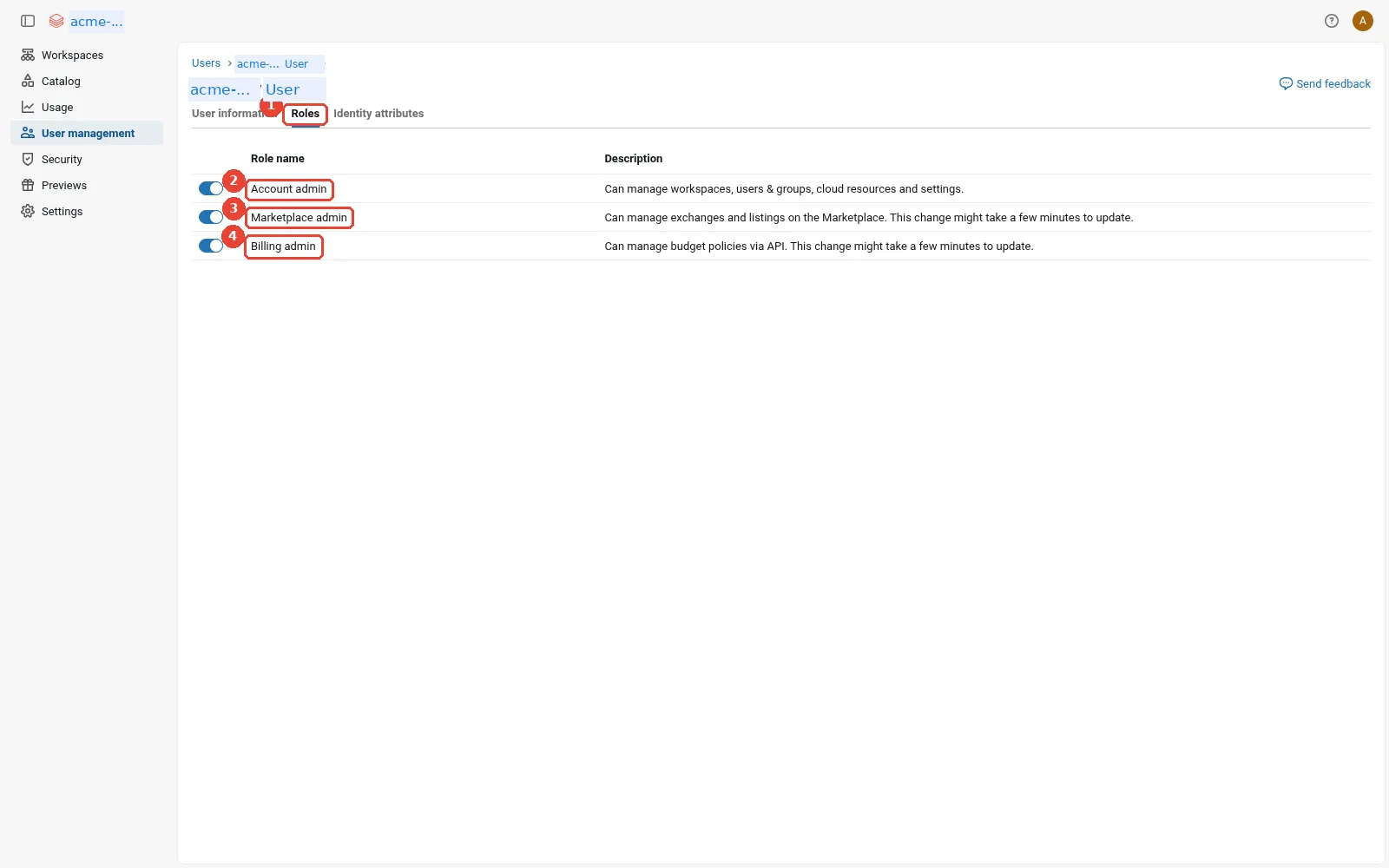
Account console: account-level roles. 1: The Roles tab on a user in User management; 2: Account admin: manages identities, workspaces and metastores. Keep this list short; 3: Marketplace admin; 4: Billing admin.
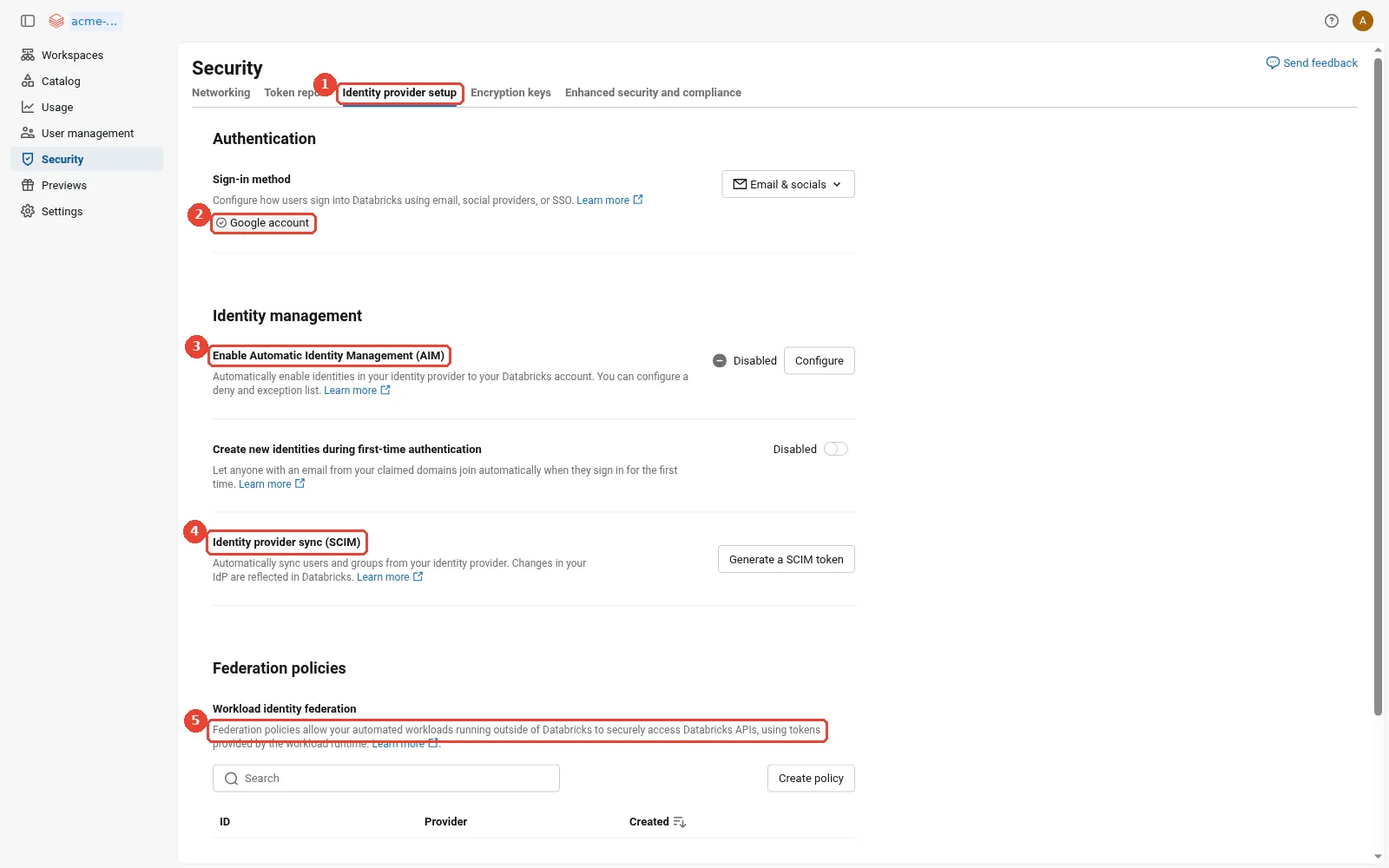
Account console: identity provider setup. 1: Security > Identity provider setup: where SSO, SCIM and AIM are configured; 2: Today people sign in with their Google account (no custom SSO); 3: Automatic identity management: off here; needs custom SSO with Entra ID or Okta; 4: SCIM: generate a token for the IdP to push users and groups; 5: Workload identity federation policies: none yet.
Where do roles live?
We now have all four layers from the start of the post. Here is every place a permission is granted, what it controls, who manages it in each deployment path, and the Acme example.
every place a permission is granted in Databricks on Google Cloud, what it controls, how it is managed in Path A (consoles) and Path B (Terraform), and an Acme example: Google Cloud IAM on projects, bucket IAM, the cluster service account, Databricks account roles, workspace assignment, entitlements, Unity Catalog privileges and ownership, storage credential and external location grants with workspace bindings, and the metastore admin
Reading down the rows:
- Google Cloud IAM on projects and the subnet holds the workspace service account’s three custom
roles and the platform team’s own rights. In Path A, Databricks writes the workspace bindings once,
with the creator’s token; in Path B, Terraform writes them with
google_project_iam_member. - Bucket IAM is where each storage credential’s generated service account gets its two roles. This is the only Google Cloud grant on the data path.
- The cluster service account is the escape hatch for paths outside Unity Catalog, covered in How does Databricks reach Google Cloud data?.
- Databricks account roles. The identity overview lists account admins (manage all identities, assign admin roles, grant workspace access), workspace admins, group managers and service principal managers. The person who set up the account is the account owner, an account admin whose role cannot be removed, according to the identity best practices page, which also recommends keeping the number of account admins small.
- Workspace assignment decides who may enter a workspace at all, as
USERorADMIN. - Entitlements decide which parts of a workspace someone may use. The entitlements page defines Workspace access (notebooks, jobs, pipelines), Databricks SQL access (SQL warehouses, queries, dashboards) and Consumer access (a simplified view for people who only consume dashboards and apps), and notes that entitlements need the Premium plan.
- Unity Catalog privileges and ownership decide who may read and change data. Privileges such
as
USE CATALOG,USE SCHEMAandSELECTare granted on securable objects, and every object has an owner who can grant on it, per the privileges reference. - Storage credentials and external locations have their own privileges (
CREATE EXTERNAL LOCATIONon a credential;READ FILES,WRITE FILESandCREATE MANAGED STORAGEon a location), and can be bound to specific workspaces. The storage credential guide warns that, by default, any privileged user can use a credential on any workspace attached to the metastore. - The metastore admin is optional, governs top-level Unity Catalog objects and ownership, and is set as the metastore’s owner, per the admin privileges page.
Now follow Sam through those layers for a single query on supply_service. Every check below must
pass, and notice where Google Cloud IAM appears.
what is checked when Sam runs one query on supply_service: Entra ID signs her in through single sign-on; the Databricks account knows her through SCIM or automatic identity management; the workspace lets her in because supply-analysts is assigned; her Databricks SQL entitlement lets her use a SQL warehouse; Unity Catalog checks SELECT on the table and USE on its catalog and schema; only then does the storage credential's Databricks-generated service account read the files, allowed by bucket IAM; Sam herself holds no Google Cloud role
That diagram is the answer to the most common question I get from Google Cloud security teams:
“which Google role do our analysts need?” None. Sam is checked by Entra ID, the Databricks account,
the workspace and Unity Catalog. Only the storage credential’s service account is checked by Google
Cloud IAM, at the bucket. It is also the reason I tell platform teams to grant Unity Catalog
privileges to groups: if supply-analysts changes membership in Entra ID, checks 2, 3 and 5 follow
automatically.
In the console, from the same redacted sandbox:
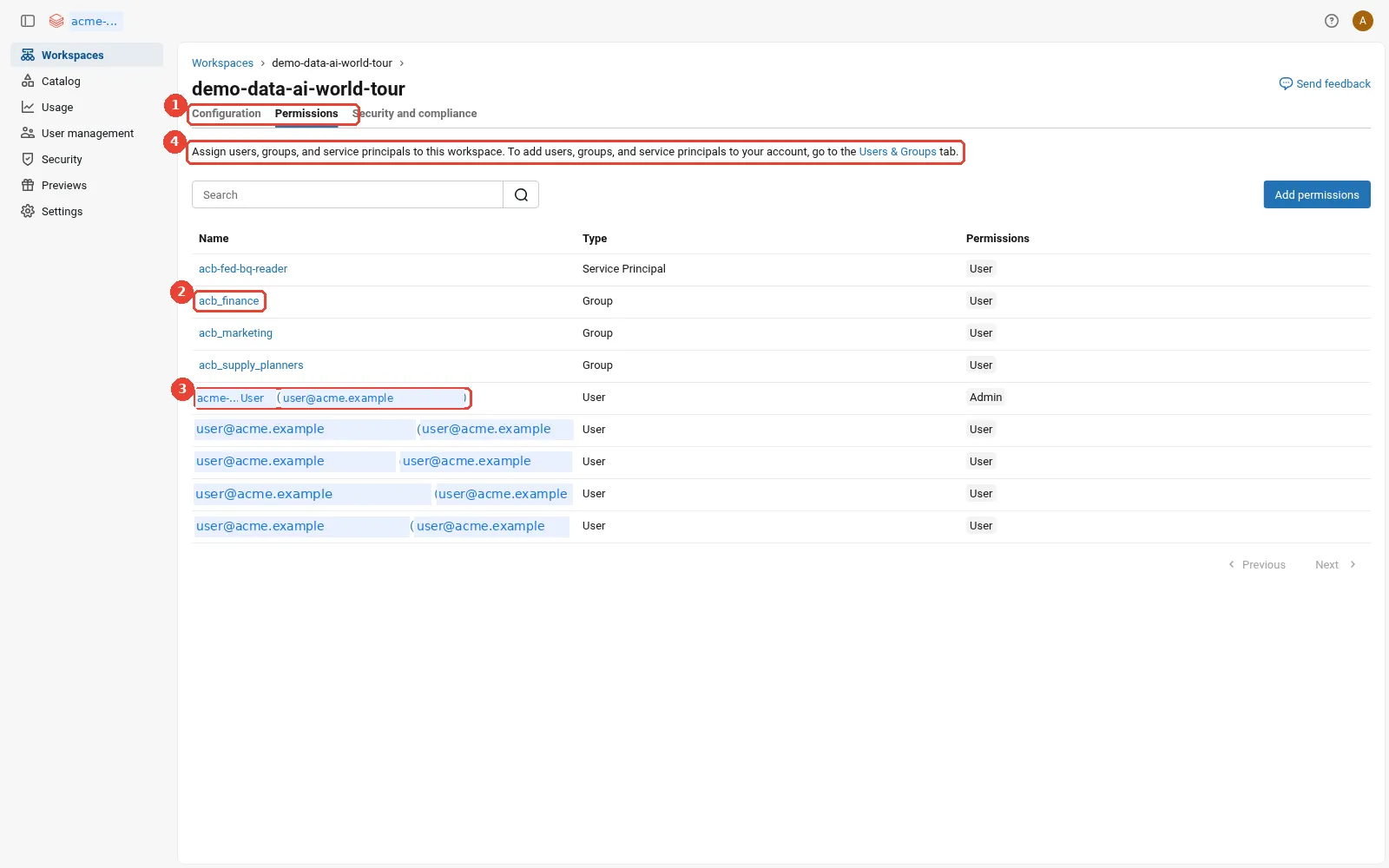
Account console: who may enter the workspace. 1: Workspace assignment lives on the Permissions tab; 2: Groups assigned to the workspace; 3: Workspace admin versus User; 4: Service principals can be assigned too.
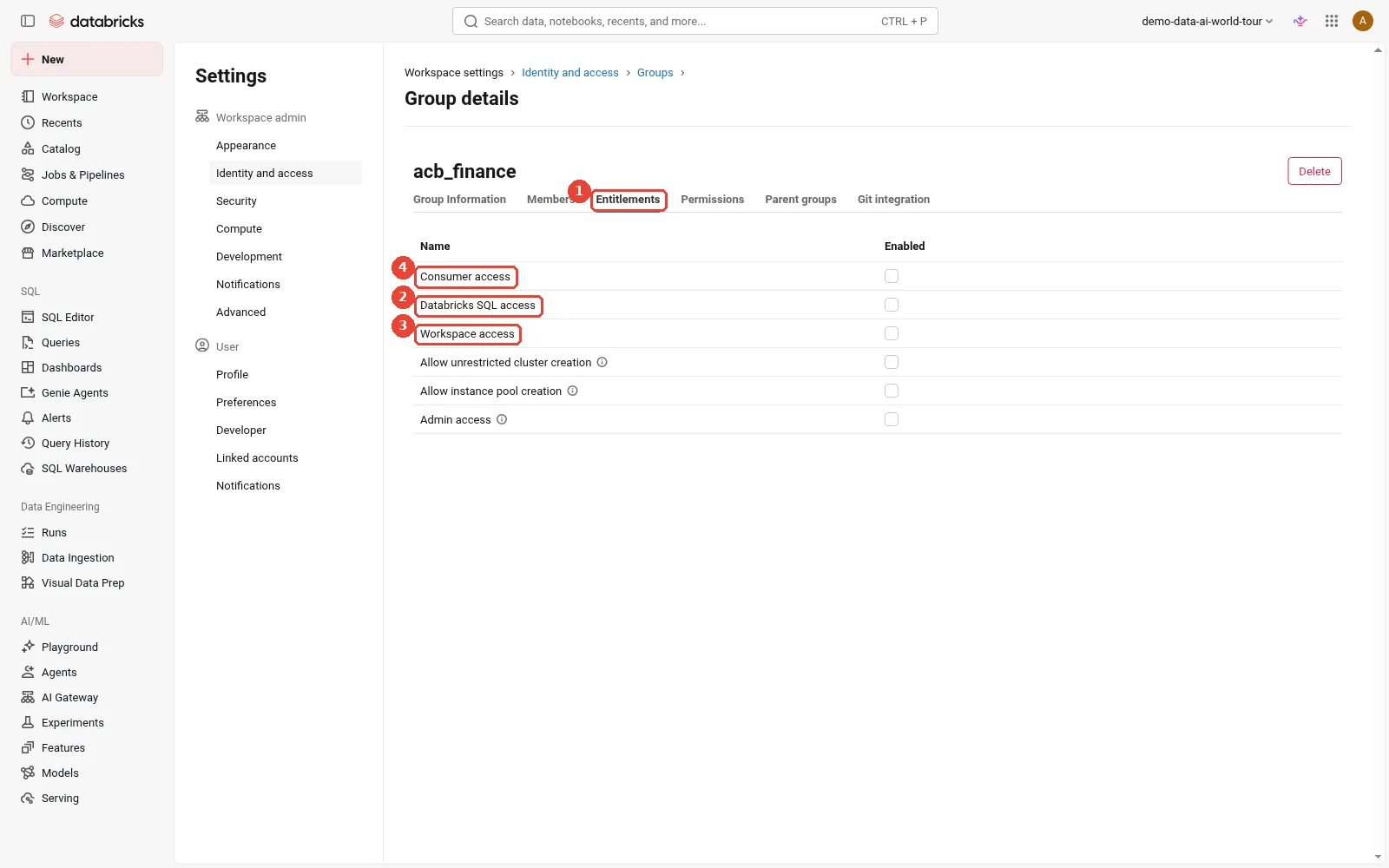
Workspace entitlements on a group. 1: Settings > Identity and access > Groups > a group > Entitlements; 2: Databricks SQL access: SQL warehouses, queries, dashboards; 3: Workspace access: notebooks, jobs, pipelines; 4: Consumer access: a simplified view for dashboards and apps.
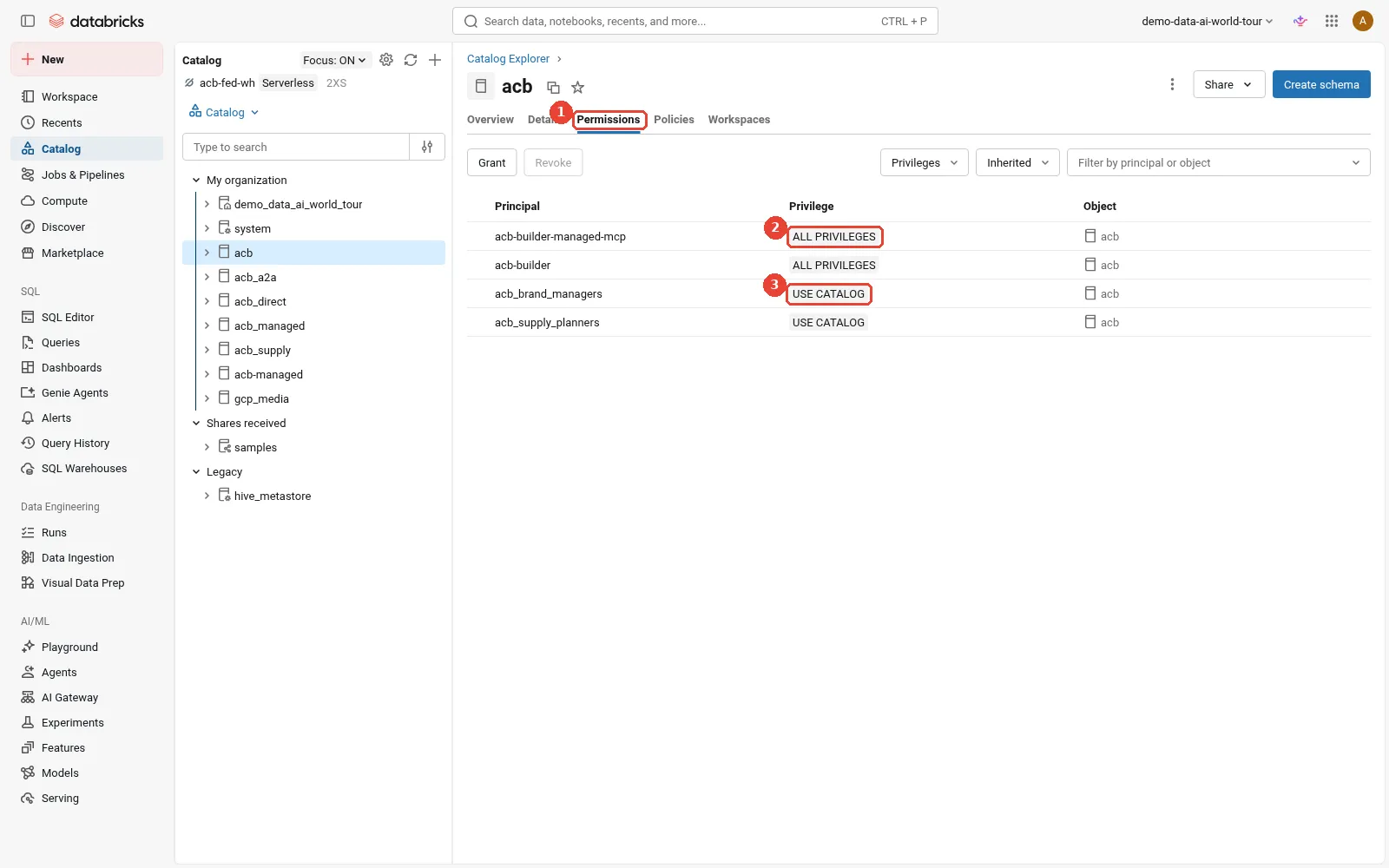
Unity Catalog: who may read which data. 1: Catalog Explorer > catalog > Permissions tab; 2: Builders and service principals with ALL PRIVILEGES; 3: Business groups get USE CATALOG; grants go to groups, not people.
How does automation authenticate?
Pipelines, Terraform and scripts are callers too. The authorisation overview lists the options; on Google Cloud there are two extra ones based on Google service accounts. The general OAuth flows behind them (client credentials, token exchange) are in Prerequisite 3.
how callers authenticate to Databricks APIs on Google Cloud: OAuth token federation, OAuth for service principals and users, Google Cloud ID authentication through impersonation, and two methods that rely on long-lived secrets
- OAuth token federation is Databricks’ recommended method for workloads. A job outside Databricks presents a token from its own identity provider, and a federation policy says which issuer, audience and subject are accepted. Databricks offers two kinds: account-wide token federation, for all users and service principals in the account, and workload identity federation, a policy on one service principal. No Databricks secret exists. See OAuth token federation.
- OAuth M2M (machine to machine) gives a service principal a short-lived token in exchange for a client ID and secret. It is the OAuth client credentials flow.
- OAuth U2M (user to machine) is the browser sign-in behind
databricks auth login. - Google Cloud ID authentication uses a Google service account as the Databricks caller. You set
google_service_accountin the CLI profile, SDK or Terraform provider; your ADC identity must be able to impersonate it. The Google Cloud ID page shows the profile fields. - Google Cloud credentials authentication (
google_credentials) reads a service account JSON key. It works, but it needs exactly the key your organisation policy probably forbids. - Personal access tokens are static and tied to a person. Keep them out of production.
These are the house key and the smart-lock code from Prerequisite 3 again: the last two are copied keys, and the first four hand out short-lived tokens. The trap is to pick by what is quickest to set up, which is usually a personal access token. A test, safest first:
Which method should this caller use?                          Ask in order; stop at the first yes.
1. Does it create or update a workspace (databricks_mws_*)?   -> Google ID tokens, impersonated
2. Does its CI system issue OIDC tokens?                      -> OAuth token federation
3. Is a person at a keyboard?                                 -> OAuth U2M
4. No external token issuer at all?                           -> OAuth M2M, secret in a secret manager
5. A JSON key or a personal access token?                     -> only as a dated exception with an owner
How does this apply to Acme? Acme answers question 1 with tf-deployer and question 2 with
sp-supply-jobs, which this section ends with. It needs neither question 4 nor question 5.
Databricks recommends two service accounts for production Google ID tokens: SA-1 runs the workload
and only impersonates; SA-2 holds the Databricks and Google Cloud permissions. One team can then own
workload security and another resource security. One honest caveat: the guide’s own step-by-step
example downloads a JSON key for SA-1. You do not need it. In Path B, SA-1’s job is done by the CI
pipeline’s federated identity, and on a laptop by a person’s gcloud sign-in, both of which can
impersonate SA-2 with no key.
Here is the workspace-level example from Path B: a storage credential created through Terraform, with the generated service account granted on the bucket.
Terraform for keyless access: the account-level provider authenticates by impersonating a Google service account, the storage credential asks Databricks to generate a service account, and its email is granted a role on the bucket
The Terraform above follows the provider’s
Google Cloud workspace guide,
which creates the deployer service account, grants roles/iam.serviceAccountTokenCreator on it to a
list of people or CI identities, and sets google_service_account on the provider. I have simplified
it and not run it as shown.
For jobs that run after the platform exists, such as a GitHub workflow that deploys Acme’s supply
pipelines, I would not reuse tf-deployer at all. A Databricks service principal, sp-supply-jobs,
with a federation policy that trusts only that repository, is narrower and needs no Google identity.
The federation policy page
shows a GitHub Actions policy of exactly this shape:
issuer:    https://token.actions.githubusercontent.com
audiences: https://github.com/acme
subject:   repo:acme/supply-pipelines:environment:prod
The same page notes that GitHub repositories created, renamed or transferred on or after 15 July 2026 use a different, immutable subject format, so copy the subject from the page rather than from this post.
What are the three things called “identity federation”?
The word federation appears in at least three unrelated places in this post, and it causes confusion in nearly every design meeting I join.
three things called identity federation: Google's Workload Identity Federation gets outside workloads into Google Cloud, Google's Workforce Identity Federation gets outside people into Google Cloud, and Databricks' workload identity federation gets outside workloads into Databricks
Google’s Workload Identity Federation brings outside workloads into Google Cloud. Google’s Workforce Identity Federation brings outside people into the Google Cloud console and APIs without syncing them into Cloud Identity, as described in Workforce Identity Federation, which also notes it follows the OAuth 2.0 Token Exchange specification (RFC 8693). Databricks’ workload identity federation, part of OAuth token federation, brings outside workloads into Databricks. They solve different problems and you may well use all three.
There are two more uses of the word on the Databricks side that the diagram leaves out, because they are not authentication at all: workspace identity federation (workspaces share the account’s identities, from the sign-in section) and Lakehouse Federation (querying external databases such as BigQuery, from the data section). When someone says “federation”, ask which one.
When should you use which identity mechanism?
With every piece on the table, here are the eight mechanisms that clash most often, each defined in one or two lines, followed by a decision table.
- Google Workload Identity Federation: a machine outside Google Cloud exchanges its own token for a short-lived Google token. It replaces service account keys for CI pipelines and other clouds.
- Google Workforce Identity Federation: a person signs in to the Google Cloud console and APIs with an Entra ID or Okta identity, without a copy of their account in Cloud Identity. It replaces directory sync to Google. It covers Google Cloud, not Databricks.
- Google service account impersonation: a person or job with Token Creator obtains short-lived tokens for a service account. It replaces keys and shared credentials, and it is how both Terraform and the Account API calls in Path B work.
- Google ID tokens: Google-signed OIDC tokens that a Google user or service account presents to Databricks APIs. On Google Cloud they are the only documented way to create a workspace through the API.
- Databricks OAuth token federation (account-wide or workload identity federation): an external token is exchanged for a Databricks OAuth token. It replaces personal access tokens and client secrets for calls into Databricks.
- Databricks OAuth M2M: a Databricks service principal with a client ID and secret gets short-lived tokens. It replaces personal access tokens where no external OIDC issuer exists.
- Databricks single sign-on: people sign in to the Databricks account and workspaces through your identity provider. It replaces Google sign-in for Databricks.
- SCIM or automatic identity management: users and groups arrive in the Databricks account from the identity provider and leave when they leave. They replace hand-made users and groups.
when to use which identity mechanism: Google Workload Identity Federation for outside workloads into Google Cloud, Workforce Identity Federation for outside people into Google Cloud, service account impersonation for acting as a Google service account, Google ID tokens for Google identities calling Databricks, Databricks OAuth token federation and OAuth M2M for workloads calling Databricks, Databricks single sign-on for people, and SCIM or automatic identity management for provisioning; with what each replaces, when to choose it and when to avoid it
Acme ends up using six of the eight: Workload Identity Federation and impersonation for the deployer, Google ID tokens for workspace creation, Databricks token federation for pipeline jobs, Databricks SSO and automatic identity management for people. It does not need Workforce Identity Federation for Databricks itself; it would only add it if its platform team wanted to reach the Google Cloud console with Entra ID identities instead of Cloud Identity accounts. That last choice is what creates the collision in the next section.
Can you combine your own SSO with Google ID tokens?
Short answer from the public documentation, as of October 2026: not for creating workspaces. Three different things get called “federation” or “SSO” in this conversation, so first, what turning on SSO actually means.
What “turning on SSO” means in a Databricks account on Google Cloud. Out of the box, people sign in to the account console and workspaces with their Google identity: the SSO page says single sign-on “using Google Cloud Identity (or GSuite) is available” by default. You can instead bring your own identity provider, such as Entra ID or Okta, over SAML 2.0 or OIDC. It is one setting for the whole account, and once it is on, “all users, including admins, must sign in to the Databricks account and workspaces using single sign-on”. It changes how people sign in. It is not OAuth token federation, which lets programs swap an identity provider’s JWT for a Databricks OAuth token, and it is not the workspace identity federation setting, which decides where identities live.
Why workspace creation hits a wall. Creating a workspace on Google Cloud needs both headers from
the section on tokens: a Google ID token in
Authorization, and a Google access token for credentials passthrough. Three public statements meet
at that point:
- Custom SSO switches off Google ID tokens. The Google ID token guide says: “If you bring your own identity provider to configure single sign-on to Databricks, you can’t authenticate with Google ID tokens.” That is the first header gone. The note lists no exception for service accounts.
- Databricks’ own tokens don’t count. The Terraform
databricks_mws_workspacespage says that on Google Cloud the provider “must be authenticated with a Google-issued OIDC token (not a Databricks OAuth token)”. So the tokens that still work with SSO on, Databricks OAuth tokens from OAuth M2M or OAuth token federation, cannot take the first header’s place, and a Databricks service principal has no Google IAM rights to fill the second. - Workforce Identity Federation users have no Google ID token of their own. A person who signs in through a workforce pool gets a federated access token, not a Google account, as Prerequisite 3 explains. The documented way for them to act as a Google identity that Databricks recognises is to impersonate a service account, which leads straight back to point 1.
custom single sign-on and workspace creation: creating a workspace on Google Cloud needs a Google ID token and a Google access token; wall 1 is that with your own identity provider for SSO Databricks says Google ID tokens cannot be used, with no exception listed for service accounts; wall 2 is that a Databricks OAuth token from M2M or token federation does not count and a Databricks service principal has no Google IAM rights; wall 3 is that Workforce Identity Federation users have no Google ID token of their own and can only get one by impersonating a service account, which leads back to wall 1; the keyless service account route works with SSO off, is not documented with SSO on, and puts an account admin outside the corporate identity provider
Why the keyless service account route is not the whole answer. Acme’s Path B works today: the CI
job federates in with Workload Identity Federation, impersonates tf-deployer with Token Creator,
and sends tf-deployer’s Google ID token and access token, with tf-deployer added to the account as
an account admin. A Workforce Identity Federation user can do the same by impersonating the service
account. Nothing in that chain depends on how people sign in, until custom SSO is switched on. Then
point 1 applies to the token tf-deployer presents, because the note is account-wide. Whether
Databricks still accepts a service account’s Google ID token with custom SSO on is exactly what the
public documentation does not settle, so test it in a lab account before you design around it: turn
SSO on, add the service account as an account admin, and call GET /workspaces on the Account API
with the impersonated tokens. A 200 with a workspace list means the tokens are accepted; a 401,
403 or a redirect to the identity provider’s sign-in page means they are not.
Even where it works, some security teams reject the route. A service account that is a Databricks account admin lives outside Entra ID or Okta: SCIM cannot remove it, conditional access does not apply to it, and its calls show up as the shared service account rather than the person behind them. Organisations that adopted Workforce Identity Federation precisely to keep every privileged identity inside their identity provider see that as a step backwards.
Why AWS and Azure do not hit this. On AWS you register a
cross-account IAM role with
Databricks in advance, Databricks assumes it, and the caller passes no cloud token, so any account
admin can create a workspace, including an OAuth M2M service principal. On Azure the workspace is an
Azure resource
(Microsoft.Databricks/workspaces),
created through Azure Resource Manager by any Entra identity with the right Azure role, and Entra ID
is the identity provider of both sides. On Google Cloud, Databricks borrows the caller’s Google
credentials on every creation call, so the caller has to be a Google identity.
My view: decide the order of operations early. Settle how workspaces will be created, and by which identity, before the identity team switches on account-wide SSO, and confirm the supported path for your exact combination with your Databricks account team.
How does Databricks reach Google Cloud data?
This is the question Google Cloud architects ask first, and the honest answer is: keyless for Cloud Storage, a key for BigQuery federation.
A simple example: a library with closed stacks. Usually you ask at the desk: the librarian checks your card against what you may borrow and fetches the book with the library’s own access to the stacks. Sometimes a reading room is handed a master key to the stacks, and anyone in the room can walk in without a card being checked. And sometimes a group is given one shared reader’s card for the archive next door, which then sees only that card, never who used it. The desk is Unity Catalog with a storage credential, the master key is a cluster service account, and the shared card is the service account key in a BigQuery federation connection.
How does this apply to Acme? Sam reads gs://acme-lake-supply through the desk, so Unity Catalog
checks his grants first. Acme’s marketing catalog over BigQuery uses the shared card: BigQuery sees
the connection’s service account on every query, not Sam. And a cluster service account such as the
etl-sa example below would be the master key, which is why Acme’s nightly job cluster in
Part 1
leaves google_service_account out on purpose. All four paths side by side:
how Databricks reaches Google Cloud data today: storage and service credentials are keyless and governed by Unity Catalog; BigQuery query federation and Lakehouse catalog federation take a service account key; a cluster service account is keyless but outside Unity Catalog
Storage credentials cover external locations, volumes and managed storage. Acme creates one for
gs://acme-lake-supply, Databricks generates a service account for it, and Acme grants that service
account two roles on the bucket, Storage Legacy Bucket Reader and Storage Object Admin. No
key exists at any point. Creating the credential needs the CREATE STORAGE CREDENTIAL privilege on
the metastore, per the
storage credential guide,
and an external location then points at the bucket through it, per the
external location guide.
Part 5
walks through the setup, including the extra grants that file events need.
Service credentials apply the same pattern to Google APIs. In a notebook,
dbutils.credentials.getServiceCredentialsProvider("pubsub_cred") returns credentials that a Google
client library accepts; inside Unity Catalog Python UDFs the call is
databricks.service_credentials.getServiceCredentialsProvider(), per
Use service credentials.
BigQuery query federation is where the key appears. The
BigQuery federation page asks for
the service account’s JSON key in the connection (GoogleServiceAccountKeyJson) and the roles
BigQuery User and BigQuery Data Viewer. It needs Databricks Runtime 16.1 or above, reads
through the BigQuery Storage API, and gets its tokens from the compute plane, so compute must reach
bigquerystorage.googleapis.com, oauth2.googleapis.com and accounts.google.com. Every query
runs as that one service account, so BigQuery sees the connection, not the person. Keep the key in a
Databricks secret rather than in the SQL:
CREATE CONNECTION bq_acme TYPE bigquery
OPTIONS (GoogleServiceAccountKeyJson secret('bq', 'acme_federation_key'));

CREATE FOREIGN CATALOG marketing USING CONNECTION bq_acme
OPTIONS (dataProjectId 'acme-analytics');

GRANT USE CATALOG, USE SCHEMA, SELECT ON CATALOG marketing TO `supply-analysts`;
The Google Cloud Lakehouse catalog federation
connector, in Beta, also takes a key, for a service account with roles/biglake.viewer; the
table files themselves are read through external locations.
Cluster service accounts are keyless, but they sit outside Unity Catalog. The Spark BigQuery
connector and direct gs:// paths on a classic cluster use the attached service account, so anyone
who can use the cluster gets its Google permissions. Serverless compute has no attached service
account at all: the serverless limitations page
says you must use Unity Catalog to connect to external data.
two ways to read the same bucket: through Unity Catalog, Sam's grant is checked first and the storage credential's Databricks-generated service account reads the bucket, so Sam needs no Google permission; through a cluster service account, anyone who can use the cluster gets the account's Google permissions with no Unity Catalog check
If you do need a cluster service account, give the workspace service account actAs on that one
account rather than project-wide, and pin it in a
compute policy so users cannot
choose another:
gcloud iam service-accounts create etl-sa --project=acme-dbx-prod
gcloud iam service-accounts add-iam-policy-binding etl-sa@acme-dbx-prod.iam.gserviceaccount.com \
  --member="serviceAccount:$WORKSPACE_SA" --role="roles/iam.serviceAccountUser"
# compute policy: "gcp_attributes.google_service_account":
#   {"type": "fixed", "value": "etl-sa@acme-dbx-prod.iam.gserviceaccount.com"}
The same thinking applies to agents. In the Production-ready agents series, the supply agent queries Databricks as the signed-in user so that Unity Catalog applies Sam’s own grants, which is the pattern Part 7 of that series builds for Gemini Enterprise. Identity done well in the platform is what makes that possible.
In the console, from the same redacted sandbox:
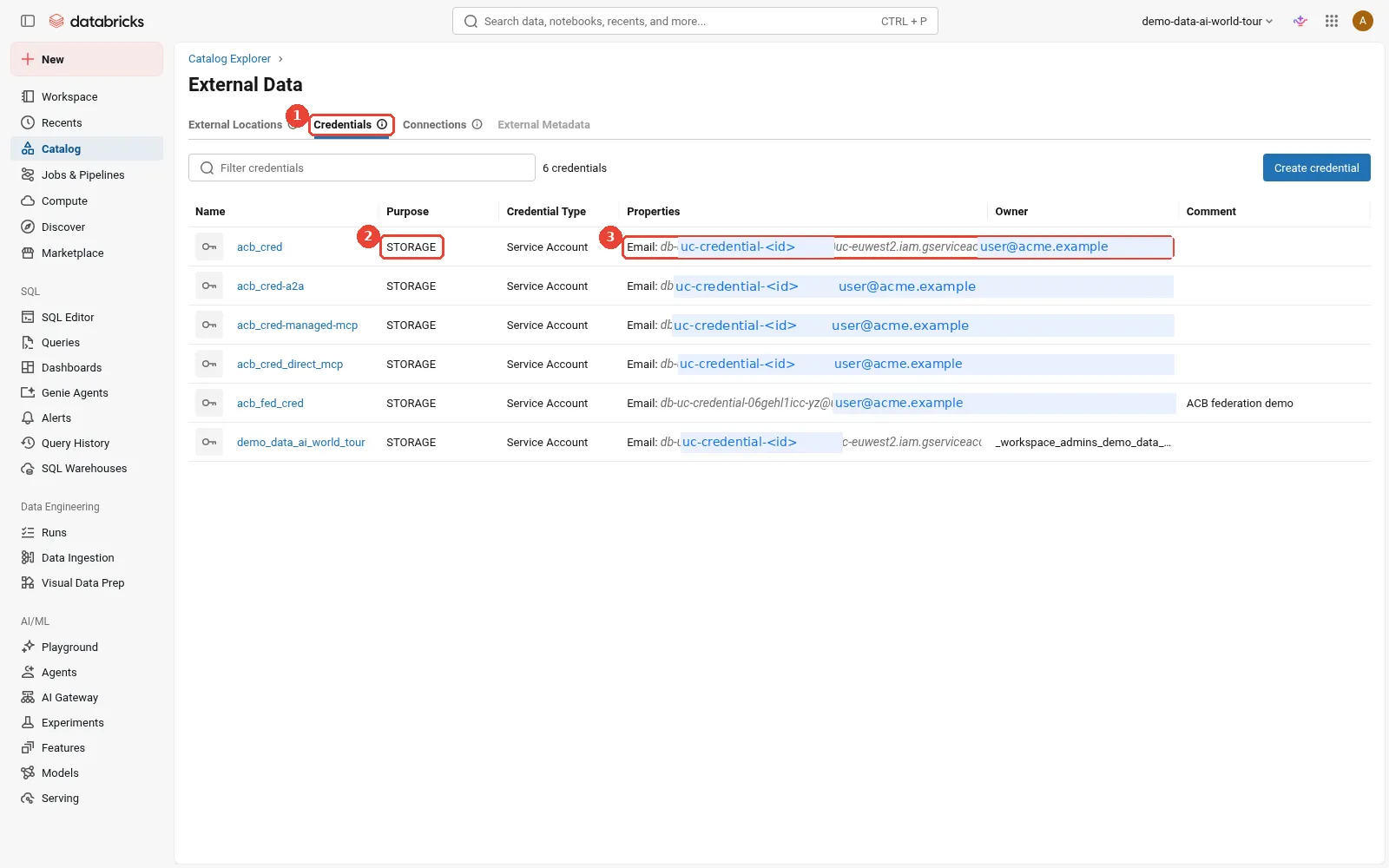
Unity Catalog: storage credentials. 1: External data > Credentials; 2: Storage credentials for Cloud Storage; 3: Each wraps a Databricks-generated Google service account. No key.
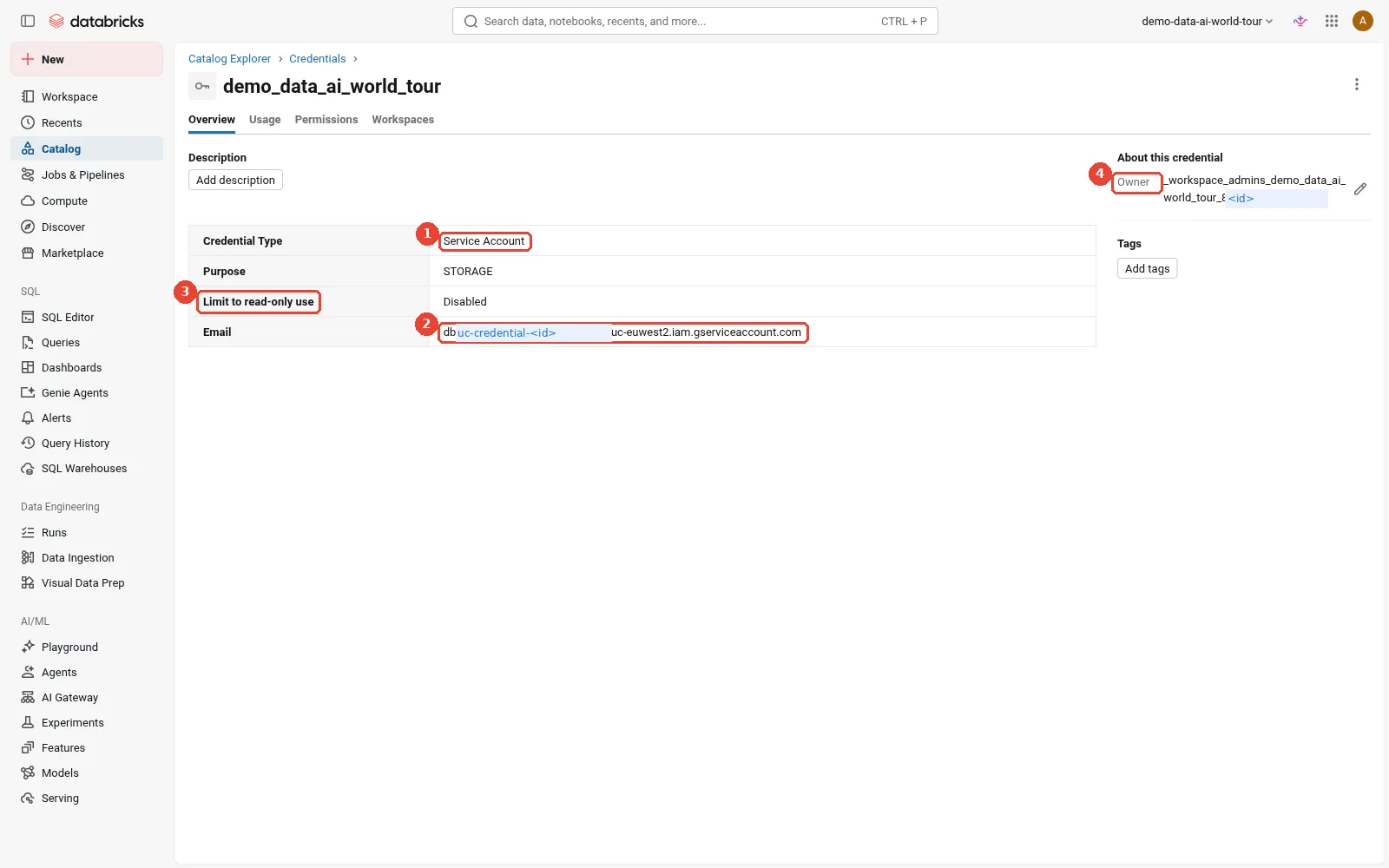
Inside one storage credential. 1: Credential type: Service Account (Databricks generated it); 2: This email is what you grant on the bucket: Storage Legacy Bucket Reader + Storage Object Admin; 3: Optionally limit the credential to read-only use; 4: The owner controls who may use the credential.
What does least privilege look like?
Least privilege means every identity holds only the permissions its job needs, for only as long as it needs them; Prerequisite 3 explains the principle. A checklist I would walk through with Acme’s platform team:
- Creator. Use the deployer service account, impersonated, never keyed. In Path A, grant Owner only for the creation window and remove it afterwards; in Path B, use the least-privilege creator roles.
- CI trust. Give the workload identity provider an attribute condition on the organisation, and
bind Token Creator on
tf-deployerto one repository (and ideally one branch or environment), not to the whole pool. - Workspace service account. Remove project-wide
actAsand grant it per cluster service account, includingdatabricks-compute, as the operator role note requires. databricks-compute. No data roles, ever.- Account admins. Two named people plus the deployer service account. Everyone else gets workspace admin at most.
- Data. Prefer storage and service credentials. Create one credential per trust boundary and bind it to the workspaces that should use it.
- BigQuery federation. A dedicated service account per connection with only BigQuery User and Data Viewer on the datasets it needs, its key in a Databricks secret, rotated on a schedule, and the key-creation exception scoped to one project.
- People. Groups from the identity provider, granted in Unity Catalog. Service principals for automation, with OAuth token federation where the CI system supports it.
- Audit logs. Prefer the
system.access.auditsystem table, which Databricks recommends; if you deliver logs to a bucket, use a dedicated bucket because the log delivery account needs Storage Admin on it.
To check what is really granted, these standard commands help:
# Every binding for Databricks-held identities on the workspace project, with conditions
gcloud projects get-iam-policy acme-dbx-prod --flatten="bindings[].members" \
  --format="table(bindings.role, bindings.members, bindings.condition.title)"
# Who can use the lake bucket (storage credential service accounts appear here)
gcloud storage buckets get-iam-policy gs://acme-lake-supply
# Who may impersonate the deployer
gcloud iam service-accounts get-iam-policy tf-deployer@acme-dbx-admin.iam.gserviceaccount.com
# Everything one identity can reach across the organisation
UC_SA=<storage credential service account email>
gcloud asset analyze-iam-policy --organization=$ORG_ID --identity="serviceAccount:$UC_SA"
The last one is Policy Analyzer, part of Cloud Asset Inventory.
What can go wrong?
- Grants to Databricks identities fail with a domain error.
iam.allowedPolicyMemberDomainsonly allows principals from listed customer IDs, so a binding for the workspace, storage credential or log delivery service account, which belong to Databricks, is refused. The domain restriction page explains the allow list. Add Databricks’ Google Cloud customer ID,C01p0oudw, next to your own, as the Databricks sign-up page asks and Part 1 explains, and change the policy at the lowest level that works. - BigQuery federation cannot get a key. Key creation is disabled by organisation policy. Agree a narrow exception for one project, or use the Spark connector with a cluster service account where governance allows it.
- Google ID tokens rejected. Check the audience: account and workspace APIs need different tokens. Check that the service account was added in the account console (account APIs) or the workspace (workspace APIs). Check whether custom SSO is on.
- Terraform fails on
databricks_mws_workspaceswith an OAuth profile. The provider needs a Google-issued token for that resource on Google Cloud. Setgoogle_service_accounton the account provider instead of an OAuth client ID and secret. - The CI job cannot impersonate the deployer. Usually the
principalSetin the Token Creator binding names a different attribute or repository than the provider maps, or the attribute condition rejects the token (for example a workflow from a fork or another branch). - Clusters with a custom service account fail to start after you removed project-wide
actAs. Grantroles/iam.serviceAccountUseron that service account, and ondatabricks-compute, to the workspace service account. - Least-privilege
PATCHreturns400 BAD_REQUEST. The guide says this means missing operator role grants. Check the condition on the Resource Role and the network role binding on the subnet. - A new joiner cannot see the workspace. With SCIM, wait for the next 20 to 40 minute sync; then check that their group is assigned to the workspace. With SCIM, nested Entra groups do not count.
- Everyone is locked out after an SSO change. Admins must also use SSO once it is on. Keep the test step, record the certificate or secret expiry date, and keep a second account admin who can fix the configuration.
- External location validation fails. Usually the file events permissions are missing. Grant them, or force-create the location if you do not need file events.
- BigQuery queries fail on materialisation. The connection’s service account lacks BigQuery User in the billing project, which it needs to create the temporary dataset.
What would I do now?
- Draw your own version of the inventory table and the “where roles live” table for one workspace, with real emails and group names, before anything is deployed. Most later arguments are about rows in them.
- Choose your deployment path per environment. Path A is fine for a sandbox; for production, build
the workload identity pool, the deployer service account and the least-privilege roles first, and
run Terraform with
google_service_account. No keys. - Check the two baseline constraints in your organisation with your security team early, and plan the domain allow list and the single BigQuery key exception together.
- Decide how workspaces will be created before switching on bring-your-own SSO, and test the SSO and automation combination in a lab account.
- Point SSO and automatic identity management (or SCIM) at the directory your people already use, grant to groups only, and put all data access through Unity Catalog storage and service credentials.
What did we learn?
- Permissions for Databricks on Google Cloud live in four places, Google Cloud IAM, the Databricks account, each workspace and Unity Catalog, and an analyst needs grants only in the last three.
- A Databricks workspace uses up to eight Google identities, every grant is made on your resources, and only BigQuery federation still needs a service account key.
- Workspace creation uses credentials passthrough: in the console Databricks acts with a person’s Google token, while a regulated pipeline uses Workload Identity Federation, impersonation and least-privilege roles with no keys at all.
- People sign in through single sign-on and arrive through SCIM or automatic identity management, which the public documentation describes for Databricks on Google Cloud with Entra ID and Okta.
- Google ID tokens are required to create workspaces through the API but are switched off by bring-your-own SSO, so the order of those decisions matters.
- “Federation” names at least five different things across Google Cloud and Databricks, so always ask which caller is entering which system.
What comes next?
Identity tells us who may connect. In Databricks on Google Cloud, Part 3: Networking: VPC, Cloud NAT, Private Google Access and Private Service Connect, we look at how they connect: the customer-managed VPC and its subnet sizes, Cloud NAT, Private Google Access, Private Service Connect for the front end and back end, and VPC Service Controls around the data. The series overview lists every part.
Sources
- Databricks on Google Cloud, Prerequisite 3: Identity and security foundations
- Google Cloud: IAM overview
- Google Cloud: Roles and permissions
- Google Cloud: IAM release notes (29 October 2026: Admin, Writer and Reader basic roles generally available)
- Google Cloud: Allow policies
- Google Cloud: IAM Conditions overview
- Google Cloud: Service accounts overview
- Google Cloud: Service account impersonation
- Google Cloud: Create short-lived credentials for a service account
- Google Cloud: Get an ID token
- Google Cloud: How Application Default Credentials works
- Google Cloud: Set up Application Default Credentials
- Google Cloud: Authenticate for the gcloud CLI
- Google Cloud SDK reference: gcloud auth login
- Terraform Registry: Google provider configuration reference
- Google Cloud: Best practices for managing service account keys
- Google Cloud: Manage Google Cloud security baseline constraints
- Google Cloud: Restricting identities by domain
- Google Cloud: Service agents
- Google Cloud: Workload Identity Federation
- Google Cloud: Workload Identity Federation with deployment pipelines
- Google Cloud: Workforce Identity Federation
- Google Cloud: Policy Analyzer
- Databricks: Required permissions for workspace creation
- Databricks: Required permissions for the workspace service account
- Databricks: Create a workspace
- Databricks: Create a least-privilege workspace
- Databricks: Authenticate with Google ID tokens
- Databricks: Google Cloud ID authentication
- Databricks: Authorize access to Databricks resources
- Databricks: OAuth token federation
- Databricks: Configure a federation policy
- Databricks: Authorize service principal access with OAuth (M2M)
- Databricks: Configure SSO in Databricks
- Databricks: SSO to Databricks with Microsoft Entra ID
- Databricks: Automatically provision users (JIT)
- Databricks: Manage users, service principals and groups
- Databricks: Identity best practices
- Databricks: Sync users and groups using SCIM
- Databricks: Configure SCIM provisioning using Microsoft Entra ID
- Databricks: Automatic identity management
- Databricks: Configure Microsoft Entra ID for automatic identity management
- Databricks: Manage entitlements
- Databricks: Unity Catalog privileges and securable objects
- Databricks: Admin privileges in Unity Catalog
- Databricks: Create a storage credential for connecting to Google Cloud Storage
- Databricks: Create an external location for a GCS bucket
- Databricks: Service credentials
- Databricks: Use service credentials
- Databricks: Run federated queries on Google BigQuery
- Databricks: Google Cloud Lakehouse catalog federation
- Databricks: Compute configuration reference
- Databricks: Compute policy reference
- Databricks: Serverless compute limitations
- Databricks: Configure audit log delivery
- Databricks: Get started with a free trial on Google Cloud
- Databricks on AWS: Create a workspace with a cross-account IAM role
- Terraform Registry: Databricks provider documentation
- Terraform Registry: Provisioning Databricks workspaces on GCP
- Terraform Registry: databricks_mws_workspaces
- Terraform Registry: databricks_mws_permission_assignment
- Terraform Registry: databricks_storage_credential
- Terraform Registry: google_iam_workload_identity_pool
- Terraform Registry: google_iam_workload_identity_pool_provider
- Terraform Registry: google_service_account_iam
- GitHub: Databricks Security Reference Architecture (SRA) Terraform templates
- Databricks: Configure SSO using SAML
Opinions are my own. Every fact in this post comes from the public documentation linked above. Acme Consumer Brands and its data are fictional.