Databricks on Google Cloud, Part 4: Serverless networking and egress
Serverless compute runs in Databricks' account, so none of your VPC controls apply to it. How it reaches Cloud Storage, BigQuery, your private services and the internet, what a network connectivity configuration is, how network policies lock egress down, how it meets VPC Service Controls, and what the networking costs.
Read this chapter as 5 illustrated mini-books
Flip pages horizontally like a hardcover book, or swipe up like a reel to move through all 5 topics (15 animated pages).
In Part 3 we built Acme’s classic network: a customer-managed VPC, subnets sized for its clusters, Cloud NAT for outbound traffic, Private Google Access for Cloud Storage, Private Service Connect for the control plane, and a VPC Service Controls perimeter around the data. Every one of those controls works because the cluster VMs sit inside Acme’s own project.
Serverless compute does not. Serverless SQL warehouses, notebooks, jobs and pipelines run in Databricks’ account, so Acme’s subnets, routes, firewall rules and Cloud NAT never see that traffic. That is the mental shift for a Google Cloud network team: for serverless, connectivity is configured in the Databricks account, by account admins, with Databricks objects.
This post covers that side of the network. We look at where serverless compute runs, how it reaches Cloud Storage and BigQuery, how it reaches a private database in Acme’s VPC, how Acme’s firewalls recognise it, how network policies decide what it may reach at all, how it fits with VPC Service Controls, what a serverless workspace changes, and what the networking costs.
If you prefer to watch first, here is the heart of this part as a short animated explainer.
Video: how serverless compute reaches your data and how you control its egress, in three minutes. The narration is a synthetic voice; the script and animation are mine.
What are the key ideas?
Six terms carry this post.
- Serverless compute plane: the compute that Databricks runs for you in its own Google Cloud account, in the same region as your workspace. “Serverless” means you do not create or manage the servers; there are still virtual machines, but they are Databricks’ machines.
- Egress: outbound network traffic, from the compute to a destination. Ingress is the opposite direction, traffic arriving at a service. This post is mostly about egress.
- Network connectivity configuration (NCC): a Databricks account object, tied to one region, that manages private endpoints for the serverless compute of the workspaces attached to it.
- Private endpoint rule: an entry in an NCC that asks Databricks to create a Private Service Connect endpoint to one of your services, or to Google APIs.
- Network policy: a Databricks account object that sets which outbound destinations serverless workloads may reach. Databricks calls the feature serverless egress control.
- Outbound IPs: the public IP address ranges that Databricks publishes for serverless traffic, so you can allow them on a firewall in front of a resource.
Here is how they fit together for Acme:
the objects that govern serverless networking: an account admin creates a network connectivity configuration (NCC) and a network policy in the Databricks account, attaches them to workspaces in one region, and the serverless compute plane then reaches Google APIs, private services and the internet by different paths
Where does serverless compute run?
The short answer: in Databricks’ Google Cloud account, not in yours, in the same region as your workspace. That one fact is why none of your VPC controls reach it.
Start with something simpler than a cloud. Picture the difference between driving your own car and taking a taxi:
Your own car                         A taxi
you own it and park it at home       the taxi firm owns it and parks it
your rules: dashcam, speed limiter   the firm's car: your gadgets are not in it
you choose every road                you say where to go; the firm drives
you set limits by changing the car   you set limits in your account with the firm
The trip is the same and so is the destination. What changes is where the controls live: for the taxi, you cannot fit anything to the car, so every rule you want (“only these destinations”, “use the private road to my warehouse”) has to be set in your account with the taxi firm. Classic compute is your own car, parked in your project. Serverless compute is the taxi, parked in Databricks’ account, and the “account with the taxi firm” is the Databricks account console.
How does this apply to Acme?
Part 1 drew the control plane and the two compute planes. In short: the control plane always runs in Databricks’ account, classic compute runs on VMs in your project, and serverless compute runs in Databricks’ account too, in the same region as your workspace. This post lives in that last box, the one Acme cannot see.
The networking security architecture page puts it in one sentence: serverless resources “run in a serverless compute plane in your Databricks account”, in “the same cloud region as your workspace’s classic compute plane”. The same page makes a promise that matters later: “Connectivity between the control plane and the serverless compute plane is always over the cloud network backbone and not the public internet.” The cloud network backbone is Google’s own private network between its data centres, as opposed to the public internet.
Which products run there? The serverless egress control page lists the ones its controls cover: notebooks, workflows (now called Lakeflow Jobs), SQL warehouses, Lakeflow pipelines (formerly Delta Live Tables), Model Serving, Data Quality Monitoring and, with limited support, Databricks Apps. Databricks isolates each workspace’s serverless compute inside its own network boundary, so Acme’s warehouse never shares a network with another customer’s.
Where people get tripped up is assuming that serverless can be pulled into their own network like any other VM. The obvious beginner question is: can Acme put serverless compute into its own VPC, so that Part 3 applies? No. You cannot fit your dashcam to the taxi. The machines are in Databricks’ projects, and you never get a subnet, a route table or a firewall rule for them. Everything in this post is the replacement for those controls.
What changes for the network team?
The questions a network team asks stay the same. The answers move from Google Cloud to the Databricks account:
the same networking questions for classic and serverless compute on Google Cloud: classic compute is governed by your VPC, firewall rules, Cloud NAT and Private Google Access; serverless compute is governed by account-level objects in Databricks, and Databricks bills its networking
Three consequences follow, and they shape the rest of this post.
- The network objects belong to account admins. NCCs and network policies are created in the
account console
(the administration site for the whole Databricks account, at
accounts.gcp.databricks.com), not in a Google Cloud project. Acme’s network team needs a seat at that table, or a Terraform pipeline that the account admins run. - Your firewalls see different addresses. Classic clusters leave through Acme’s Cloud NAT addresses. Serverless traffic leaves from addresses that Databricks owns and publishes. A resource that serves both needs both in its allowlist.
- Some controls are tier-gated. Private endpoint rules and network policies need the Enterprise plan, while serverless SQL warehouses need only Premium. A Premium workspace can therefore run serverless compute, but without those two controls. Part 9 compares the plans.
How does serverless reach Cloud Storage and BigQuery?
The short answer: over Google’s own network, with nothing for you to configure, and with Unity Catalog deciding who may read what. The traffic is private, but it does not pass through a network that you own.
A simple picture first. A large company has two offices on the same private campus. A clerk in office A needs a file from the records room in office B:
1. Clerk asks for the file          (a request)
2. Records room checks the list     (is this clerk allowed this file?)
3. Internal courier walks it over   (campus paths only, never the public road)
4. Courier shows the records badge  (the room hands over the file)
The file never leaves the campus, so it is private. But it also never passes office A’s own front desk, so office A’s visitor rules play no part. Map it across: the campus is Google’s network, the internal courier is Private Google Access, the list is Unity Catalog’s grant, the badge is the storage credential’s service account, and “office A’s front desk” is a VPC that Acme owns.
How does this apply to Acme?
This is the path Acme uses most: an analyst opens the SQL editor and queries the gold table
acme_supply.supply_gold.supply_service, one row per brand, region and week, whose files sit in
gs://acme-lake-supply. Here is the query and the first rows it returns:
SELECT week_start, units_ordered, units_delivered, otif_pct
FROM acme_supply.supply_gold.supply_service
WHERE brand = 'Acme Pure' AND region = 'Western Europe'
ORDER BY week_start LIMIT 3;
-- 2026-05-04   17475   15585   89.18
-- 2026-05-11   16679   14799   88.73
-- 2026-05-18   17448   15160   86.89
Part 2 explains every identity in that read; the overview post explains every column. On the network, three things happen, and each matches part of the courier story: the route (the courier), the identity (the list and the badge), and the region (both offices on the same campus).
how a serverless SQL warehouse reads Acme's bucket: the analyst's query goes to the control plane, Unity Catalog checks the grant, the warehouse in the same region reads gs://acme-lake-supply as the storage credential's service account over Google's network, and the result comes back
The route is Google’s network. The serverless networking page says: “On the serverless compute plane, traffic to Google APIs routes over the Google Cloud backbone.” The networking costs page names the mechanism: “In-region Google API access from serverless uses Private Google Access and is not charged by Databricks.” Private Google Access is the Google Cloud feature that lets machines with only internal IP addresses reach Google APIs such as Cloud Storage; on classic compute you turn it on per subnet (Prerequisite 2 introduces it). For serverless, Databricks has already set it up on its side, so Acme has nothing to switch on.
The identity is Unity Catalog’s. Serverless compute has no cluster service account. The serverless limitations page says “You must use Unity Catalog to connect to external data sources. Use external locations to access cloud storage.” So the read happens as the Google service account behind Acme’s storage credential, which Part 5 grants two roles on the bucket:
# From Part 5: the storage credential's service account may read and write the bucket
gcloud storage buckets add-iam-policy-binding gs://acme-lake-supply \
  --member="serviceAccount:$UC_SA" --role="roles/storage.objectAdmin"
The region matters. Cloud Storage does not charge for data that
moves within the same location, and a network policy in
restricted mode only allows external locations whose bucket is in the same region as the Unity
Catalog metastore. Acme keeps gs://acme-lake-supply in europe-west2, beside the workspace.
BigQuery follows the same route. A serverless warehouse that queries Acme’s marketing data in
acme-analytics through a Unity Catalog connection calls the BigQuery APIs over the same backbone;
Part 2
covers the connection and its key, and
Part 8 covers the four ways Databricks
and BigQuery work together.
The common misconception is that “private” must mean “a private IP address in my own network”. It does not have to. So this read is private: the traffic stays on Google’s backbone and never crosses the public internet, like the courier on the campus paths. What it does not use is a private IP address in a network Acme owns, because Databricks connects to Google APIs “using serverless project numbers with virtual private cloud (VPC) Service Controls (VPC-SC)”. If a security team wants the bucket itself locked down to Databricks serverless, the answer is a VPC Service Controls perimeter that admits those project numbers, which the VPC Service Controls section below covers. Private Service Connect from serverless is a different tool: it is for your own services behind a service attachment, which the private service section builds.
How does serverless reach everything else?
The short answer: the destination picks the path, not you. Where the resource sits and how it is protected decides which of four routes serverless takes.
Cloud Storage and BigQuery in the same region are the easy case. The serverless networking page describes the other paths, and which one serverless takes “depending on the resource’s location, configuration, and type”:
the four ways serverless compute reaches a destination on Google Cloud: Google APIs in the same region over Google's backbone; resources inside a VPC Service Controls perimeter through serverless project numbers or a PSC endpoint; your own private services through an NCC private endpoint rule; everything else from published outbound IP addresses
Each path in plain words:
- Google APIs in the same region. Covered above. Nothing to configure on the network.
- Google resources inside a VPC Service Controls perimeter. A perimeter is a boundary that blocks API calls to protected Google services from outside it, even with valid credentials. Serverless compute is outside Acme’s perimeter by definition, so it needs a way in. That has its own section below.
- Your own private services. A database or an internal API that only has a private address in Acme’s VPC, or sits on-premises behind Cloud Interconnect. Serverless reaches it through a private endpoint rule in an NCC, which the next two sections build.
- Anything else. A SaaS API, a server on another cloud, a Google resource in another region, or a Cloud SQL instance on a public IP address. Serverless connects from public outbound addresses that Databricks publishes, and the resource’s firewall allows them.
Two limits apply to every path. Serverless cannot connect to resources that are reachable only over IPv6, per the limitations page, and creating a firewall on a resource “also affects connectivity from the classic compute plane”, so allow both.
When a team asks “can our serverless job reach X?”, walk the questions in this order. Each answer costs more set-up than the one before, so stop at the first yes:
1. Is X a Google API (Cloud Storage, BigQuery) in the workspace's region?
     yes -> nothing to do on the network; grant it in Unity Catalog
2. Is X inside a VPC Service Controls perimeter?
     yes -> an ingress rule for serverless (Preview or Beta), or classic compute
3. Is X your own service with only a private address (VPC or on-premises)?
     yes -> an NCC private endpoint rule to a service attachment (Enterprise)
4. Only then: X is on the internet, another cloud or another region
     -> allow Databricks' published outbound IPs on X's firewall, refreshed automatically
For Acme: the gold supply table is question 1, the perimeter around acme-lake is question 2,
orders-db is question 3, and the logistics partner’s SFTP server is question 4. The next sections
cover each one, starting with the object behind question 3.
What is a network connectivity configuration?
The short answer: an NCC is a regional list of private routes, kept in the Databricks account and shared by the workspaces you attach to it. On its own it does nothing; the rules inside it do the work.
A simple picture first. A company’s regional office keeps one list of private courier routes:
Regional office: London
  route 1: private van to the warehouse   (no public road)
  route 2: private van to the bank vault
Teams that use the list: Finance, Supply
Anything not on the list: goes by normal post
One list per office, many teams share it, and an empty list means everything simply goes by normal post. Map it across: the office is a region, the list is the NCC, each route is a private endpoint rule, the teams are workspaces, and “normal post” is the default paths from the previous section.
How does this apply to Acme? Acme’s list is acme-ncc-euw2-prod for europe-west2, with one route,
to orders-db, shared by both of its workspaces. Now the precise definition.
The serverless networking page defines it like this: “NCCs are account-level regional constructs that manage private endpoint creation.” Unpacking that definition piece by piece:
- Account-level means it lives in the Databricks account, above any one workspace. Account admins create it in the account console.
- Regional means it belongs to one region, and it “can be attached to one or more workspaces in
the same region”. Acme creates one NCC for
europe-west2. - Manage private endpoint creation means that when you add a private endpoint rule, Databricks creates a Private Service Connect endpoint in its own project and points it at your service.
An NCC serves the serverless compute of any workspace in its region, classic or serverless, which is why Acme’s one NCC is attached to both of its workspaces. If no rule exists, the page says, “serverless compute reaches Google APIs using serverless project numbers and other resources using published outbound IP addresses”. An NCC with no rules changes nothing.
what an NCC is: a regional object in the Databricks account that holds private endpoint rules and is attached to workspaces in the same region, with documented limits; it is unrelated to Google's Network Connectivity Center, which shares the initials
The name is a trap for Google Cloud people. Google has its own product called Network Connectivity Center, and Google’s documentation abbreviates it to NCC too. Network Connectivity Center is “an orchestration framework that simplifies network connectivity among spoke resources that are connected to a central management resource called a hub”: it joins VPC networks and on-premises links. A Databricks NCC is a settings object for serverless compute. They can meet, because a service attachment that a Databricks NCC points at may sit in a VPC that is a spoke of a Network Connectivity Center hub, but they are different products.
The limits, from the private connectivity page as of October 2026: up to 20 NCCs per region per account, up to 10 private endpoints per region spread across those NCCs, up to 50 workspaces per NCC, and up to 100 domain names per private endpoint rule. Ten endpoints per region is the number to plan around. Acme shares one NCC between its production workspaces, following the page’s tip to share an NCC “across workspaces that are in the same region and belong to the same business unit or environment”.
The NCC and its binding to a workspace can be created with Terraform. The resource names are
databricks_mws_network_connectivity_config and databricks_mws_ncc_binding, both on the
account-level provider. A sketch, which I have not run, using the arguments in the
provider documentation:
resource "databricks_mws_network_connectivity_config" "euw2" {
  provider = databricks.account
  name     = "acme-ncc-euw2-prod"   # 3 to 30 characters
  region   = "europe-west2"         # changing it forces a new NCC
}

resource "databricks_mws_ncc_binding" "supply" {
  provider                       = databricks.account
  network_connectivity_config_id = databricks_mws_network_connectivity_config.euw2.network_connectivity_config_id
  workspace_id                   = var.supply_workspace_id   # acme-prod-euw2-supply
}
One honest gap: the provider pages are written mainly for AWS and Azure, and the binding page says it is for those clouds. The Google Cloud documentation says the opposite for Google Cloud (“You can create the NCC and the workspace binding with Terraform”) and adds that the private endpoint rule itself “is not available in the Databricks Terraform provider”, so that step stays in the account console. Test the binding in a sandbox account before you rely on it.
How does serverless reach a private service in your VPC?
The short answer: you publish one private door to the service, Databricks builds the matching door on its side, and nothing flows until you approve the connection. That is Private Service Connect, driven by a rule in the NCC.
A simple picture first. A supplier needs to deliver to a warehouse that has no public entrance:
1. Warehouse builds one loading bay, behind its own gatehouse
2. Supplier's head office registers the route on its list
3. Supplier's courier firm builds its own bay door facing it; request is pending
4. Warehouse manager approves that door; the route opens
5. A test delivery checks the route works
The warehouse never gets a public entrance, and the supplier never gets a key to the whole site: just one approved bay. If the manager ignores the request for long enough, it lapses and the supplier must ask again. Map it across: the gatehouse is an internal load balancer, the loading bay is a service attachment, the courier’s bay door is the Private Service Connect endpoint that Databricks creates, the head office’s list is the NCC, and the manager’s approval is accepting the connection.
How does this apply to Acme?
Acme’s supply team wants a serverless Lakeflow pipeline to read its order management database,
orders-db, a PostgreSQL server on Compute Engine VMs in the Shared VPC that acme-net-host
hosts. The database has no public address and must not get one. This is what a private endpoint
rule is for.
Two Google Cloud terms first. A service attachment is the producer side of Private Service Connect: it publishes a service that sits behind an internal load balancer, so that consumers in other projects can reach it through an endpoint of their own. An internal passthrough Network Load Balancer is a regional load balancer with a private IP address that passes TCP traffic straight to its backends, here the database VMs on port 5432. The Google Cloud producer guide explains both.
wiring an NCC private endpoint rule to a private service: Acme publishes its order database behind an internal load balancer and a service attachment; an account admin creates the NCC and a rule; Acme approves the endpoint; the NCC is attached to the workspace; serverless traffic then flows privately through the Databricks-managed PSC endpoint to the database
The steps match the warehouse story one to one, following the private connectivity page:
-
Publish the service (Acme, in Google Cloud). Put the database behind a regional internal load balancer, create a subnet for Private Service Connect’s address translation, and publish the load balancer as a service attachment in the same region as the NCC. Choose manual approval, so nothing connects until Acme says so. The
gcloudcommands come from the producer guide; I have not run them against Databricks.gcloud compute networks subnets create psc-nat-euw2 \ --project=acme-net-host --network=acme-dbx-vpc --region=europe-west2 \ --range=10.10.9.0/28 --purpose=PRIVATE_SERVICE_CONNECT gcloud compute service-attachments create orders-db-sa \ --project=acme-net-host --region=europe-west2 \ --target-service=projects/acme-net-host/regions/europe-west2/forwardingRules/orders-db-ilb \ --connection-preference=ACCEPT_MANUAL \ --nat-subnets=psc-nat-euw2Note the attachment URI,
projects/acme-net-host/regions/europe-west2/serviceAttachments/orders-db-sa. -
Create the NCC (Databricks account admin). In the account console, Security, then Networking, then Add Network Connectivity Configuration, with region
europe-west2. Skip this if the regional NCC already exists. -
Add a private endpoint rule. Paste the attachment URI and the domain names that serverless code will use, here
orders-db.supply.acme.example. The domains “must resolve directly to the backend resources”, and names that end in private-use top-level domains such as.internal,.localhostor.testare not supported. The rule shows CREATING, then PENDING, and the rule’s details show the endpoint’s URI, of the formhttps://www.googleapis.com/compute/v1/projects/<databricks-project>/regions/europe-west2/forwardingRules/<id>. -
Approve the endpoint (Acme, in Google Cloud). In the Google Cloud console, under Private Service Connect, open
orders-db-saand accept the pending connection whose URI matches. The rule turns ESTABLISHED, usually within minutes. -
Attach the NCC and test. In the account console, update the workspace and pick the NCC. After serverless compute restarts, a notebook cell checks the path:
%sh nc -vz orders-db.supply.acme.example 5432
The manage private endpoint rules page lists the other states: REJECTED, DISCONNECTED, CREATE_FAILED and EXPIRED. “A private endpoint rule expires after being in the REJECTED, DISCONNECTED, or PENDING state for 14 days”, so an approval that waits in someone’s queue for a fortnight means starting again. Changes “propagate to serverless compute within 10 minutes, but can take up to 24 hours to fully apply”.
Three details are easy to miss. The rule applies to every serverless workload in every workspace attached to the NCC, so attach the NCC only where the access is intended. The domains on a rule are “implicitly allowlisted in network policies”, which we meet next. And the same page calls this feature generally available for services behind a customer-managed service attachment, with requirements of the Enterprise plan and an account admin.
How do your firewalls recognise serverless traffic?
The short answer: by Databricks’ published outbound IP ranges, which change, so the allowlist must refresh itself. This is question 4 from the litmus test above.
A simple picture first. A gated yard lets in only vans whose number plates are on its list. A delivery firm sends a different van each night, and publishes its fleet’s plates on its website, adding new vans now and then:
Month 1: yard copies the firm's published plates once
Month 2: firm publishes two new plates
Month 4: a van with one of the new plates arrives -> turned away
Copying the plates once works until the first new van turns up. The yard has to check the firm’s
published list on a schedule. Map it across: the plates are serverless outbound IP addresses, the
firm’s published list is ip-ranges.json, and the yard’s list is the firewall allowlist on the
resource.
How does this apply to Acme?
Acme’s logistics partner runs an SFTP server that accepts connections only from listed IP addresses, and a serverless job uploads a delivery file to it every night. That is the “anything else” path, and the serverless firewall page describes it, in Public Preview as of October 2026.
Databricks publishes its addresses in one machine-readable file,
ip-ranges.json. You keep the entries
where service is Databricks, type is outbound, platform is gcp and region matches the
workspace. Each entry is a list of ranges in CIDR notation, where /32 is one address and /24
is 256 (Prerequisite 3 explains CIDR notation).
When I fetched the file on 21 October 2026, the entry for Acme’s region looked like this:
{
  "platform": "gcp",
  "region": "europe-west2",
  "service": "Databricks",
  "type": "outbound",
  "ipv4Prefixes": ["34.105.190.3/32", "34.39.0.32/28", "34.39.36.0/24"],
  "ipv6Prefixes": []
}
Do not copy those ranges into a firewall by hand: that is the yard copying the plates once, and it
is the trap that catches teams who treat the list as fixed. The page is blunt: “You must automate
updates to your allowlist.” Updates “publish as often as once every 30 days, new IPs become active as soon as
60 days after publication”, and the file has a timestampSeconds field to compare against your
saved copy. A short script on a monthly schedule is enough:
import json, urllib.request
URL = "https://www.databricks.com/networking/v1/ip-ranges.json"
data = json.load(urllib.request.urlopen(URL))
cidrs = sorted({p for e in data["prefixes"]
                if (e["service"], e["type"], e["platform"], e["region"]) ==
                   ("Databricks", "outbound", "gcp", "europe-west2")
                for p in e["ipv4Prefixes"]})
print(data["timestampSeconds"], cidrs)   # compare with last month's copy, then update the allowlist
A warning from the same page: “The legacy list of stable IPs was decommissioned.” Teams that allowlisted an older, fixed list during an earlier preview must migrate, because “Until you migrate, serverless compute might return a 403 Forbidden error”. If Acme’s classic clusters also upload to the partner, the partner must allow Acme’s Cloud NAT addresses as well.
How do you control what serverless can reach?
The short answer: a network policy, in restricted mode, turns serverless egress into deny by default: only Unity Catalog locations and the destinations you list stay reachable. Watch it in dry run before you enforce it.
A simple picture first. A company gives staff work phones and has two settings for them:
Open:       any number can be called
Restricted: only numbers on the approved list, plus the office switchboard
Trial week: calls to unlisted numbers still connect, but each one is logged
Review:     add the numbers people genuinely need, then switch the trial off
The trial week is what stops the restricted setting from breaking real work on day one. Map it across: the two settings are the full access and restricted access modes of a network policy, the approved list is the allowed destinations, the switchboard is Unity Catalog and the workspace’s own APIs, and the trial week is dry-run mode, whose log is a system table.
How does this apply to Acme?
So far every section has been about letting serverless reach things. A security team also asks the opposite question: what stops a notebook from sending the supply table to a server on the internet? On classic compute the answer is a deny-all egress firewall rule. On serverless it is a network policy, the core of serverless egress control. It needs the Enterprise tier.
A network policy is an account-level object. “While a single network policy can be associated with
multiple workspaces, each workspace can only be linked to one policy at a time.” Every account has
a policy called default-policy that applies to every workspace without an explicit assignment,
including new ones; you can change it, but not delete it. A policy has one of two network access
modes:
- Full access: serverless workloads have unrestricted outbound access to the internet.
- Restricted access: outbound access is limited to a list, and everything else is denied. That is a deny-by-default posture: nothing is allowed unless a rule allows it.
how a network policy in restricted mode treats serverless traffic: requests from supported serverless products to Unity Catalog external locations, listed domains and buckets, and the workspace's own APIs are allowed; anything else, including direct bucket access from user code, is blocked and logged
In restricted mode, the page lists what remains reachable:
- Unity Catalog external locations bound to the workspace, whose bucket is in the same region as the metastore. These are allowed automatically, so governed data keeps working.
- Destinations you list: up to 100 fully qualified domain names (an FQDN is a complete host
name such as
pypi.org) and up to 100 Cloud Storage buckets per policy. - The same workspace’s own APIs. Other workspaces are denied unless you allow them through cross-workspace access, which is in Beta and needs both sides to agree.
- Implicit destinations: “the Google Cloud Storage bucket associated with your workspace, essential system tables, and sample datasets (read-only)”, the domains on private endpoint rules, and OpenSharing (formerly Delta Sharing) buckets.
Where people get tripped up is assuming a network policy only governs the internet. Here is what it
blocks besides the open internet: “Direct access from user code in UDFs and notebooks
is prohibited.” A UDF (user-defined function) is code that a user registers and calls from
SQL or Python. A notebook that reads gs://acme-lake-supply/... with a Cloud Storage client library
fails, while the same data read as a Unity Catalog table or volume works. Private endpoint traffic
is checked too: “Outbound access through private endpoints is also subject to the rules defined in
the network policy.”
Acme’s policy, as Terraform. The resource is databricks_account_network_policy, and
databricks_workspace_network_option assigns it to a workspace; both are in the
provider documentation.
I have not run this:
resource "databricks_account_network_policy" "acme_restricted" {
  network_policy_id = "acme-restricted"
  egress = {
    network_access = {
      restriction_mode = "RESTRICTED_ACCESS"
      allowed_internet_destinations = [
        { destination = "sftp.logistics-partner.example.com", internet_destination_type = "DNS_NAME" }
      ]
      allowed_storage_destinations = [
        { bucket_name = "acme-lake-landing", region = "europe-west2", storage_destination_type = "GOOGLE_CLOUD_STORAGE" }
      ]
      policy_enforcement = { enforcement_mode = "DRY_RUN" }   # watch first, then ENFORCED
    }
  }
}

resource "databricks_workspace_network_option" "supply" {
  workspace_id      = var.supply_workspace_id
  network_policy_id = databricks_account_network_policy.acme_restricted.network_policy_id
}
The details that decide whether a rollout goes smoothly, all from the manage network policies page:
- Dry run first. In dry-run mode, “requests that violate the policy are logged but not blocked”. You can put only Databricks SQL, only AI model serving, or all products in dry run. Calls to external models and MCP servers (the Model Context Protocol, a standard way for agents to call tools) are put in dry run only by the “All products” option.
- AI destinations need listing. Model Serving endpoints that call an external model provider, and calls to external MCP servers, go out through the serverless plane, so their DNS names must be allowed. Provisioned throughput endpoints do not support granular FQDN filtering, so restricted mode blocks all internet access for them.
- An FQDN entry is broader than it looks. “The FQDN filter allows access to all domains that share the same IP address.” Adding a storage service’s base domain “could inadvertently grant access to all storage resources in the region”; list the exact host.
- Changes take time, and some need a restart. Most changes reach serverless compute in about ten minutes, but changing the access mode or dry-run setting needs a restart of the compute: restart the SQL warehouse, stop and start the pipeline, redeploy the serving endpoint. For notebooks that use Spark, some of these changes can take up to 24 hours.
- Blocking without restricting. A newer option, in Public Preview and not yet available to every
Enterprise workspace, keeps full access but blocks named domains through the REST API (for
example
https://accounts.gcp.databricks.com/api/2.0/accounts/<account-id>/network-policies/<policy-id>).
The same policy object also carries ingress rules. The egress page says it plainly: “Policies
do not just govern outbound access. They can also include ingress controls.” Those rules are
context-based ingress control,
generally available on the Enterprise tier. Each rule combines an identity, a network source
(public IPs, partner platforms such as Power BI or the Genie app for Slack, registered private
endpoints in Beta, or source workspaces in Beta)
and an access scope (the UI, API scopes, the Apps runtime or the Lakebase runtime). It has its own
dry-run mode, logs denials to system.access.inbound_network beside the egress log, and on Google
Cloud offers workspace-level policies only. So one acme-restricted policy can say both what Acme’s
serverless workloads may reach and who may reach Acme’s workspace.
Part 3
shows how it combines with private access settings and IP access lists, which Databricks now
recommends replacing with it.
Here is the policy object in a real account console, from my own sandbox, captured read-only on 4 November 2026 with identifiers redacted. My sandbox still has the default policy with full access, which is what every new account starts with:
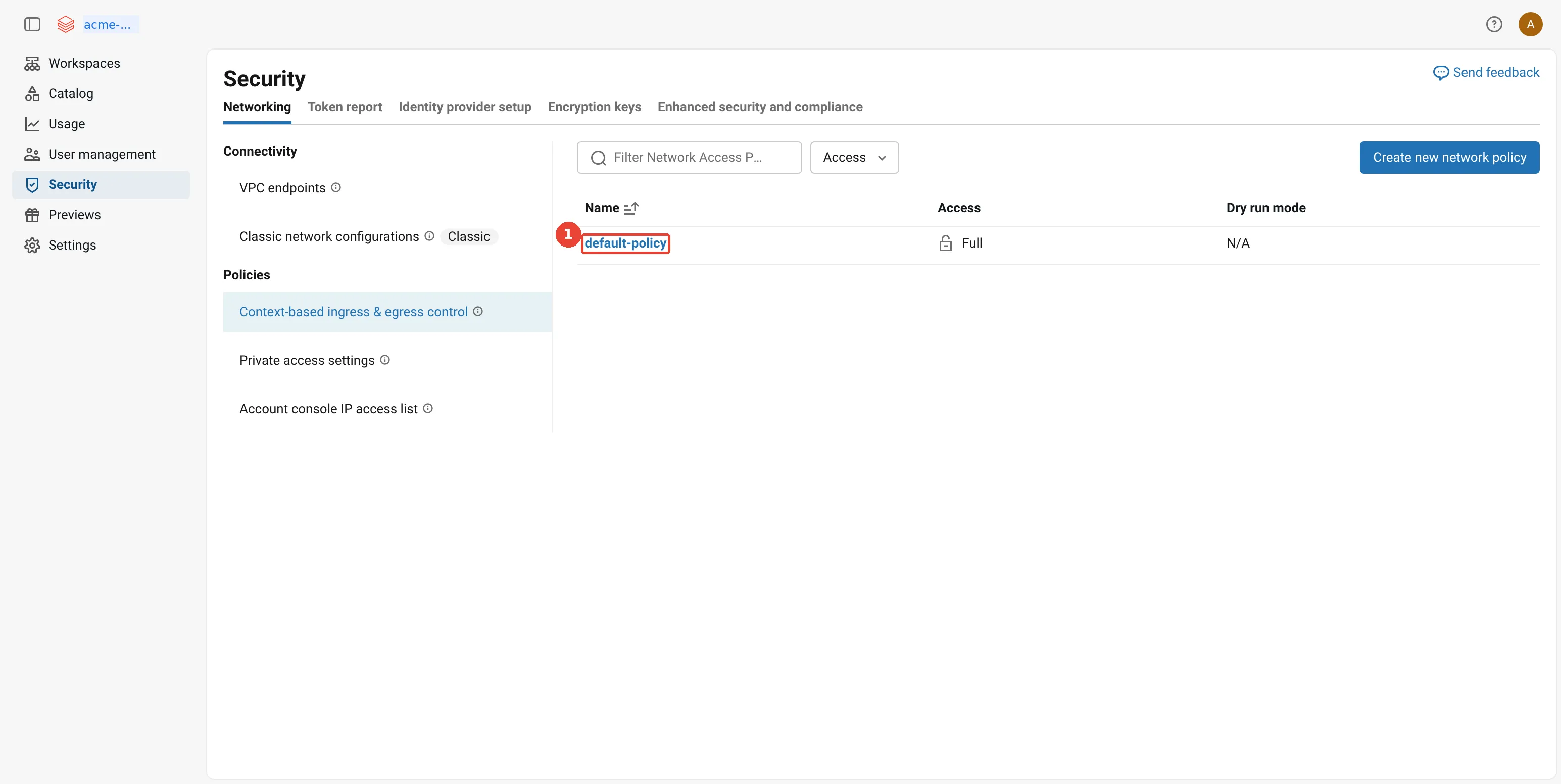
Account console: network policies (serverless egress and ingress). 1: default-policy applies to every workspace without its own policy.
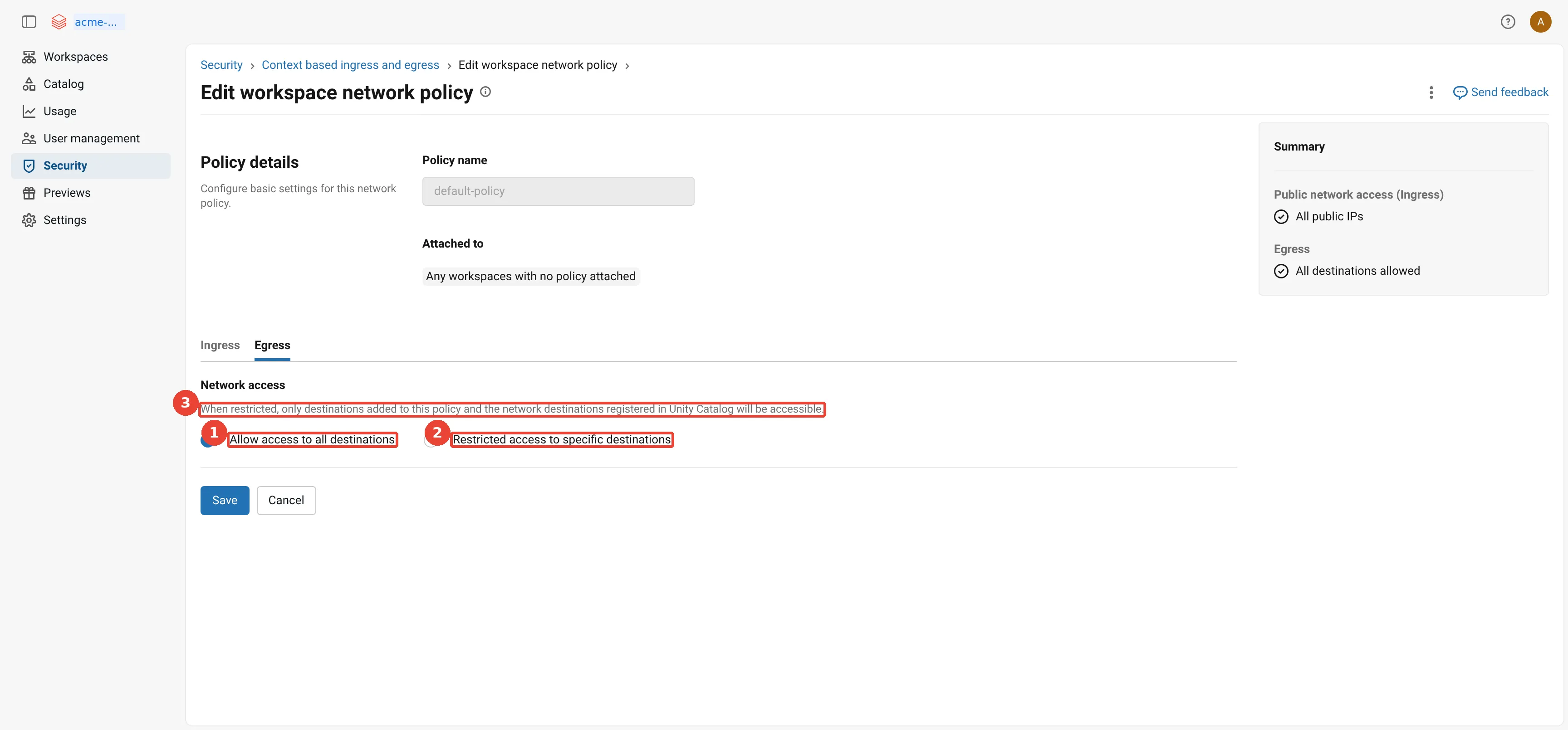
Network policy: the egress settings. 1: Egress: all destinations allowed (full access); 2: Restricted access: only listed destinations and Unity Catalog locations; 3: Unity Catalog external locations stay reachable when restricted.
How do you see what the policy blocked?
A dry run is only useful if someone reads the results. Denials go to a
system table,
system.access.outbound_network, in Public Preview as of October 2026. A system table is a
read-only table that Databricks fills with operational data about your account; this one needs the
access schema enabled on the metastore. Here is what Acme’s first day of dry run might look like:
a quick look at system.access.outbound_network during Acme's dry run: real column names, four illustrative rows; each row is one outbound request that the network policy denied or, in dry-run mode, would have denied
The query Acme runs each morning of the dry run groups the would-be denials, so the team can decide which ones to allow:
SELECT destination_type, destination, network_source_type, COUNT(*) AS requests
FROM system.access.outbound_network
WHERE event_time >= current_timestamp() - INTERVAL 24 HOURS
  AND access_type = 'DRY_RUN_DENIAL'
GROUP BY ALL
ORDER BY requests DESC;
Records “are typically available within one hour”. Two limits from the documentation: denial logs
from workloads that live for less than 120 seconds “might not be delivered before the node
terminates”, although the block still happens; and only denials are recorded unless you join the
Private Preview of extended network traffic logs, which adds allowed events. In the example above,
the first two rows tell Acme that its data scientists install Python packages from PyPI. The cleaner
fix than allowing pypi.org is a
default package repository,
an internal mirror that a workspace admin sets for notebooks, jobs and pipelines, and then allowing
only that mirror’s host name.
How do serverless and VPC Service Controls fit together?
The short answer: serverless starts outside your perimeter, so the perimeter refuses it until you let it in, and today the only generally available way to work inside the perimeter is classic compute.
A simple picture first. A research lab has a secure wing. Even staff with valid badges are stopped at the wing’s door unless they are on its list. An outside contractor needs a sample from inside:
A. Put the contractor's company on the wing's guest list
B. Give the contractor a dedicated, signed-in entrance, and list that entrance
C. Have your own staff, who already work inside the wing, do the job
The badge alone never gets the contractor in; something about the perimeter has to change, or the work has to be done from inside. Map it across: the secure wing is a service perimeter, the badge is IAM permission, the guest list is an ingress rule, and the contractor is serverless compute. A, B and C are exactly the three options below.
How does this apply to Acme?
VPC Service Controls draws a
service perimeter around projects. API calls to protected services such as Cloud Storage and
BigQuery that cross the perimeter are refused unless an ingress rule (who may come in, from
where, to which services) or an egress rule allows them, even when the caller holds valid IAM
permissions. Part 3 builds Acme’s perimeter around acme-lake and acme-dbx-prod for classic
compute.
Serverless compute runs in Databricks’ projects, which are outside that perimeter, so its calls to
gs://acme-lake-supply are refused. As of October 2026 there are three ways through:
three ways to reach data inside a VPC Service Controls perimeter: A, list the serverless project numbers in an ingress rule (Private Preview); B, give serverless a dedicated Private Service Connect endpoint for Google APIs and allow its URI in an ingress rule (Beta); C, run the work on classic compute whose projects are inside the perimeter
-
A: serverless project numbers. Every Google Cloud project has a number, and an ingress rule can name source projects by number. Databricks offers the numbers of its regional serverless projects so that you can allow exactly those. The firewall page marks this Private Preview; you ask your Databricks account team to join. The Private Service Connect page shows where the number goes, in the example ingress rule for the control plane:
From: Identities: ANY_IDENTITY Source > Projects = <regional control plane project numbers> <regional-serverless-project-number> To: Projects = <compute plane project numbers> <data (GCS, BigQuery) project numbers> # needed for serverless Services = storage.googleapis.com, bigquery.googleapis.com, ... -
B: a private endpoint for Google APIs. New in October 2026 and in Beta, the private connectivity to Google APIs page lets an NCC rule target Google APIs instead of your own service: specific APIs such as Cloud Storage or BigQuery, all Google APIs, or “All VPC-SC compatible services”. Databricks creates a dedicated Private Service Connect endpoint and shows its URI; you add that URI to an ingress rule on your perimeter, and only then enable the rule. The order matters, because enabling it “routes traffic for the configured Google APIs through Private Service Connect for any workspace attached to the NCC”. It needs the Enterprise plan for every attached workspace, enrolment can take up to seven days, and there is no Terraform support.
-
C: classic compute. The serverless limitations page still says “Serverless compute does not support Private Service Connect connectivity to Google-managed services. Use classic compute to access Google Cloud Storage and BigQuery with Private Service Connect.” That sentence predates the Beta in option B, so expect the limitations page to change. Read it narrowly: serverless traffic to Cloud Storage and BigQuery is already private, on Google’s backbone. What only classic compute offers with general availability today is compute whose projects sit inside your perimeter, and a Private Service Connect endpoint for Google APIs in a network you own, which is why Part 1 points workloads with that exact requirement to classic compute.
My view: for Acme’s perimeter today, I would keep the serverless SQL warehouses outside the most sensitive data, or run those workloads on classic compute, and test option B in a sandbox perimeter. I would not build a production design on a Beta or a Private Preview without a date for general availability.
As a decision guide, ordered from most mature to least, as of October 2026:
Need                                              Choice                      Why
Production job on perimeter data, today           C: classic compute          GA; projects inside
Prove serverless can work with the perimeter      B: PSC to Google APIs       Beta; test in a sandbox
Allow serverless by project, no new endpoint      A: project numbers          Private Preview; ask
Serverless data that is not in the perimeter      nothing extra               backbone path applies
What is different in a serverless workspace?
The short answer: a serverless workspace has no network of yours at all, so the only network objects left to design are the NCC and the network policy from this post.
In the taxi picture from the start of this post, a classic workspace is a household that owns a car and also uses taxis: two sets of rules, one at home and one in the taxi account. A serverless workspace is a household with no car: every trip is a taxi, so every rule lives in the taxi account.
How does this apply to Acme?
Everything above applies to the serverless compute of a classic workspace such as
acme-prod-euw2-supply. A serverless workspace goes further. The
serverless workspaces page
describes one as “preconfigured with serverless compute and default storage”, where default
storage is a fully managed storage location in Databricks’ account. Part 1 drew it in full; here
is the short version, for a team sandbox Acme creates called acme-labs-euw2:
a serverless workspace, acme-labs-euw2, in brief: the control plane, the serverless compute plane and default storage all run in Databricks' account; the only Acme resource is the bucket it connects through a Unity Catalog storage credential; an NCC and a network policy govern its traffic
In a serverless workspace, only your own buckets are in your project. Serverless compute reaches them through a Unity Catalog storage credential and external location; to reach resources through private endpoints, account admins attach a network connectivity configuration (NCC), which the documentation describes as “account-level regional constructs that manage private endpoint creation”.
For the network team this is the simplest workspace there is. There is no VPC, subnet, Cloud NAT
or workspace bucket to design, because the workspace has none in Acme’s projects. An account admin
creates it in the account console by choosing Use serverless compute and default storage, and,
in the page’s words, “account admins without permission to provision traditional cloud
infrastructure can still deploy and manage serverless workspaces”. Everything that remains is in
this post: the storage credential and external location for gs://acme-lake-supply, the NCC if the
sandbox needs a private service, and a network policy.
Two billing facts belong with it. Because serverless compute and default storage are not in your cloud account, “your cloud-provider credits or discounts do not apply to this usage”, although a Databricks private offer does. Storage and data access in your own buckets are billed by Google “and appear in your cloud billing console”, and if you bought Databricks through Google Cloud Marketplace, the serverless workspace’s charges appear under the service name Databricks.
How does traffic reach default storage, and does Private Service Connect cover it?
Default storage changes one thing for the network team: the workspace’s own storage is no longer a bucket in your project, so none of your network controls sit in front of it. Three kinds of traffic touch it, and each takes a different path.
- Serverless compute to default storage. Both run in Databricks’ account, so the traffic never enters your network. A network policy cannot block it either: even in restricted mode, the network policies page says “you can always access the Google Cloud Storage bucket associated with your workspace, essential system tables, and sample datasets”.
- Outside clients to default storage. BI tools on the ODBC or JDBC drivers, and scripts that call the Files API, reach default storage through Databricks’ regional storage gateways. The default storage page tells you to allow those gateways in your firewall, and the IP addresses and domains page lists them under “Control Plane services, including default storage, webapp, and SecureConnect”.
- Clients with inbound Private Service Connect. Inbound (front-end) Private Service Connect makes the web application and REST API private. The default storage page adds a catch: with front-end Private Service Connect, ODBC queries on default storage tables “that return results larger than approximately 5 MiB will fail”, because the driver’s Cloud Fetch optimisation (downloading large results straight from storage, in parallel) does not support that path yet.
So does Private Service Connect give serverless a private path to default storage? Not as a feature you configure. The Private Service Connect concepts page (updated 30 October 2026) lists three kinds: inbound, classic compute plane, and outbound (serverless). It calls serverless outbound connectivity to your own service attachments generally available and adds “This does not include Google-managed services.” The newer private connectivity to Google APIs feature, in Beta since October 2026, gives serverless a dedicated endpoint to Cloud Storage or BigQuery, and you then allow that endpoint in your own VPC Service Controls perimeter. It is written for your buckets and datasets. Neither page says it changes how serverless reaches default storage, which is not in your perimeter. One honest gap: the public documentation does not describe the network path inside Databricks’ account, so if a customer needs that in writing, ask the Databricks account team.
A worked example. Acme’s sandbox workspace, acme-labs-euw2, keeps a catalog on default storage,
and Acme’s network team has turned on front-end Private Service Connect. Here is what happens to
four requests:
1. Serverless notebook in acme-labs-euw2 reads a table on default storage
   -> works; stays inside Databricks' account, network policy always allows it
2. Analyst in Acme's office runs a small Power BI query (2 MiB of results)
   -> works; through the front-end endpoint and the regional storage gateway
3. Same analyst exports 40 MiB of results over ODBC
   -> fails; Cloud Fetch on default storage does not support front-end PSC
4. Serverless job reads gs://acme-lake-supply with a PSC rule for Cloud Storage (Beta)
   -> works privately through Acme's dedicated endpoint, allowed in Acme's perimeter
Requests 1 and 4 show the split: default storage is Databricks’ to secure, Acme’s bucket is Acme’s. Request 3 is the one that surprises people. If large ODBC exports matter, keep those tables in a catalog on Acme’s own bucket, or test the export before turning on front-end Private Service Connect.
What does serverless networking cost?
Today, nothing extra from Databricks. Every serverless networking page carries the same note: “There are currently no networking charges for serverless features. In a later release, you might be charged. Databricks will provide advance notice for networking pricing changes.”
The networking costs page lists the charges that are “Expected in the future” for serverless workloads that reach your resources:
- Private connectivity, per GB: data processed through private endpoints.
- Private connectivity, per hour: a fee for each private endpoint.
- Public connectivity, per GB: data sent to cloud resources or the internet over public IP addresses.
- Data transfer, per GB: traffic between zones in a region, to another region, and to the internet or other clouds.
The Databricks data transfer and connectivity pricing page adds the timeline: AWS and Azure customers are already billed for data transfer from serverless to their own resources, and Google Cloud “is expected to follow at a later date”. When it does, the charges will come from Databricks on its own data transfer SKUs (a SKU, stock-keeping unit, is one priced line item), not from Google. In-region access to Google APIs over Private Google Access is “not charged by Databricks”.
Classic compute is different: “Customers using classic compute manage and pay networking costs directly to GCP”, so Cloud NAT, cross-zone and cross-region traffic from Acme’s clusters appear on Acme’s Google Cloud bill. Part 9 covers both bills and the billing system tables.
My view: design now as if the charges exist. Keep buckets in the workspace’s region, prefer the default Google backbone path for Cloud Storage and BigQuery, and add private endpoints only where a requirement asks for them, because each one is a future hourly fee and counts against the limit of ten per region.
What can go wrong?
troubleshooting serverless networking: seven common symptoms, the likely cause of each, and where to look first
A few failure modes deserve a sentence more than the table gives them.
- Assuming Part 3 covers serverless. A perimeter, a deny-all egress firewall rule or a private DNS zone in Acme’s VPC does nothing for serverless traffic. Review the account console as well as the VPC.
- Enforcing a policy on day one. Restricted mode without a dry run breaks package installs,
external model calls and any notebook that reads storage directly. Run a week of dry run and
read
system.access.outbound_networkdaily. - A static IP allowlist. It works until Databricks rotates an address. Automate the refresh from
ip-ranges.jsonand alert whentimestampSecondschanges. - An approval that waits too long. A private endpoint rule expires after 14 days in PENDING. Agree the approval step with the team that owns the service attachment before you create the rule.
- Running out of endpoints. Ten private endpoints per region, across all NCCs, is easy to reach if every team asks for its own. Share NCCs and publish shared services once.
- Trusting a Beta in production. Private Service Connect to Google APIs and serverless project numbers are not generally available as of October 2026. Check the release notes before you promise either to a security team.
What would I do now?
- Decide which workloads may run on serverless, using the four paths above: anything that only needs Cloud Storage and BigQuery in the same region can move now; anything behind a VPC Service Controls perimeter waits for option A or B, or stays on classic compute.
- Create one NCC per region and environment in Terraform, attach it to the workspaces that
need private services, and publish shared services such as
orders-dbthrough one service attachment with manual approval. - Turn on serverless egress control in dry run for every Enterprise workspace, starting from a restricted policy that lists only Unity Catalog locations, your package mirror and named partner domains, then read the denial log for a week before you enforce.
- Automate the outbound IP allowlist for every resource that serverless reaches over the internet, and add the classic Cloud NAT addresses beside it.
- Put serverless networking on the cost dashboard now, with buckets in the workspace region and private endpoints counted, so the future charges are a known number when they arrive.
What did we learn?
- Serverless compute runs in Databricks’ account in the workspace’s region, so VPC firewall rules, Cloud NAT and Private Google Access settings in your project do not apply to it; its controls are account-level Databricks objects.
- Serverless reaches Cloud Storage and BigQuery in the same region over Google’s backbone using Private Google Access, with Unity Catalog credentials as the identity and no networking charge from Databricks.
- A network connectivity configuration (NCC) is a regional account object, unrelated to Google’s Network Connectivity Center, whose private endpoint rules connect serverless compute through Private Service Connect to a service attachment in your VPC.
- Resources outside Google Cloud, or in another region, see serverless traffic from the outbound
IP ranges in
ip-ranges.json, which change over time and must be refreshed automatically. - A network policy in restricted mode gives serverless a deny-by-default egress posture on the
Enterprise tier, should be tested in dry run, and records denials in
system.access.outbound_network. - Reaching data inside a VPC Service Controls perimeter from serverless needs serverless project numbers (Private Preview) or a private endpoint for Google APIs (Beta); classic compute remains the generally available route.
What comes next?
We now know how both kinds of compute reach Acme’s data. The next question is what that data looks like at rest. In Databricks on Google Cloud, Part 5: Storage, Cloud Storage and how Unity Catalog uses it, we design the buckets, look inside the workspace storage buckets and default storage, and follow storage credentials, external locations and managed locations down to where each table and volume lands. The series overview lists every part.
Sources
- Databricks: Networking security architecture
- Databricks: Serverless compute plane networking
- Databricks: Configure private connectivity to resources in your VPC
- Databricks: Manage private endpoint rules
- Databricks: Private Service Connect concepts
- Databricks: Default storage in Databricks
- Databricks: Configure private connectivity to Google APIs
- Databricks: Serverless compute firewall configuration
- Databricks: IP addresses and domains for Databricks services and assets
- Databricks: ip-ranges.json
- Databricks: What is serverless egress control?
- Databricks: Manage network policies for serverless egress control
- Databricks: Cross-workspace access
- Databricks: Context-based ingress control
- Databricks: Network access events system table reference
- Databricks: Configure default package repositories
- Databricks: Serverless compute limitations
- Databricks: Enable Private Service Connect for your workspace
- Databricks: Serverless workspaces
- Databricks: Understand Databricks networking costs
- Databricks: Data transfer and connectivity pricing
- Terraform: databricks_mws_network_connectivity_config
- Terraform: databricks_account_network_policy
- Google Cloud: Private Google Access
- Google Cloud: Publish services by using Private Service Connect
- Google Cloud: Overview of VPC Service Controls
- Google Cloud: Network Connectivity Center overview
- Google Cloud: Cloud Storage pricing
Opinions are my own. Every fact in this post comes from the public documentation linked above. Acme Consumer Brands and its data are fictional.