Databricks on Google Cloud, Part 3: Networking: VPC, Cloud NAT, Private Google Access and Private Service Connect
How a classic Databricks workspace sits in a Google Cloud network: the customer-managed VPC and Shared VPC, subnet sizing, firewall rules, Cloud NAT, Private Google Access, how the control plane reaches clusters that have no public IP, Private Service Connect for the back end and the front end, the DNS that makes it work, VPC Service Controls, and how to troubleshoot it all.
Read this chapter as 5 illustrated mini-books
Flip pages horizontally like a hardcover book, or swipe up like a reel to move through all 5 topics (15 animated pages).
In Part 2 we settled who may reach Acme’s Databricks workspace and its data. This post is about how they reach it: which network the cluster machines sit in, which paths their traffic takes, and how Acme closes every path it does not need.
Networking is where most first deployments of Databricks on Google Cloud get stuck. A cluster that never leaves the starting state and then times out is nearly always a missing route, a missing firewall rule or a DNS record that points at the wrong address. The good news is that the design has only a handful of moving parts, and each one is a standard Google Cloud feature with a clear job.
We start from the Google Cloud building blocks, then place a classic workspace into them, then make it private step by step: a customer-managed VPC inside a Shared VPC, a subnet sized for growth, Cloud NAT and Private Google Access, a deny-by-default firewall, Private Service Connect for the clusters and for the users, and a VPC Service Controls perimeter around the data. Serverless compute runs somewhere else entirely, and Part 4 covers it.
If you prefer to watch first, here is the heart of this part as a short animated explainer.
Video: how a classic Databricks cluster on Google Cloud reaches the control plane, and how to make every path private, in three minutes. The narration is a synthetic voice; the script and animation are mine.
What are the key ideas?
Ten terms carry this post. The general networking ideas behind them are explained from scratch in Learning Cloud, Part 5, and Prerequisite 2 introduces Google Cloud’s projects and regions.
- VPC network (Virtual Private Cloud): a private network defined in software. It decides which internal IP addresses machines get and which other machines they may talk to. On Google Cloud a VPC network is global: one network spans every region.
- Subnet (subnetwork): a range of IP addresses inside a VPC network, written in CIDR
notation (Classless Inter-Domain Routing), for example
10.10.0.0/22. The number after the slash says how many leading bits are fixed, so a smaller number means a bigger range. A subnet is regional: it lives in one region and covers all of that region’s zones. Prerequisite 3 explains CIDR notation and DNS from the ground up. - Shared VPC: one host project owns the network, and service projects attach to it and create their machines in its subnets.
- Customer-managed VPC: a VPC that you create and give to Databricks, instead of one that Databricks creates for you.
- Firewall rule: a rule on a VPC network that allows or denies connections by direction, address range, protocol and port. Google Cloud firewall rules are stateful: if a connection is allowed out, its replies are allowed back in.
- Cloud NAT: because cluster nodes have no public IP addresses, they need network address translation (NAT) (a service that lets private VMs make outbound connections through shared public addresses) to reach the control plane. Cloud NAT is Google’s managed NAT. With Private Service Connect, which this post covers below, traffic to Databricks stays private instead.
- Private Google Access (PGA): a setting on a subnet that lets machines with only internal IP addresses reach Google APIs such as Cloud Storage and BigQuery.
- Secure cluster connectivity (SCC): the Databricks design in which cluster nodes have no public IP addresses and no open inbound ports, and each node opens an outbound connection to a relay in the control plane.
- Private Service Connect (PSC): a Google Cloud feature that gives a service run by someone else an endpoint (an internal IP address in your own VPC), so traffic to that service never crosses the internet.
- VPC Service Controls (VPC-SC): a perimeter around projects that refuses Google API calls crossing its edge, even from callers with valid permissions.
Here is the whole architecture in one picture, which Part 1 introduced as the control plane and the two compute planes. Watch the dot: a cluster node dials out to the control plane, and instructions come back down the same connection.
the architecture of Databricks on Google Cloud: the control plane and the serverless compute plane run in Databricks-managed projects; the classic compute plane runs in the customer's project, where cluster nodes without public IPs dial out to the secure cluster connectivity relay through Cloud NAT and reach Cloud Storage through Private Google Access
Everything in the blue band is Acme’s, and everything in this post happens there. The rest of the post explains each box and each arrow.
Which Google Cloud services does a classic workspace use?
A classic Databricks workspace (one whose clusters run in your project) touches eight Google Cloud services. Prerequisite 2 explains each one as a Google Cloud service; here is what Databricks does with it.
- Compute Engine: every classic cluster is a set of zonal virtual machines, one driver and some workers.
- Cloud Storage: a classic workspace gets
workspace storage buckets
named
databricks-<workspace id>anddatabricks-<workspace id>-system, and your Delta and Iceberg tables live in buckets that you own. - VPC network: the cluster VMs take their addresses
from one regional subnet, and Databricks accepts a subnet range between
/29and/9. - Cloud NAT: the outbound path from VMs without public IP addresses to the control plane and the internet, configured on a Cloud Router.
- Private Google Access: the subnet setting that lets those VMs reach Cloud Storage and other Google APIs.
- Private Service Connect (PSC): private paths to the workspace and the control plane.
- Cloud KMS (Key Management Service): customer-managed keys (CMEK) for workspace storage and for managed services data in the control plane, on the Enterprise tier and labelled Public Preview as of October 2026; Part 6 covers them.
- Cloud Logging: Data Access audit logs are off by default for Cloud Storage, and Databricks recommends turning them on for its workspace buckets.
When you create a workspace, Databricks enables the Compute Engine and Cloud Storage APIs on the project if they are not already on. Here is how the eight fit together for Acme:
where the core services sit for one classic Databricks workspace: the Databricks control plane runs in Databricks' account; in Acme's project, cluster VMs on Compute Engine sit in a regional subnet of a VPC network, reach the control plane through Cloud NAT or Private Service Connect, reach Cloud Storage through Private Google Access, and use Cloud KMS keys and Cloud Logging
The network piece has a branch, and each side has a plan requirement.
- Without Private Service Connect, the subnet needs outbound internet access so that clusters can reach the Databricks control plane, which is what Cloud NAT is for. A customer-managed VPC (a network you create, instead of one Databricks creates) needs the Premium plan, and Databricks now recommends one for every new classic workspace.
- With Private Service Connect, clusters reach the control plane over private endpoints in your VPC instead of the internet. The Private Service Connect page lists two requirements: “The workspace is on the Enterprise plan”, and “You must use a customer-managed VPC”.
Where does the network live?
On Google Cloud a VPC network is global, but each subnet, and so each workspace, lives in one region. Think of a company’s internal phone system. One system serves every office in the world, so any extension can ring any other without a special link between offices. But each office owns its own block of extension numbers: London has 2000 to 2999, Singapore has 3000 to 3999. The phone system is the VPC network, each block of numbers is a subnet, and each office is a region.
How does this apply to Acme? Google Cloud runs in 43 regions and 130 zones, and Databricks supports
15 of those regions, including
europe-west2.
For Databricks, the rule is simple. A workspace lives in one region, and the subnet you give it
must be in the same region.
Acme’s workspace, its subnet and its main buckets all sit in europe-west2, and the cluster virtual
machines land in that region’s zones.
That rule shapes the network. Because a Google Cloud VPC network is global and its subnets are regional, Acme can put workspace subnets for several regions into one network, with one set of firewall rules and one connection to its offices. On AWS a VPC is regional, and on Azure a virtual network (VNet) is regional, so a multi-region estate there needs peering or a transit hub between regions. Part 10 returns to that difference for teams moving from those clouds. The habit to unlearn: teams arriving from AWS or Azure often build one network per region and then join them; on Google Cloud, one network with a subnet per region already does that job.
Should Databricks create the VPC, or should you?
Let Databricks build the network for a sandbox; build it yourself for anything that will last, because the choice can never be undone. A classic workspace can use one of two kinds of network.
- Databricks-managed VPC. Databricks creates a VPC named
databricks-managed-<workspace-id>in your project, with a subnet whose range you may optionally choose from the private ranges the create-workspace page lists (inside10.0.0.0/8,100.64.0.0/10,172.16.0.0/12,192.168.0.0/16or240.0.0.0/4). It is quick, and it is fine for a sandbox. - Customer-managed VPC. You build the VPC, subnet, router and NAT yourself and tell Databricks to use them. The customer-managed VPC page says the feature “requires that your account is on the Premium plan”.
A simple picture: a serviced office versus leasing your own floor. The serviced office is ready the day you sign, but the landlord chooses the wiring and the locks, and you cannot later turn it into your own lease; you would have to move out. Leasing a floor takes longer, but your facilities team decides the wiring and the locks, and several of your teams can share it. The serviced office is the Databricks-managed VPC, and the leased floor is the customer-managed VPC.
How does this apply to Acme? Acme chooses the customer-managed VPC, for four reasons that come straight from that page.
- Lower privileges. The role Databricks grants its workspace service account “omits permissions such as creating, updating, and deleting objects such as networks, routers, and subnets”. Part 2 lists the roles that remain.
- The network team stays in charge. Address plans, routes and firewall rules stay with the people who run the rest of Acme’s network.
- Several workspaces can share one VPC, which keeps routing, NAT and the office connection in one place.
- Private Service Connect needs it. “Using a customer-managed VPC is required if you need to configure Private Service Connect for any connection type.”
The catch is that the choice is permanent. “You cannot move an existing workspace with a Databricks-managed VPC to your own VPC. Also, after workspace creation you cannot change which customer-managed VPC that the workspace uses.” You can change the subnet inside that VPC later, as a section near the end shows, but never the VPC itself.
The common misconception is that you can start on a Databricks-managed VPC and upgrade later. The quote above rules that out, so the real decision is made on day one:
Which network should a new classic workspace get?
1. A throwaway sandbox or trial, never private?      Databricks-managed VPC
2. Real data, or a life beyond the trial?            Customer-managed VPC (Premium)
3. Any chance it will need Private Service Connect?  Customer-managed VPC, Enterprise plan
Here is what a Databricks-managed VPC looks like in a real console. These screenshots come from my own sandbox project, captured read-only on 4 November 2026, with project and workspace IDs redacted. The numbered red markers match the caption.
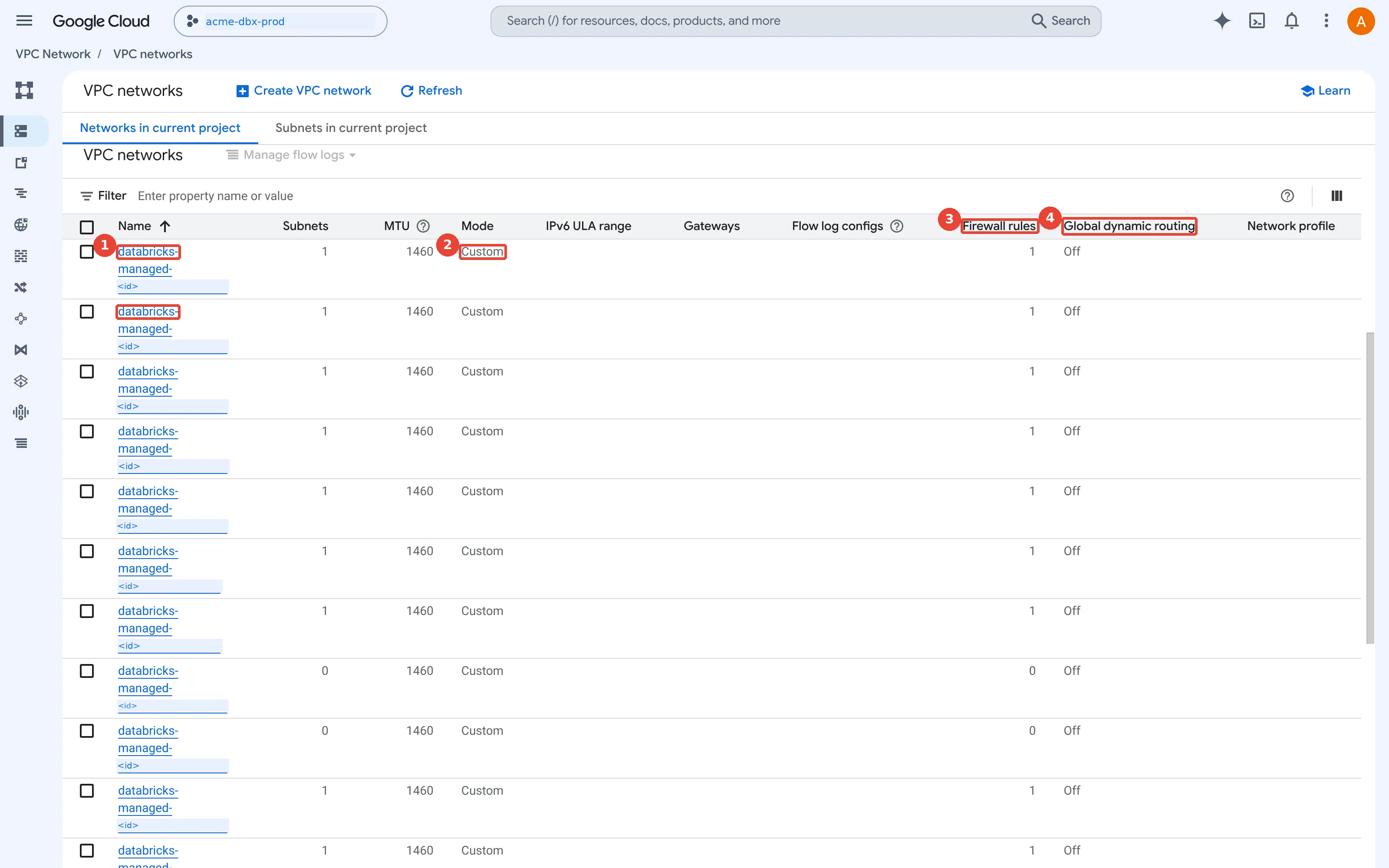
VPC networks: one Databricks-managed VPC per workspace. 1: Databricks-managed VPCs, one per workspace, named databricks-managed-<workspace-id>; 2: Custom subnet mode: Databricks creates exactly one subnet; 3: One firewall rule per VPC (VPCs with 0 belong to deleted or failed workspaces); 4: Regional routing only: each VPC lives in one region.
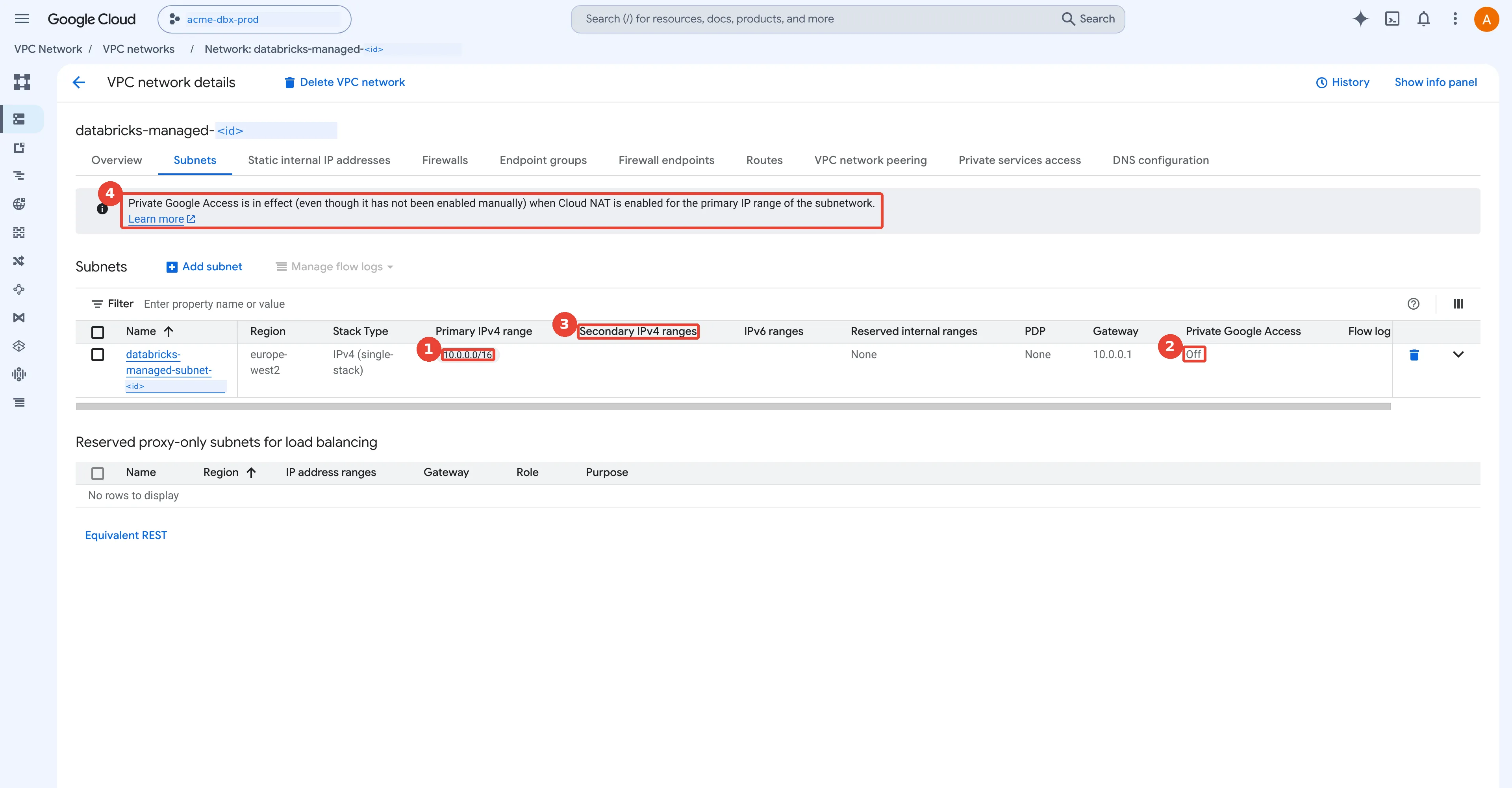
The workspace subnet and Private Google Access. 1: One subnet, 10.0.0.0/16, in the workspace region; 2: The column shows only the manual setting, so it still says Off; 3: No secondary ranges: clusters are plain Compute Engine VMs; 4: Private Google Access is in effect anyway, because Cloud NAT covers the subnet's primary range.
Standalone VPC or Shared VPC?
Use a Shared VPC when a central network team already runs one; a standalone VPC is fine when one team owns everything. Picture an office building. The facilities team owns the corridors, the wiring and the security desk; each tenant team rents a floor, furnishes it and pays its own bills. Tenants plug into the building’s wiring rather than running their own cables. Facilities is the host project, the wiring is the VPC and its subnets, and each tenant floor is a service project.
A customer-managed VPC can live in the same project as the workspace (Google calls that a standalone VPC) or in a different project. The second kind is a Shared VPC: one host project owns the network, and service projects attach to it and use its subnets. Databricks supports Shared VPC, with the network in the host project and the workspace’s compute and storage in the service project.
Databricks uses Google’s terms. The host project is the project for the VPC, and the service project is the project in which Databricks creates each workspace’s virtual machines and workspace buckets. The documentation adds a warning about words: a Shared VPC (also called a Cross Project Network, or XPN) is a different thing from “several workspaces sharing one VPC”. Both standalone and Shared VPCs can host one workspace or many.
How does this apply to Acme? Its design follows the pattern most enterprises already run, and the
building maps onto it one to one. The network team (facilities) owns
acme-net-host. Each environment has its own service project (a tenant floor), so its virtual machines, quota and
Compute Engine bill land in that project:
Acme's network for Databricks: the host project acme-net-host owns the Shared VPC acme-dbx-vpc with one subnet per workspace, a small subnet for Private Service Connect endpoints, Cloud Router and Cloud NAT, firewall rules and a private DNS zone, plus a separate transit VPC for users; the service projects acme-dbx-prod and acme-dbx-dev hold each workspace's VMs and buckets and use their subnet
Three rules from the Databricks documentation shape that picture.
- One subnet per workspace. The
classic compute plane page
says “You can share VPCs across workspaces, but you cannot share subnets across workspaces.” So
acme-prod-euw2-supplygetsdbx-prod-euw2and the development workspace getsdbx-dev-euw2. - The subnet carries a role binding. Databricks grants the workspace service account a custom role called Databricks Network Role v2 on that workspace’s subnet in the host project, so it can place cluster VMs in that subnet and in no other.
- The creator needs rights on both projects. For a Shared VPC, whoever creates the workspace “must have specific roles on both the VPC’s project and the workspace’s project”. Databricks recommends Owner on both during creation; Part 1 covers what happens during creation.
If you are choosing for your own estate, three questions settle it:
Standalone or Shared VPC?
1. One team owns the project, the network and the workspace?      Standalone VPC
2. A network team already runs a Shared VPC host project?         Shared VPC: add a subnet per workspace
3. Several environments should share routes, NAT and office link? Shared VPC
What does Acme’s network team run first?
These are the commands that build Acme’s network, in order: the Shared VPC steps first, then the network, the subnet with Private Google Access, the router, Cloud NAT and the one firewall rule every workspace needs (adapted from the Shared VPC provisioning guide and the Databricks customer-managed VPC page; I have not run it as written):
# Once, by a Shared VPC Admin: make acme-net-host a host project and attach the service projects
gcloud compute shared-vpc enable acme-net-host
gcloud compute shared-vpc associated-projects add acme-dbx-prod --host-project=acme-net-host
gcloud compute shared-vpc associated-projects add acme-dbx-dev --host-project=acme-net-host

# Databricks enables these on the workspace project if they are off; doing it up front is harmless
gcloud services enable compute.googleapis.com storage.googleapis.com --project=acme-dbx-prod

# In the host project: a custom-mode network, one subnet per workspace, a router and NAT
gcloud compute networks create acme-dbx-vpc --subnet-mode=custom --project=acme-net-host
gcloud compute networks subnets create dbx-prod-euw2 --network=acme-dbx-vpc \
  --region=europe-west2 --range=10.10.0.0/22 --enable-private-ip-google-access \
  --project=acme-net-host
gcloud compute routers create acme-dbx-router --network=acme-dbx-vpc \
  --region=europe-west2 --project=acme-net-host
gcloud compute routers nats create acme-dbx-nat --router=acme-dbx-router \
  --router-region=europe-west2 --auto-allocate-nat-external-ips --nat-all-subnet-ip-ranges \
  --project=acme-net-host

# Let cluster nodes in the subnet talk to each other (driver to workers)
gcloud compute firewall-rules create db-dbx-prod-euw2-ingress --network=acme-dbx-vpc \
  --direction=INGRESS --priority=1000 --action=ALLOW --rules=all \
  --source-ranges=10.10.0.0/22 --project=acme-net-host
Line by line: --subnet-mode=custom stops Google Cloud from creating a subnet in every region
automatically, so Acme controls every range. --enable-private-ip-google-access switches on
Private Google Access for the subnet. The router is the Cloud Router that Cloud NAT is
configured on, and --nat-all-subnet-ip-ranges makes NAT serve every subnet in the region, which
you can narrow to named subnets later. The firewall rule follows the Databricks naming pattern
db-<subnet-name>-ingress: a VPC network refuses incoming connections by default, so without it
the driver and the workers cannot reach each other, as the section on network paths explains.
How big should the subnet be?
Size the subnet for the busiest moment, at two addresses per node plus four that Google keeps, then add generous headroom. A car park is the simple picture: you size it for the busiest Saturday, not the average Tuesday, because you cannot easily add spaces once the walls are up. Here every car takes two spaces.
The subnet sizing page
gives the rule in one sentence: “Each Databricks compute node requires two IP addresses from the
subnet.” A node is one virtual machine, the driver or a worker. The number that matters is the
most nodes that run at the same time across the whole workspace, so count the peak, not the
average. (If prefix lengths such as /22 are new, the
CIDR section of Prerequisite 3 shows how to count
the addresses in a range.)
Google Cloud also keeps
four addresses in every subnet’s primary range:
the network address, the default gateway, the second-to-last address and the broadcast address.
Databricks accepts any range from /29 to /9, and its sizing table rounds the maths down a little
for safety:
subnet sizing for a classic workspace: each node takes two IP addresses and Google keeps four in every subnet, so a /24 holds 120 nodes and a /22 holds 500; Acme's peak of 84 nodes needs 168 addresses, and a /22 per workspace leaves room for growth
Start with a tiny example. A small team runs one cluster of one driver and four workers: 5 nodes, so
5 x 2 = 10 addresses, plus the 4 Google keeps = 14. A /28 holds 16 addresses, so it fits, with
room for one more node (16 - 4 = 12 usable, 12 / 2 = 6 nodes). Start a second cluster of the same
size at the same time and it no longer fits. That is the raw arithmetic; the Databricks table above
rounds down a little further, so use the table for real plans.
How does this apply to Acme? The same sum, with bigger numbers. Acme’s busiest hour on the production workspace runs six job clusters of one driver and eight
workers, four shared all-purpose clusters of one driver and four workers, and keeps ten idle
instances warm in a pool (a set of ready VMs that clusters can grab to start faster). That is 84
nodes and 168 addresses. A /24 would hold it with little room to spare, so Acme gives each
workspace a /22, which allows 500 nodes. My view: address space inside 10.0.0.0/8 is cheap, and a resize
later is not, as the section on changing a subnet shows. Where teams usually go wrong is counting
clusters or users instead of nodes running at the same moment, or forgetting the pool: those ten
warm instances are running VMs, so they hold addresses even while no job uses them.
One beginner question deserves an answer here: does serverless compute use this subnet? No.
Serverless SQL warehouses, notebooks, jobs and pipelines run in Databricks’ own projects, so they
never take an address from dbx-prod-euw2. Classic clusters, pools and pro and classic SQL
warehouses do, because the
SQL warehouse types page
says their compute layer “exists in your Google Cloud resources account”.
What does Databricks need to know about your network?
Building the Google half is only half the job. You then describe it to Databricks with a few objects in the Databricks account (the top-level container above workspaces, which Part 1 explains). Each object has a console page, an Account API and a Terraform resource:
the Databricks account objects that describe a classic workspace's network: a network configuration that points at your VPC and subnet, a VPC endpoint registration for each Private Service Connect endpoint, private access settings and IP access lists, with the plan each needs and its Terraform resource
The network configuration is the one every customer-managed VPC needs: the host project, the VPC, the subnet and its region. In the account console it sits under Security, then Classic network configurations. The other three objects belong to Private Service Connect and front-end access, and the sections below build them for Acme.
Here is the full version for acme-prod-euw2-supply: the network configuration and the workspace
that uses it, with the Databricks Terraform provider’s
databricks_mws_networks
and
databricks_mws_workspaces
resources (not run here; the provider authenticates to the account API with a Google-issued
OIDC token, and
Part 2 shows the keyless CI pipeline that runs it). The Private Service Connect section later in this post adds fields to both.
resource "databricks_mws_networks" "prod" {
  provider     = databricks.accounts
  account_id   = var.databricks_account_id
  network_name = "acme-prod-euw2-net"
  gcp_network_info {
    network_project_id = "acme-net-host"
    vpc_id             = "acme-dbx-vpc"
    subnet_id          = "dbx-prod-euw2"
    subnet_region      = "europe-west2"
  }
}

resource "databricks_mws_workspaces" "prod" {
  provider       = databricks.accounts
  account_id     = var.databricks_account_id
  workspace_name = "acme-prod-euw2-supply"
  location       = "europe-west2"
  cloud_resource_container {
    gcp {
      project_id = "acme-dbx-prod"
    }
  }
  network_id = databricks_mws_networks.prod.network_id
}
If you have older Terraform, you may see pod_ip_range_name and service_ip_range_name, or a
gke_config block. Those belonged to the legacy model in which classic clusters ran on Google
Kubernetes Engine (GKE). Classic compute now runs directly on Compute Engine VMs, and the provider
documents those fields as deprecated and safe to remove.
In the Databricks account console of the same redacted sandbox:
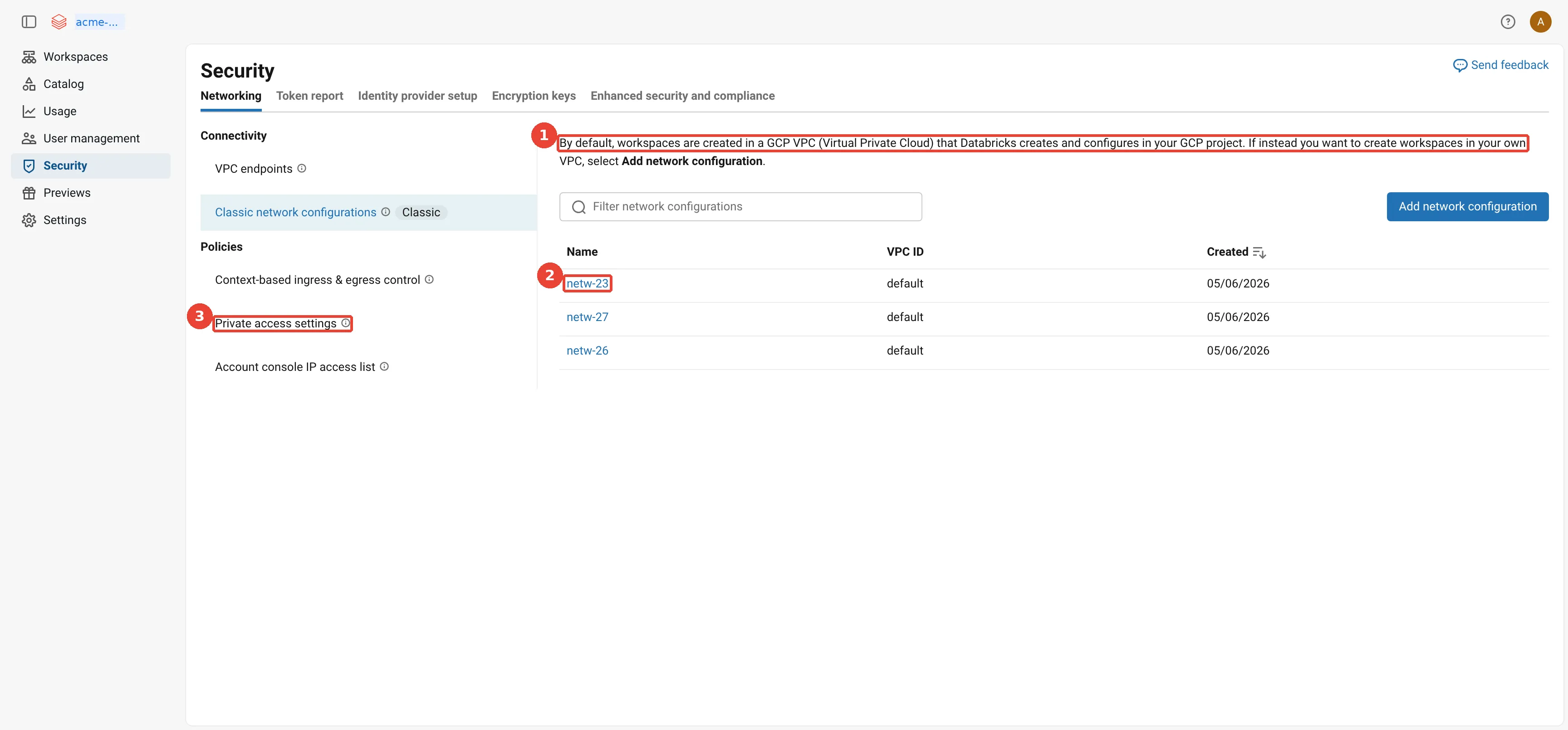
Account console: classic network configurations. 1: Default: Databricks creates the VPC. A network configuration is only needed for a customer-managed VPC; 2: A network configuration names your VPC, subnet and project for a customer-managed VPC; 3: Private access settings: turn PSC on and decide whether public access stays open.
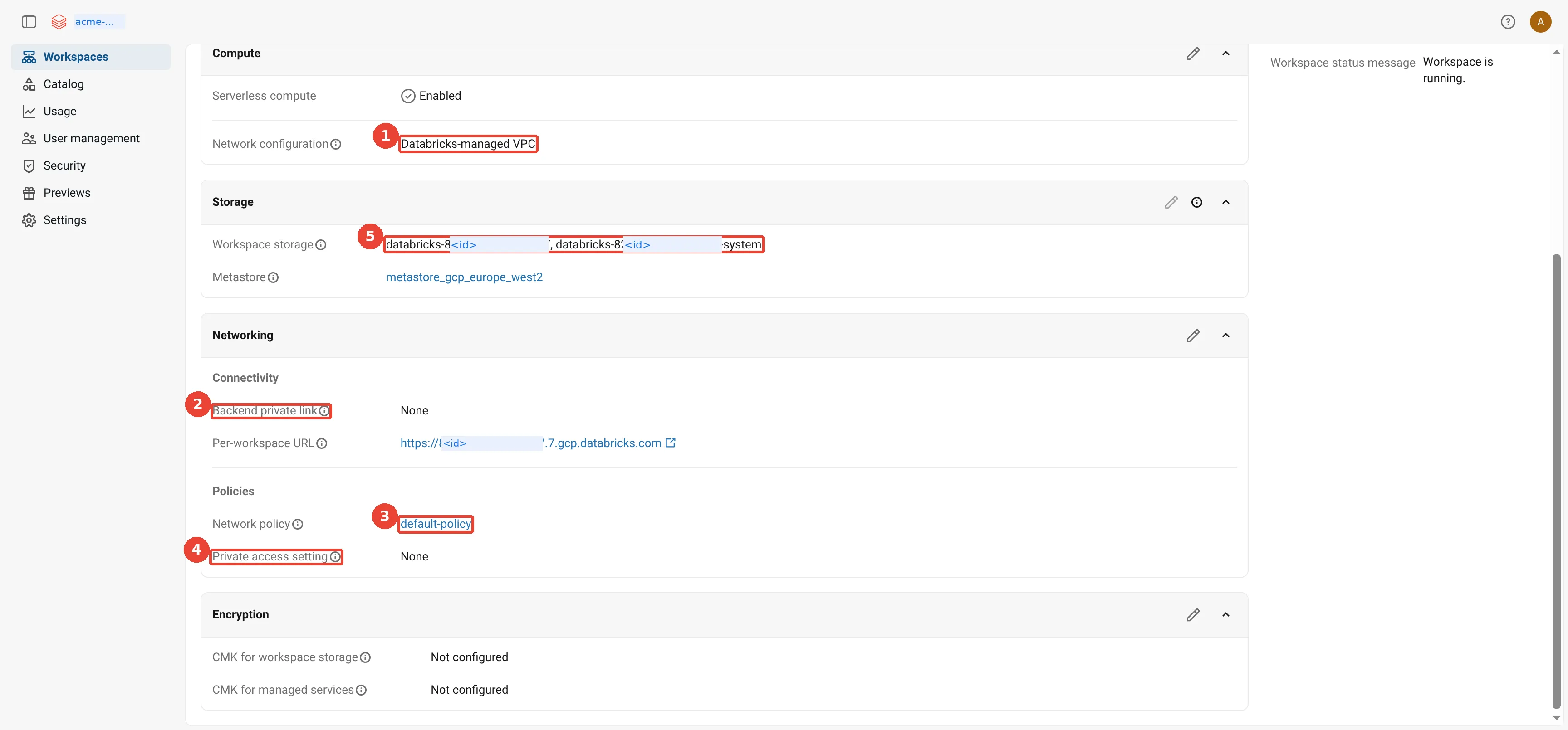
Account console: the workspace's network settings. 1: Databricks-managed VPC: no network configuration attached; 2: No back-end PSC; 3: The serverless network policy in force; 4: No private access settings: no inbound PSC; 5: The workspace storage buckets in your project.
If Cloud NAT is outbound only, how does the control plane reach the VMs?
Outbound only describes who may start a connection, not which way data flows once it is open. Picture a hotel whose rooms have no direct outside line. A guest can ring out through the switchboard, and the person they call can talk back on that call, but nobody outside can dial a room directly. If a guest rings the travel desk and keeps the line open, the desk can give instructions for as long as the call lasts. The room is a cluster VM, the switchboard is Cloud NAT, and the travel desk is the secure cluster connectivity relay in the control plane. The misconception to drop is that the control plane must somehow dial in, so the VMs need an open inbound port; they do not.
How does this apply to Acme? Each VM in dbx-prod-euw2 rings out and keeps the line open, and the
control plane talks back down it.
Cloud NAT lets VMs that have only internal IP addresses start connections to the internet. Replies to those connections come back through it, but nothing on the internet can use it to open a new connection into your VPC. (Strictly, Cloud NAT allows outbound connections to any internet address; egress firewall rules are what narrow that down to the Databricks addresses.) So the control plane never connects into your network. It does not need to, for three reasons.
- Creating the VMs is an API call, not a network connection. The control plane asks the Compute Engine API (a Google Cloud service, reached on Google’s side, not through your VPC) to create the cluster’s VMs in your project, using permissions you granted when you created the workspace.
- The VMs call home. Databricks calls this secure cluster connectivity: “customer VPCs have no open ports and classic compute plane resources have no public IP addresses”, and “clusters connect to the Databricks control plane through a secure tunnel using HTTPS (port 443)” to a secure cluster connectivity relay, so the tunnel is encrypted with TLS. Once a VM has opened that tunnel, it is a two-way channel: the control plane sends its commands (run this task, report status) back down the connection the VM opened. Outbound only describes who opens the connection, not which way the data flows afterwards.
- Storage is reached through Google APIs. The VMs read and write Cloud Storage through Private Google Access (internal addresses, no NAT needed). Where the control plane itself needs a workspace bucket, it calls the Cloud Storage API with a Databricks service account that has been granted access to that bucket, again on Google’s side and not through your VPC. The Private Service Connect documentation lists this path separately as “Databricks control plane to storage in your projects including the DBFS bucket”.
how the control plane reaches classic cluster VMs that have no public IP: it creates them through the Compute Engine API, each VM opens an outbound HTTPS tunnel through Cloud NAT to the secure cluster connectivity relay and commands come back over that tunnel, VMs reach Cloud Storage through Private Google Access, and the control plane reads the workspace buckets through the Cloud Storage API; nothing can open a connection into the VMs
In the same redacted sandbox:
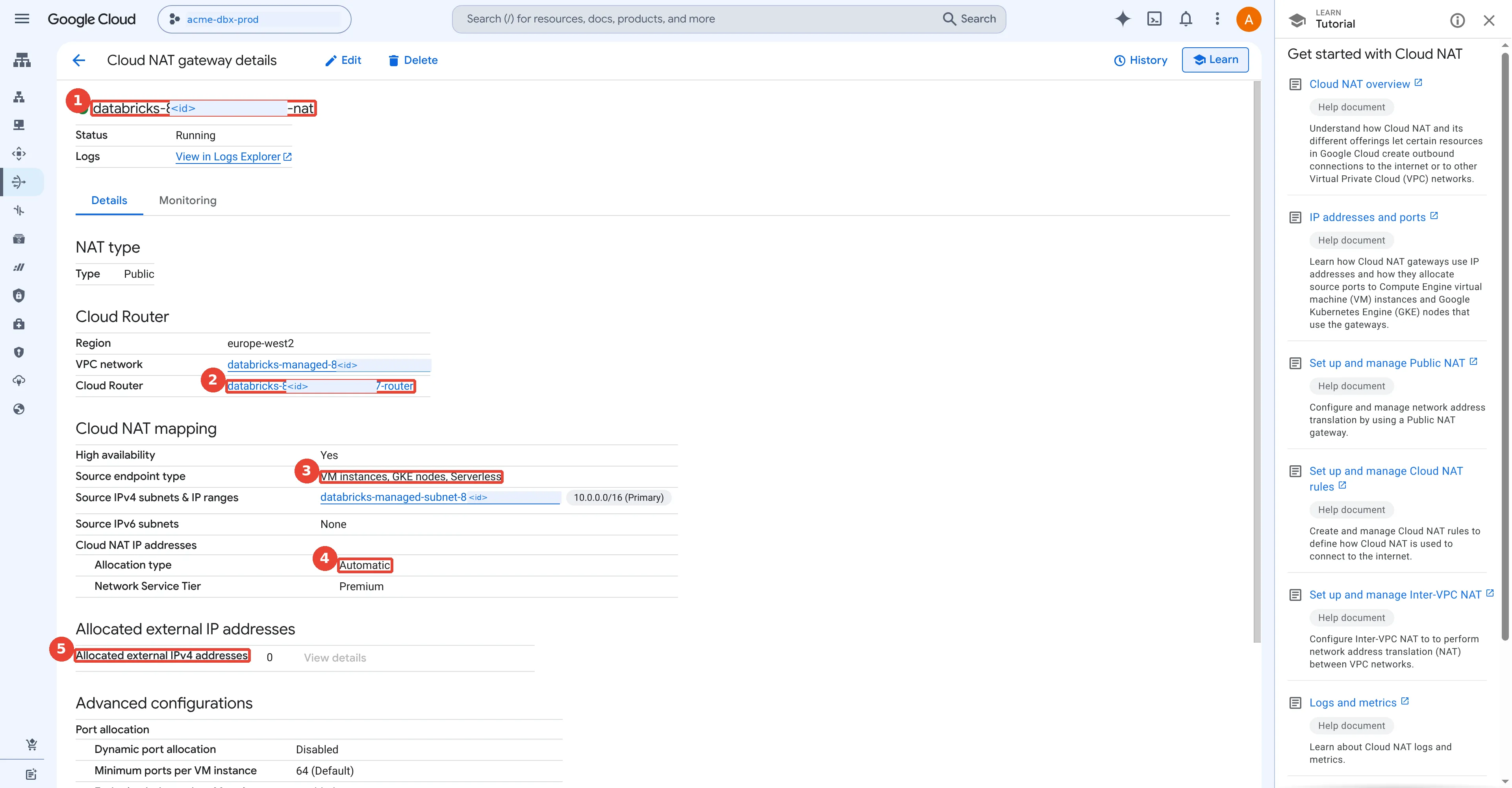
Cloud NAT: outbound for nodes without public IPs. 1: One Cloud NAT gateway per workspace VPC; 2: Hosted on a Cloud Router created just for NAT; 3: Covers the VMs in the workspace subnet; 4: External IPs allocated automatically; 5: 0 IPs in use right now: no clusters running.
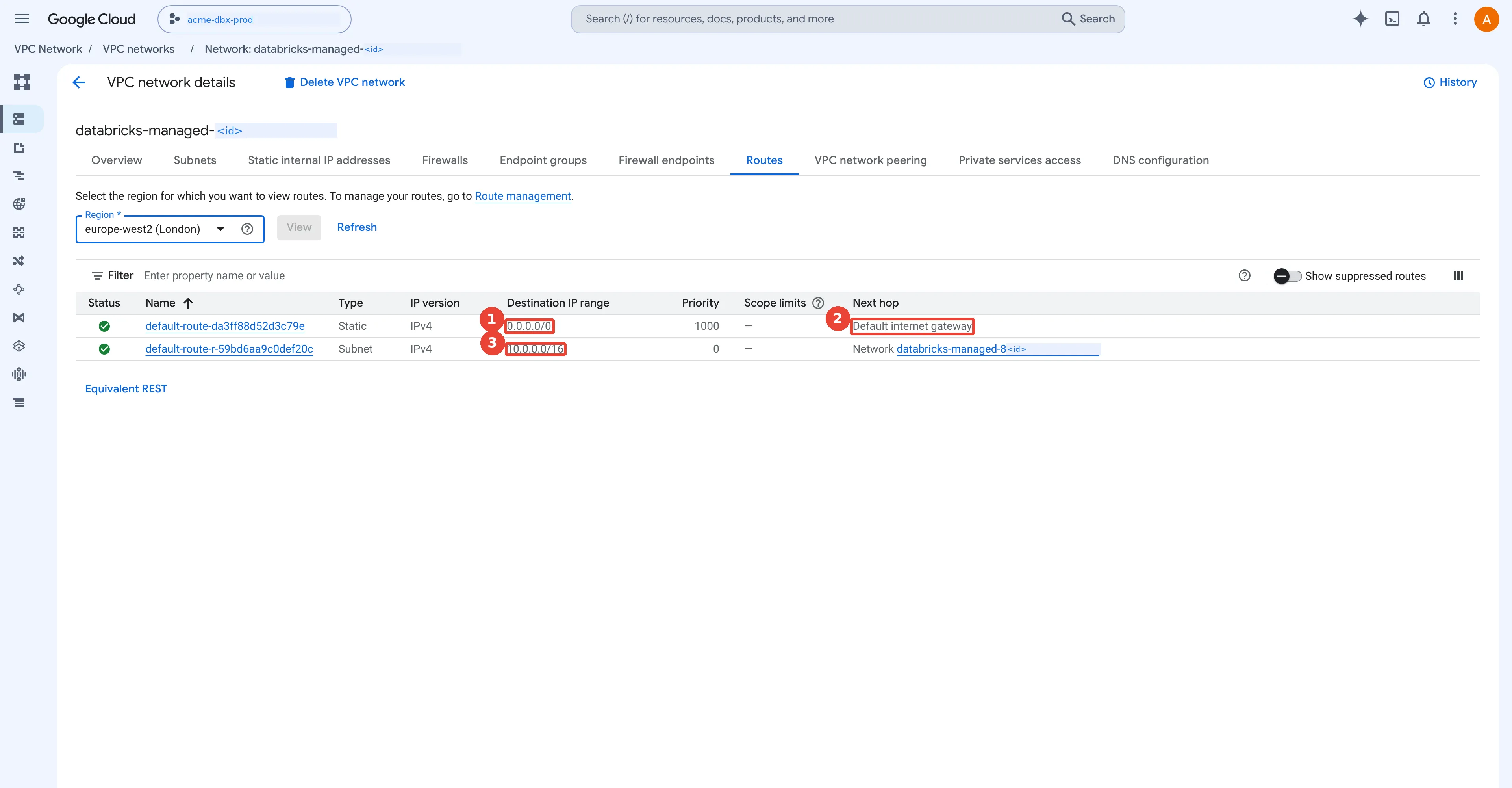
Routes: the default internet gateway. 1: Default route, 0.0.0.0/0; 2: Next hop: default internet gateway, used by Cloud NAT and by Private Google Access; 3: Subnet route for traffic inside the VPC.
Which network paths does a classic cluster use?
Before writing a single firewall rule, list every path. Each row below is a conversation a cluster or a person has, and each needs a route, a DNS answer and, if you deny by default, a firewall rule:
every network path of a classic workspace, with and without back-end Private Service Connect: the SCC relay and REST API go through Cloud NAT or through the two PSC endpoints, Google APIs always go through Private Google Access, cluster traffic stays inside the subnet, libraries need NAT or a mirror, users come over the internet or inbound PSC, and the control plane reaches workspace buckets through the Cloud Storage API
Four rows deserve a sentence each.
- Driver to workers traffic never leaves the subnet. It still needs an ingress rule, because a
Google Cloud VPC network blocks all incoming connections unless a rule allows them (the implied
deny ingress rule). That is why the Databricks guide always creates
db-<subnet-name>-ingress. - Libraries are the surprise.
pip installfrom PyPI (the Python Package Index) and Maven Central downloads are internet traffic. Without Cloud NAT, or with a deny-all rule, they fail until you provide a mirror. - The legacy Hive metastore listens on port 3306 in the control plane. Features such as legacy SQL access control lists (ACLs) need it; Unity Catalog does not use it.
- The control plane to the workspace buckets never uses your VPC at all, so no rule of yours affects it, but a VPC Service Controls perimeter does, as we will see.
How do you lock down egress with firewall rules?
Deny-by-default egress is a short list of allowed destinations, checked in priority order, with a final rule that refuses everything else. Think of an office post room with a list on the wall. The clerk reads it from the top and stops at the first line that matches the parcel: “Head office: send”, “Our bank: send”, and at the bottom, “Anything else: return to sender”. Pin “Anything else: return” at the top and nothing ever leaves. The lines are firewall rules, their order is the priority number, and the last line is the deny-all egress rule.
How does this apply to Acme? Egress is outbound traffic from the cluster; ingress is traffic arriving at it. By default a
Google Cloud VPC network has an implied allow egress rule, so with only the ingress rule
db-dbx-prod-euw2-ingress from the first commands a cluster can reach any address that Cloud NAT
can. Regulated teams want the opposite. The
Databricks guide
Limit network egress for your workspace using a firewall
describes a deny-by-default design, which looks like this with Acme’s names and the published
europe-west2 addresses from
IP addresses and domains for Databricks services:
the deny-by-default firewall rule set from the Databricks egress guide, with Acme's names and the published europe-west2 control plane addresses: intra-subnet ingress and egress, the restricted Google APIs ranges, the control plane or the PSC endpoint subnet on ports 443 and 8443 to 8451, and a deny-all egress rule at priority 1100
Read the priority column carefully, exactly as the post room clerk reads the list. Google Cloud evaluates rules from the lowest number up, and the first match wins. The guide puts every allow rule between 1000 and 1099 and the deny at 1100, and warns that a deny with a lower number “renders your workspace unusable”.
The two Google ranges need a word. 199.36.153.4/30 is restricted.googleapis.com, a set of four
virtual IP addresses (VIPs) that serve only the Google APIs that VPC Service Controls supports, and
34.126.0.0/18 is the matching entry point. Allowing only these, instead of every Google address,
stops a compromised cluster from sending data to a Google service outside your control. Making
traffic use them takes a route and a private DNS zone as well as the firewall rules:
# Routes: send the restricted VIP ranges to Google's network (no NAT needed with PGA on)
gcloud compute routes create allow-private-google-access --network=acme-dbx-vpc \
  --destination-range=199.36.153.4/30 --next-hop-gateway=default-internet-gateway
gcloud compute routes create allow-restricted-google-apis --network=acme-dbx-vpc \
  --destination-range=34.126.0.0/18 --next-hop-gateway=default-internet-gateway

# Private DNS: every *.googleapis.com name answers with the restricted VIPs
gcloud dns managed-zones create restricted-apis-zone --dns-name="googleapis.com." \
  --visibility=private --networks="projects/acme-net-host/global/networks/acme-dbx-vpc" \
  --description="restricted.googleapis.com for Databricks subnets"
gcloud dns record-sets create "restricted.googleapis.com." --type=A --ttl=300 \
  --zone=restricted-apis-zone --rrdatas="199.36.153.4,199.36.153.5,199.36.153.6,199.36.153.7"
gcloud dns record-sets create "*.googleapis.com." --type=CNAME --ttl=300 \
  --zone=restricted-apis-zone --rrdatas="restricted.googleapis.com."
The default-internet-gateway next hop sounds alarming, but for these Google-owned ranges the
traffic stays on Google’s network; it is how Private Google Access routes work. The same guide warns
that this DNS zone sends every Google API call to the restricted VIP, so services that VPC Service
Controls does not support stop working from these subnets.
One honest gap: the control plane addresses change. The IP addresses page asks you to “always allowlist the provided domain names (FQDNs) for secure cluster connectivity (SCC) relay endpoints, rather than individual IP addresses”, and the firewall guide recommends “a firewall that supports FQDN-based rules”. Google Cloud VPC firewall rules match IP ranges only, so if you keep IP rules, re-check that page and automate the update, or remove the problem entirely with Private Service Connect.
In the same redacted sandbox:
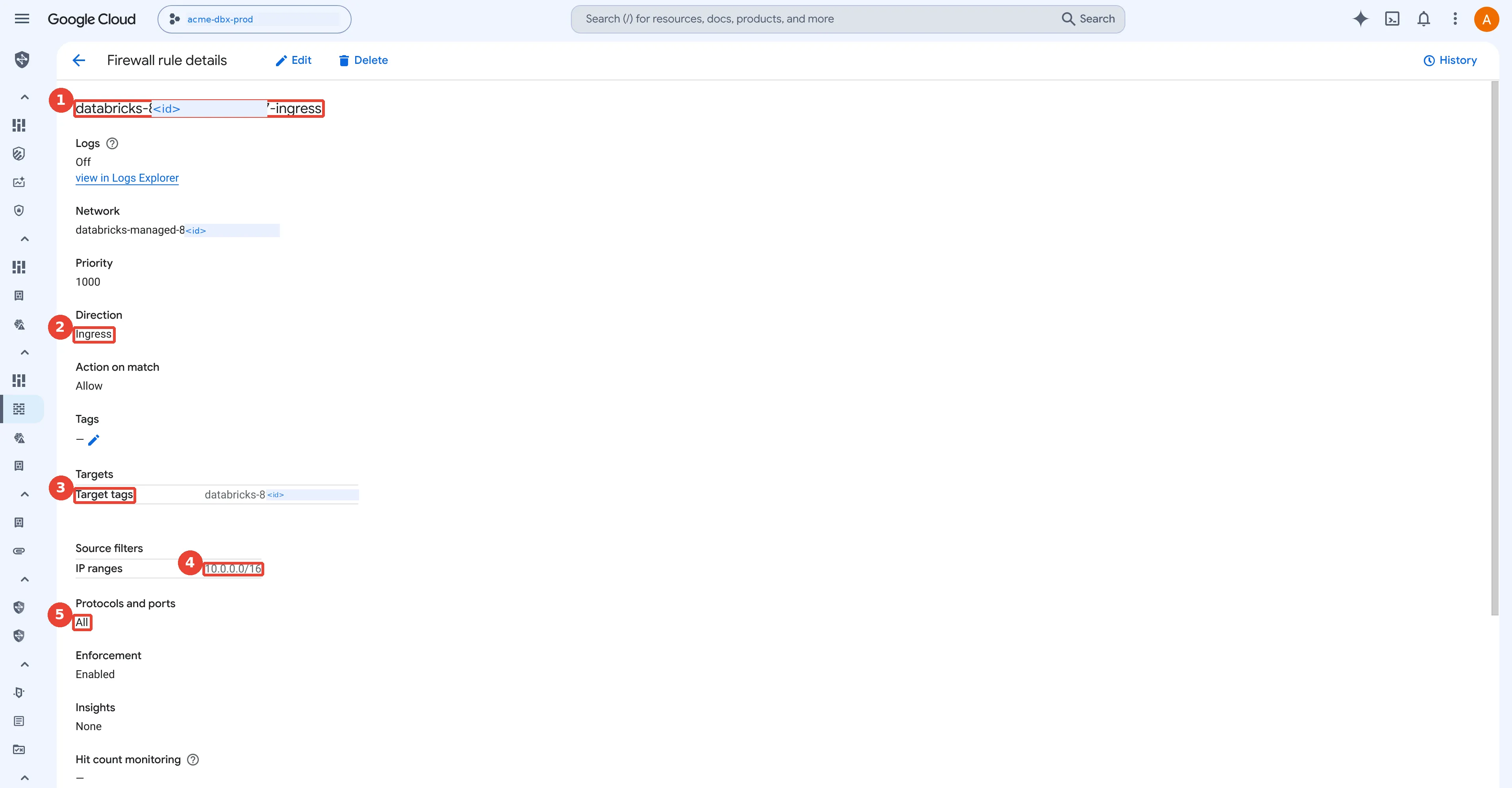
The only VPC firewall rule Databricks creates. 1: One ingress rule per workspace, created by Databricks; 2: Ingress only; egress falls back to the implied allow-all rule; 3: Applies only to VMs carrying the workspace's network tag; 4: Source is the subnet itself: node-to-node traffic only; 5: All protocols and ports, between cluster nodes.
What does back-end Private Service Connect change?
Back-end Private Service Connect swaps a trip across the public internet for a private door inside your own network. Picture a supplier across town. Without it, your staff drive there on public roads: in a locked van, but on public roads all the same, and your gatehouse has to keep track of a supplier address that keeps changing. With it, the supplier opens a service hatch in your own corridor, with an internal room number. Your staff walk to hatch 8.2, and the supplier’s private conveyor carries everything the rest of the way. The hatch in your corridor is the endpoint, its room number is the endpoint’s internal IP address, and the supplier’s end of the conveyor is the service attachment.
How does this apply to Acme? Without PSC, Acme’s clusters reach the control plane across the internet, encrypted, through Cloud NAT. That works, but two things trouble a security team: the traffic leaves Google’s private network, and the firewall has to allow public Databricks addresses that change. Classic compute plane Private Service Connect (Databricks also calls it back-end PSC) replaces that path with two endpoints inside Acme’s own VPC.
A little vocabulary first. A service producer (here, Databricks) publishes a service through a service attachment, a named object in its own project. A service consumer (Acme) creates an endpoint: technically a forwarding rule with an internal IP address from one of its subnets, pointed at that attachment. Traffic sent to the endpoint’s address arrives at the producer’s service over Google’s network. Google’s Private Service Connect overview explains the general model.
The Databricks PSC page lists the requirements as of October 2026: the workspace is on the Enterprise plan, and it uses a customer-managed VPC. It names two service attachments per region:
- the workspace endpoint, ending in
plproxy-psc-endpoint-all-ports, for the web application and REST APIs. Foreurope-west2it isprojects/general-prod-europewest2-01/regions/europe-west2/serviceAttachments/plproxy-psc-endpoint-all-ports. - the SCC relay endpoint, ending in
ngrok-psc-endpoint, for the secure cluster connectivity relay:projects/prod-gcp-europe-west2/regions/europe-west2/serviceAttachments/ngrok-psc-endpoint.
(The relay’s attachment name comes from ngrok, a tunnelling tool; it is only a name.) Back-end PSC always needs both. Here is the result for Acme, with the dot following one node as it resolves the relay name, connects to the endpoint and gets its commands back:
classic compute plane Private Service Connect for Acme: nodes in dbx-prod-euw2 look up the workspace and tunnel names in the private DNS zone, get the internal addresses of two endpoints in dbx-psc-euw2, and connect through them to the Databricks workspace and SCC relay service attachments in europe-west2; Cloud Storage still goes through Private Google Access
The steps follow the Databricks guide. The endpoints get a dedicated subnet whose range must not
overlap the workspace subnet; a /28 (16 addresses) is plenty for two endpoints. On Google Cloud
each endpoint is a reserved internal address plus a forwarding rule (adapted from
Access published services through endpoints;
I have not run it as written):
gcloud compute networks subnets create dbx-psc-euw2 --network=acme-dbx-vpc \
  --region=europe-west2 --range=10.10.8.0/28 --project=acme-net-host

# Workspace (REST API) endpoint
gcloud compute addresses create psc-dp-rest-api-ip --region=europe-west2 \
  --subnet=dbx-psc-euw2 --addresses=10.10.8.2 --project=acme-net-host
gcloud compute forwarding-rules create psc-dp-rest-api --region=europe-west2 \
  --network=acme-dbx-vpc --address=psc-dp-rest-api-ip --project=acme-net-host \
  --target-service-attachment=projects/general-prod-europewest2-01/regions/europe-west2/serviceAttachments/plproxy-psc-endpoint-all-ports

# SCC relay endpoint
gcloud compute addresses create psc-dp-ngrok-ip --region=europe-west2 \
  --subnet=dbx-psc-euw2 --addresses=10.10.8.3 --project=acme-net-host
gcloud compute forwarding-rules create psc-dp-ngrok --region=europe-west2 \
  --network=acme-dbx-vpc --address=psc-dp-ngrok-ip --project=acme-net-host \
  --target-service-attachment=projects/prod-gcp-europe-west2/regions/europe-west2/serviceAttachments/ngrok-psc-endpoint
Then Acme registers both endpoints with Databricks, creates a private access settings object, and adds the endpoints to the network configuration from earlier in this post. In Terraform (not run here; the same account-level provider as before):
resource "databricks_mws_vpc_endpoint" "rest" {
  provider          = databricks.accounts
  account_id        = var.databricks_account_id
  vpc_endpoint_name = "psc-dp-rest-api"
  gcp_vpc_endpoint_info {
    project_id        = "acme-net-host"
    psc_endpoint_name = "psc-dp-rest-api"
    endpoint_region   = "europe-west2"
  }
}
# databricks_mws_vpc_endpoint "relay" is the same with psc-dp-ngrok

resource "databricks_mws_private_access_settings" "prod" {
  provider                     = databricks.accounts
  account_id                   = var.databricks_account_id
  private_access_settings_name = "acme-prod-euw2-pas"
  region                       = "europe-west2"
  public_access_enabled        = false
  private_access_level         = "ENDPOINT"
  # every endpoint that must reach the UI or APIs: the back-end workspace endpoint
  # and the inbound endpoint built in the next sections
  allowed_vpc_endpoint_ids     = [databricks_mws_vpc_endpoint.rest.vpc_endpoint_id,
                                  databricks_mws_vpc_endpoint.inbound.vpc_endpoint_id]
}

resource "databricks_mws_networks" "prod" {
  # ... provider, account_id, network_name and gcp_network_info as above ...
  vpc_endpoints {
    dataplane_relay = [databricks_mws_vpc_endpoint.relay.vpc_endpoint_id]
    rest_api        = [databricks_mws_vpc_endpoint.rest.vpc_endpoint_id]
  }
}
# and on databricks_mws_workspaces.prod: private_access_settings_id = ...prod.private_access_settings_id
Three limits matter at scale. First, the endpoints are shared: every workspace whose compute sits
in acme-dbx-vpc in europe-west2 must use the same two endpoints, which keeps the count low.
Second, the quota is “up to ten Private Service Connect endpoints of each type per region, per host
project”, and it counts per host project, not per VPC; an endpoint that stays unapproved usually
means you hit it. Third, there is “no cross-region connectivity”: the workspace, both VPCs, the
endpoints and their subnets must all be in one region.
PSC does not replace Private Google Access; the common misconception is that it makes all of a cluster’s traffic private. Clusters still reach Cloud Storage and BigQuery through PGA (or through a separate PSC endpoint for Google APIs), not through the Databricks endpoints. And some traffic still wants the internet: libraries, sample datasets and the legacy Hive metastore. The guide suggests either keeping Cloud NAT with a firewall for those, or a “no-firewall architecture” with no internet path, an external metastore and “your own locally mirrored package repo”.
In the Databricks account console of the same redacted sandbox:
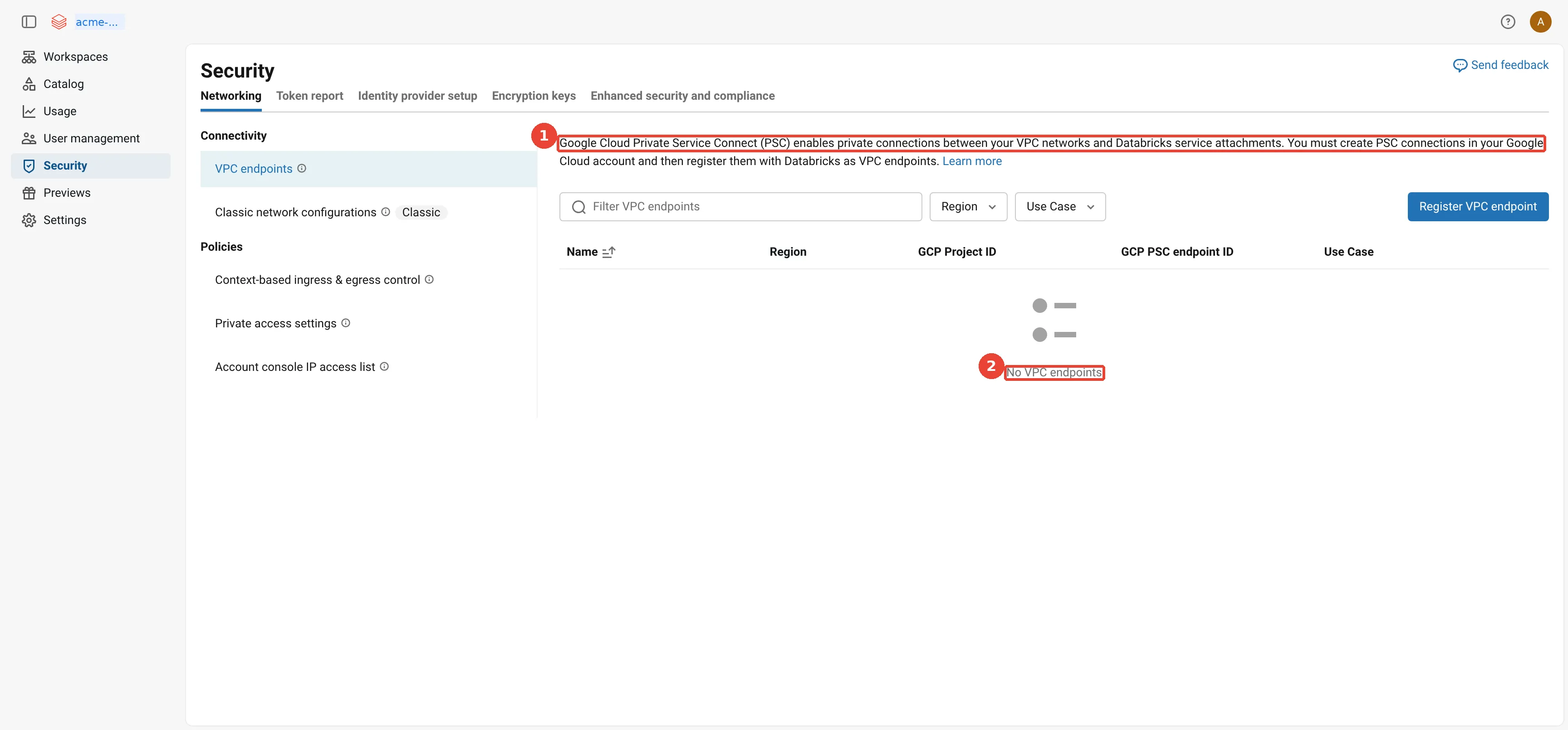
Account console: VPC endpoints (PSC). 1: Register your PSC endpoints here: back-end (relay, REST API) or inbound; 2: None in this sandbox: it uses the standard path without PSC.
Why is Private Service Connect mostly a DNS exercise?
An endpoint does nothing until DNS sends traffic to it, so most of the PSC work is making names resolve to the private addresses. Back to the supplier’s hatch. Staff still look the supplier up in the public phone book, get the outside address and drive there; the delivery arrives, so nobody notices the new hatch is unused. Only when the internal directory lists the supplier at hatch 8.2 do deliveries take the private route. The phone book is public DNS, the internal directory is a Cloud DNS private zone, and hatch 8.2 is the endpoint’s IP address.
How does this apply to Acme? An endpoint is only an IP address. Nothing sends traffic to it until a DNS name points there. A
cluster node looks up the workspace URL and the relay’s name like any other host name, so Acme
creates a Cloud DNS private zone for gcp.databricks.com, visible only to its VPCs, that
answers with the endpoint addresses instead of the public ones
(Prerequisite 3 covers how DNS and private zones work):
the private DNS records that make Private Service Connect work for Acme: the workspace URL, the dp- data plane URL and the intermediate psc name point at the workspace endpoint in each VPC, the tunnel name points at the SCC relay endpoint in the compute VPC, and the psc-auth name points at the inbound endpoint in the transit VPC
Each record has a reason.
- The workspace URL (
<workspace-id>.<n>.gcp.databricks.com) is what browsers, API clients and the nodes use. - The data plane URL (
dp-in front) is used by classic compute and some control plane services. - The intermediate name
europe-west2.psc.gcp.databricks.comappears in public DNS once a workspace has a private access settings object; it separates PSC traffic from services that do not support PSC, such as the account console. - The tunnel name
tunnel.europe-west2.gcp.databricks.comis the relay, so it points at the relay endpoint and is needed only where clusters run. - The
psc-authname is used by browser sign-in over inbound PSC; REST-only clients can skip it.
The guide is blunt about one failure: “Ensure that both the workspace URL and the intermediate PSC
URL … resolve to the same Private Service Connect endpoint IP in your private DNS zone. Databricks
worker nodes use both names to reach the control plane, and mismatched resolution causes compute
failures.” Testing is simple. From a notebook on a classic cluster, %sh nslookup <workspace-url>
must return 10.10.8.2. If it returns a public address, the REST call may still succeed, but over
the internet, which is the failure nobody notices.
My sandbox has no Private Service Connect at all, which is what a default workspace looks like:
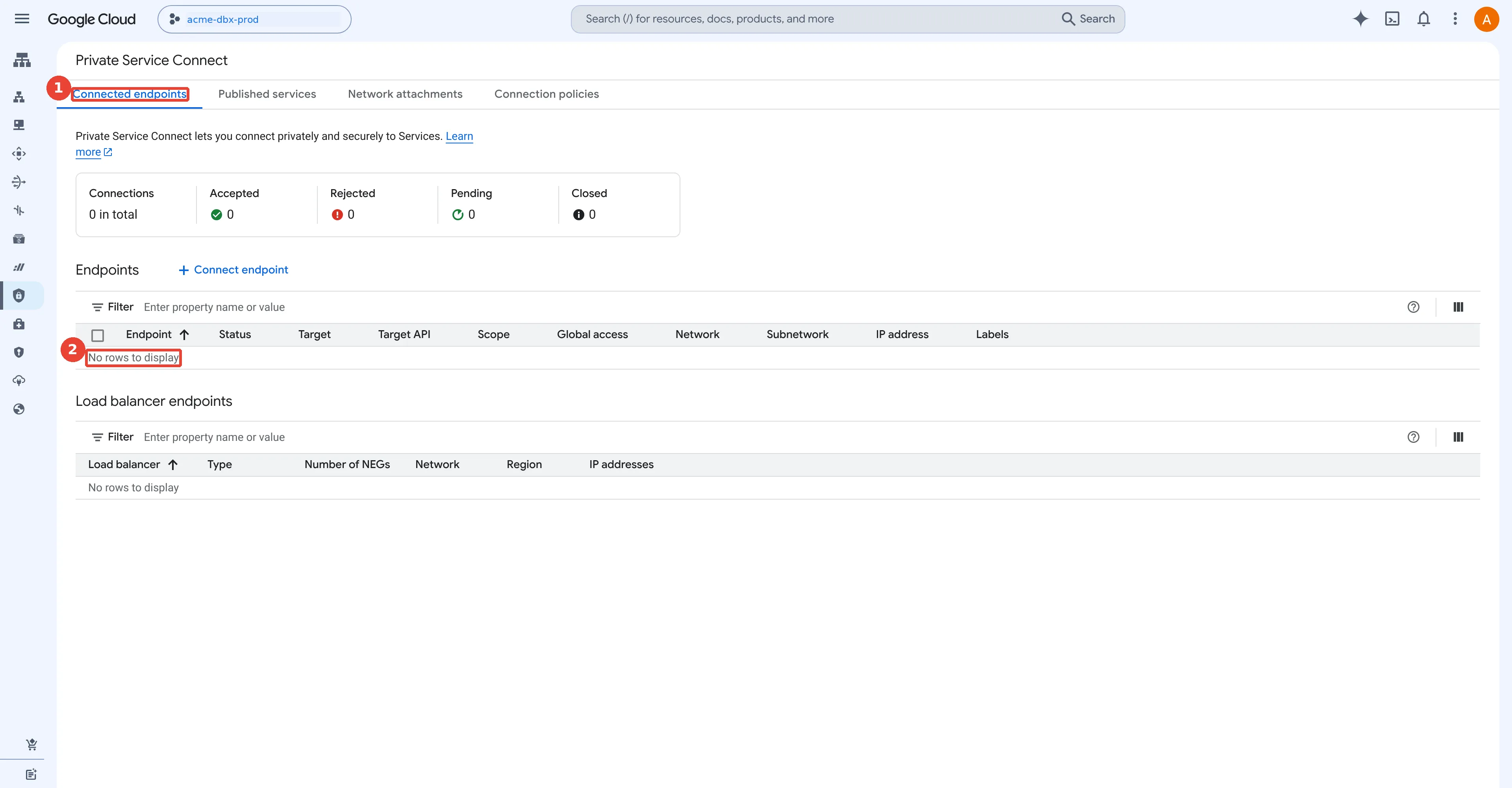
Private Service Connect: nothing configured here. 1: Connected endpoints: where back-end and inbound PSC endpoints would appear; 2: Empty: this sandbox uses the standard secure path without PSC.
How do users reach the workspace privately?
Inbound Private Service Connect gives people a private front door from a transit VPC; it reuses the same Databricks attachment as the clusters, reached from a different network. In the supplier picture, it is a second hatch to the same supplier, opened in the reception area where visitors arrive rather than in the warehouse corridor where the clusters work.
How does this apply to Acme? So far only the clusters are private. Acme’s analysts still open the workspace in a browser over the internet. Inbound Private Service Connect (also called front-end PSC) gives them a private path too, described on Configure inbound Private Service Connect for workspaces.
It uses the same workspace attachment, plproxy-psc-endpoint-all-ports, which has “a dual role”,
reached from a different VPC: the transit VPC, the network where users’ traffic arrives. For
Acme that is acme-transit-vpc in the host project, joined to the London offices over Cloud
Interconnect (a private physical link between a data centre and Google’s network). It supports
the web application, the REST API and the Databricks Connect API (the client library that runs
Spark code from a laptop’s IDE against a remote cluster).
inbound Private Service Connect for Acme: staff in the office reach Google Cloud over Cloud Interconnect, their resolvers forward gcp.databricks.com to Cloud DNS, and the workspace name resolves to an endpoint in the transit VPC that connects to the same Databricks workspace service attachment; with public access disabled in the private access settings, a user on the internet is refused
Two details make it work in practice.
- Office DNS has to ask Cloud DNS. Laptops use Acme’s own DNS servers, which know nothing about
the private zone. A Cloud DNS
inbound server policy gives
acme-transit-vpcan address that on-premises resolvers can forward queries to, so Acme forwardsgcp.databricks.comthere. The transit zone needs three records, the workspace URL,dp-andeurope-west2.psc-auth.gcp.databricks.com, all pointing at10.20.0.2, as the inbound DNS page lists. - A transit VPC cannot mix. It may hold only workspaces that use inbound PSC, or only workspaces that do not, “due to the specifics of DNS resolution on Google Cloud”. If the transit VPC and the compute VPC are the same network, all access from it must go over inbound PSC.
The same regional attachment list also names a second front-end attachment for
performance-intensive services (regional-plproxy-psc-endpoint-all-ports). Acme does not need
it yet; the IP addresses page links the setup guide for it.
Does the transit VPC connect to the compute VPC?
No, and this trips up almost everyone the first time. When an analyst opens
https://<workspace>.gcp.databricks.com, the browser is not talking to the clusters in
acme-dbx-vpc at all. It talks to the Databricks web application and REST API, which run in the
control plane, in Databricks’ own account. So the transit VPC and the compute VPC are two
independent spokes that both point at the same Databricks service attachment,
plproxy-psc-endpoint-all-ports, which the
inbound Private Service Connect page
says has “a dual role”: inbound PSC uses it for the web application and REST API, and back-end PSC
uses it for the REST API.
acme-dbx-vpcuses back-end PSC, so that cluster VMs reach the control plane privately.acme-transit-vpcuses inbound (front-end) PSC, so that people reach it privately.
the transit VPC and the compute VPC are two separate spokes: users in acme-transit-vpc reach the Databricks web app and REST API through an inbound endpoint on the plproxy attachment, clusters in acme-dbx-vpc reach the same attachment and the relay through back-end endpoints, and the two VPCs are not peered
The same page says the transit VPC “can be a separate VPC from the workspace’s compute plane VPC, and
it can be connected to an on-premises network”. Keeping them apart is a security choice: Acme does
not want every laptop in the company to have a route into the subnet where production clusters run.
With the endpoint in the transit VPC, a user can reach exactly one private address, 10.20.0.2 on
port 443, and nothing else. One VPC for both is allowed, but then all access from that VPC must use
inbound PSC.
Why is it called a transit VPC, and how do laptops get into it?
A transit VPC (sometimes called a hub VPC) is the landing-zone network where a company
terminates its Cloud VPN tunnels, Cloud Interconnect links or SASE connectors. Some strict
companies make engineers work from virtual desktops that run inside that VPC; those desktops use its
private DNS zone directly. Most people, though, open a browser on their own laptop at home or in the
office. For that browser to reach a private 10.20.0.2 address inside Google Cloud, something has to
carry the packet from the laptop into the transit VPC. There are three common answers.
- A: VPN or Interconnect. The office network reaches
acme-transit-vpcover Cloud Interconnect, and home workers connect a VPN client to the corporate network, which reaches Google Cloud over HA VPN or the same Interconnect. Acme’s on-premises DNS servers forwardgcp.databricks.comto the transit VPC’s inbound server policy, so the workspace name resolves to10.20.0.2. The usual mistake is split tunnelling (a VPN mode where only some traffic uses the tunnel): if the VPN does not carry the endpoint’s subnet and the DNS forwarding, the laptop quietly falls back to the public address, or fails once public access is off. - B: SASE with private-app connectors. SASE (Secure Access Service Edge) replaces the VPN
with a cloud service; its zero-trust network access (ZTNA) part publishes private applications
through connectors, small VMs that run next to the application. Products in this category
include Zscaler Private Access, Palo Alto Networks Prisma Access, Cloudflare One and Netskope. The
agent on the laptop checks the device, then sends traffic for
*.gcp.databricks.comto the SASE cloud, which hands it to the connector VMs inacme-transit-vpc. The connectors resolve the three Databricks names in the transit VPC’s private zone and land on10.20.0.2. Acme publishes*.gcp.databricks.comas a private application, runs two connectors for availability, and never points laptops at Cloud DNS directly. - C: internet-only SASE. Some companies use only the secure web gateway part of SASE: an internet proxy with no connector into Google Cloud. There is then no network path to a private address, so inbound PSC cannot work. The design flips: clusters stay private with back-end PSC, the workspace keeps its public address, and an IP access list or a context-based ingress rule allows only the SASE vendor’s egress IP addresses, so every user still passes the gateway’s sign-in, multi-factor and device checks first.
three ways a laptop reaches a Databricks workspace on Google Cloud: A, over VPN or Interconnect into the transit VPC with on-premises DNS forwarding to the inbound endpoint; B, through a SASE agent and cloud to private-app connectors in the transit VPC and then the inbound endpoint; C, through an internet-only SASE gateway to the workspace's public URL, filtered to the SASE egress IPs
A worked example. Acme’s London office uses pattern A over Interconnect, and its home workers use
pattern B through the SASE agent on their laptops. Both end at 10.20.0.2, so Acme disables public
access in the private access settings. Acme’s contractors’ agency uses only a secure web gateway, so
for the contractors’ sandbox workspace Acme chooses pattern C: public access stays on, and a
context-based ingress rule allows the agency’s two published egress ranges for the workspace UI only.
Those are architecture patterns, not Databricks features: check each SASE vendor’s own documentation
for connector placement and DNS behaviour.
Is the account console private too?
No. Everything above makes Acme’s workspaces private. The account console,
accounts.gcp.databricks.com, where account admins manage workspaces, users, networking and
billing (and the host the Account API uses), stays on the internet on Google Cloud, for three reasons.
- A private access settings object “describes a workspace’s Private Service Connect connectivity” and is referenced when you create or update a workspace. It never applies to the account console.
- The inbound DNS zone has
exactly three records: the workspace URL,
dp-<workspace-id>and<region>.psc-auth. There is no record foraccounts.gcp.databricks.com, so it keeps resolving to its public address. Do not add a wildcard record that sends everygcp.databricks.comname to the endpoint. - The context-based ingress page says “On Google Cloud, context-based ingress control provides workspace-level policies only. Account-level policies are not available.” On AWS, by contrast, inbound Private Link for account-level resources is in Beta.
What Acme does instead is turn on the account console IP access list (Premium) and allow only its office, VPN and SASE egress ranges and the addresses its automation runs from. One catch from that page: serverless jobs that call the account console come from internal Databricks addresses you cannot allowlist, so they need an exemption from the Databricks account team. Sign-in still goes through single sign-on, so the list of account admins should stay short.
What actually blocks the internet?
Adding a private entrance does not lock the public one: only public access disabled in the private access settings, an ingress policy or an IP access list keeps the internet out. Picture a shop that opens a staff entrance at the back. The front door stays open until someone locks it. A doorman with a guest list at the front filters who walks in from the street, but never looks at the staff entrance. The staff entrance is inbound PSC, locking the front door is disabling public access, and the doorman’s list is an IP access list or a context-based ingress policy. The real controls come first below, and Acme’s choice follows them.
This is the most misunderstood point of the whole design. The documentation says that enabling inbound and back-end PSC “privatizes the user and classic compute traffic paths”, yet on its own it does not block public access to the workspace. Three controls decide who may connect.
- The private access settings object (Enterprise) has two fields. Public access enabled
(
public_access_enabledin the API; the console now labels the choices Governed by your Databricks ingress policies and Block public network access) says whether the workspace accepts any traffic from the internet at all. Private access level says which PSC endpoints may connect:ACCOUNT(any endpoint registered in the Databricks account, the default) orENDPOINT(only the ones you list). - IP access lists (Premium) are
ALLOWorBLOCKlists of public IPv4 ranges. They “only affect requests from public IP addresses over the internet. They do not block private traffic from Private Service Connect.” - Context-based ingress control (Enterprise, generally available as of October 2026) combines who is calling, from which network and for what kind of request. The context-based ingress page notes that on Google Cloud it offers workspace-level policies only, and the IP access list page now recommends it as the primary method. Part 4 covers the same policy object from the serverless side.
Here is how the first two combine:
how private access settings and IP access lists combine: with public access enabled, IP access lists filter internet traffic but never PSC traffic, and a BLOCK 0.0.0.0/0 list shuts the internet out; with public access disabled only registered PSC endpoints can connect, which is Acme's production choice
Two warnings from the documentation. First, set public access explicitly. As of 8 November 2026 the
private access settings page
names the two console choices Governed by your Databricks ingress policies and Block public
network access, and calls the first one “the default”: the workspace stays reachable from the
internet, filtered only by IP access lists or context-based ingress. (Earlier versions of the page
said the console defaulted to disabled.) The
Terraform provider
documents public_access_enabled = true as its default on Google Cloud, so whichever tool you use,
a new object leaves the internet open until you close it. Databricks recommends starting with public access
on while you test DNS, then switching it off in a maintenance window. Second, if clusters reach the
control plane through Cloud NAT, the
IP access lists page
says those NAT addresses “must either be added to an allow list or you must configure back-end
Private Service Connect. Otherwise, classic compute resources cannot launch.” With the Databricks
CLI, an allow list for the office looks like this (the ranges are documentation examples):
databricks workspace-conf set-status --json '{"enableIpAccessLists": "true"}'
databricks ip-access-lists create --json '{
  "label": "acme-london-offices", "list_type": "ALLOW",
  "ip_addresses": ["203.0.113.0/24", "198.51.100.17/32"] }'
That allow list is the older way to filter the front end. The IP access lists page (checked 8 November 2026) says Databricks “recommends using context-based ingress controls as your primary method for managing access” and recommends migrating workspaces that already have IP access lists. Context-based ingress is generally available (private access to workspaces is the one part still in Beta) and needs the Enterprise tier. The context-based ingress page builds each rule from three parts:
- Identity: all users and service principals, only users, only service principals, or named ones.
- Network source: all public IPs or selected ranges; partner platforms, software-as-a-service tools that Databricks keeps current for you; all or selected registered private endpoints (Beta, see below); and selected source workspaces for serverless traffic between workspaces (Beta).
- Access scope: the workspace UI, all APIs or chosen API scopes (including JDBC and ODBC for SQL), the Databricks Apps runtime and the Lakebase runtime.
In restricted mode everything is denied unless a rule allows it, and deny rules win over allow
rules. A dry-run mode logs violations without blocking them, and both denials and dry-run
denials land in the system.access.inbound_network system table, with the identity, network source
and the rule that matched. On Google Cloud the policies are workspace-level only, and they are not
available in me-central2.
Two parts of that list changed recently, so here they are in detail (checked 8 November 2026).
- Partner platforms no longer carry a Beta label. Since 5 November 2026 the partner platforms page lists five: Power BI, Tableau Cloud and dbt Cloud, matched by the IP ranges each partner publishes (Databricks “syncs the published ranges every one to two weeks”), and the Databricks Genie apps for Slack and Microsoft Teams, matched by the app’s OAuth client ID (the identifier an app presents when it asks for a token). Partner sources work in allow rules only, one partner per rule. And because “partner platforms connect over the public internet”, the workspace must have public access enabled; otherwise Databricks blocks the request before the ingress policy is evaluated.
- Registered private endpoints as a source are in Beta (since 21 October 2026). The context-based ingress page now reads “generally available (GA), except private access to workspaces, which is in Beta”, and an account admin turns on Context-Based Ingress: Workspace Private Access Policies from the account console Previews page before using it.
A worked example. Suppose Acme’s marketing team publishes a Power BI report on a non-production workspace that keeps public access enabled. The rule reads: identity all users and service principals, source Partner platforms: Microsoft Power BI (all regions), destination Workspace API. A refresh from the Power BI service arrives from a Microsoft address on Databricks’ synced list, matches the rule, and still runs with the permissions of the identity that sent it. The same refresh against Acme’s production workspace never reaches the policy, because production has public access disabled and only registered PSC endpoints can connect.
The three controls do not replace each other; they stack. The page says the IP access list and the ingress policy are evaluated “using a logical AND”: a request must pass both, and an IP access list “can further narrow access but cannot widen it”. For inbound PSC, “both the private access settings and context-based ingress must permit the endpoint”. By default the ingress policy allows all private endpoints and so defers to the private access settings; to manage endpoints in the policy instead, set the private access settings to allow all registered endpoints and list the endpoints you trust in the policy. And when public access is disabled, all public ingress is blocked and the ingress policy is not evaluated at all.
the three front-end checks on a Google Cloud workspace: private access settings, the context-based ingress policy and IP access lists combine with a logical AND, so a request reaches Acme's workspace only if every check allows it; an analyst on inbound PSC passes, and an internet request is refused because public access is disabled, before the ingress policy is evaluated
How does this apply to Acme? In shop terms, the front door of production is locked, the staff
entrance is the only way in, and a doorman now stands at the staff entrance too. That means one production ingress policy: allow users and service principals from the
registered inbound endpoint (10.20.0.2 in acme-transit-vpc) for the UI and all APIs, started in dry run for a week while it reads
system.access.inbound_network, then enforced. Once it is enforced, the office IP access list
above adds nothing that the policy and the disabled public access do not already cover, so Acme
retires it. My view: think of context-based ingress as VPC Service Controls for the Databricks front
end, deciding who may come in, from where and to what, rather than for Google APIs.
For your own workspaces, pick the front door in this order, cheapest first:
How should a workspace's front door be locked?
1. Sandbox, internet access with sign-in is acceptable?  Ingress policy or IP access list on the public URL
2. Partner SaaS (Power BI, dbt Cloud) must reach it?     Public access on; partner platforms in the policy
3. Production, and users can reach a transit VPC?        Inbound PSC, then public access disabled
In the Databricks account console of the same redacted sandbox:
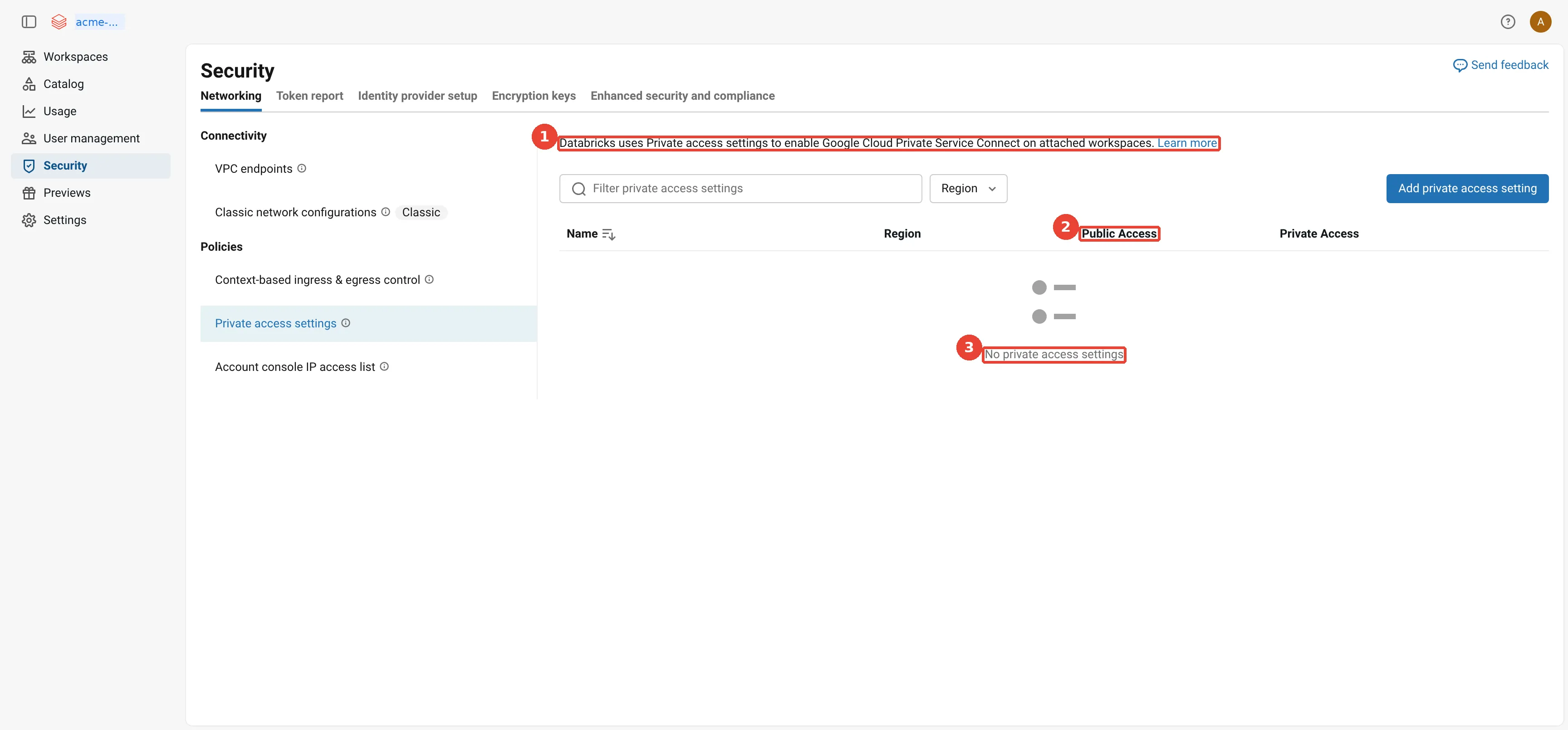
Account console: private access settings. 1: A private access settings object turns on PSC for the workspaces attached to it; 2: Public access: whether the workspace stays reachable from the internet; 3: None here, so the workspace is public, protected by sign-in.
How do VPC Service Controls fit in?
Private networking decides which roads traffic may take; VPC Service Controls decides where data may go, even for someone holding the right keys. Picture a pharmacy. Staff with keys may open the medicine cabinet, and the building has private corridors, but a rule at the door says no medicine leaves the building except to the hospitals on a list, whoever is carrying it. The keys are the IAM permissions from Part 2, the building’s edge is the service perimeter, and the list of hospitals is the egress rules (with ingress rules saying who may come in).
How does this apply to Acme? Private networking stops people and clusters from reaching things over the wrong path. It does not
stop someone with valid credentials from copying data out. A cluster that may read
gs://acme-lake-supply may also, by default, write it to a bucket in someone else’s project.
VPC Service Controls closes that
gap: it draws a service perimeter around projects, and Google API calls that cross the edge are
refused unless an ingress rule (who may come in, from where, to which services) or an egress
rule (who may go out, to which projects and services) allows them.
Acme’s production design puts the host project, the workspace project and the lake project in one perimeter, removes Cloud NAT, and reaches everything through PSC endpoints and the restricted VIP:
Acme's fully private production design: a VPC Service Controls perimeter around acme-net-host, acme-dbx-prod and acme-lake; the compute VPC has no Cloud NAT, reaches Google APIs only through restricted.googleapis.com and Databricks only through the two PSC endpoints, and pulls libraries from an Artifact Registry remote repository; ingress and egress rules let the Databricks control plane projects reach the workspace project and buckets
The perimeter must let Databricks in, because the control plane creates VMs and reads the workspace
buckets from its own projects. The PSC page gives the rules; in the shape that
ingress and egress rules
use, Acme’s look roughly like this, with the europe-west2 project numbers from the IP addresses
page:
# Ingress: Databricks control plane projects may call these APIs on Acme's projects
- ingressFrom:
    identityType: ANY_IDENTITY
    sources:
      - resource: projects/204760216014   # control plane VPC host projects
      - resource: projects/374166936325
      - resource: projects/751957430136   # Unity Catalog project
      # + the five europe-west2 audit log delivery projects, and the us-central1
      #   control plane host projects (needed only while a workspace is created)
  ingressTo:
    resources: [projects/<acme-dbx-prod number>, projects/<acme-lake number>]
    operations:   # each with methodSelectors: [{method: "*"}]
      - serviceName: storage.googleapis.com
      - serviceName: compute.googleapis.com
      - serviceName: serviceusage.googleapis.com
      - serviceName: logging.googleapis.com
      - serviceName: cloudresourcemanager.googleapis.com
      - serviceName: iam.googleapis.com
      - serviceName: cloudkms.googleapis.com
      - serviceName: bigquery.googleapis.com   # for Lakehouse Federation
# Egress: Acme's projects may reach Databricks-managed storage and one Compute Engine method
- egressFrom:
    identityType: ANY_IDENTITY
  egressTo:
    resources: [projects/323146983994, projects/204760216014, projects/374166936325]
    operations:
      - serviceName: storage.googleapis.com
        methodSelectors: [{method: "*"}]
      - serviceName: compute.googleapis.com
        methodSelectors: [{method: "InstancesService.BulkInsert"}]
The egress rule exists because the clusters read Databricks-managed buckets in the control plane’s asset project. If the lake sat in a separate perimeter, Acme would add matching rules on both perimeters; in one perimeter, inside-to-inside traffic needs none.
Two practical points. Turn the perimeter on in dry-run mode first, which logs what would be refused without refusing it, and read those logs for a week. And remember that libraries now have nowhere to come from: Acme uses an Artifact Registry remote repository, a cache inside the perimeter that proxies PyPI and Maven Central. Serverless compute runs outside this perimeter by definition, and Part 4 explains the ways through it.
In the same redacted sandbox:
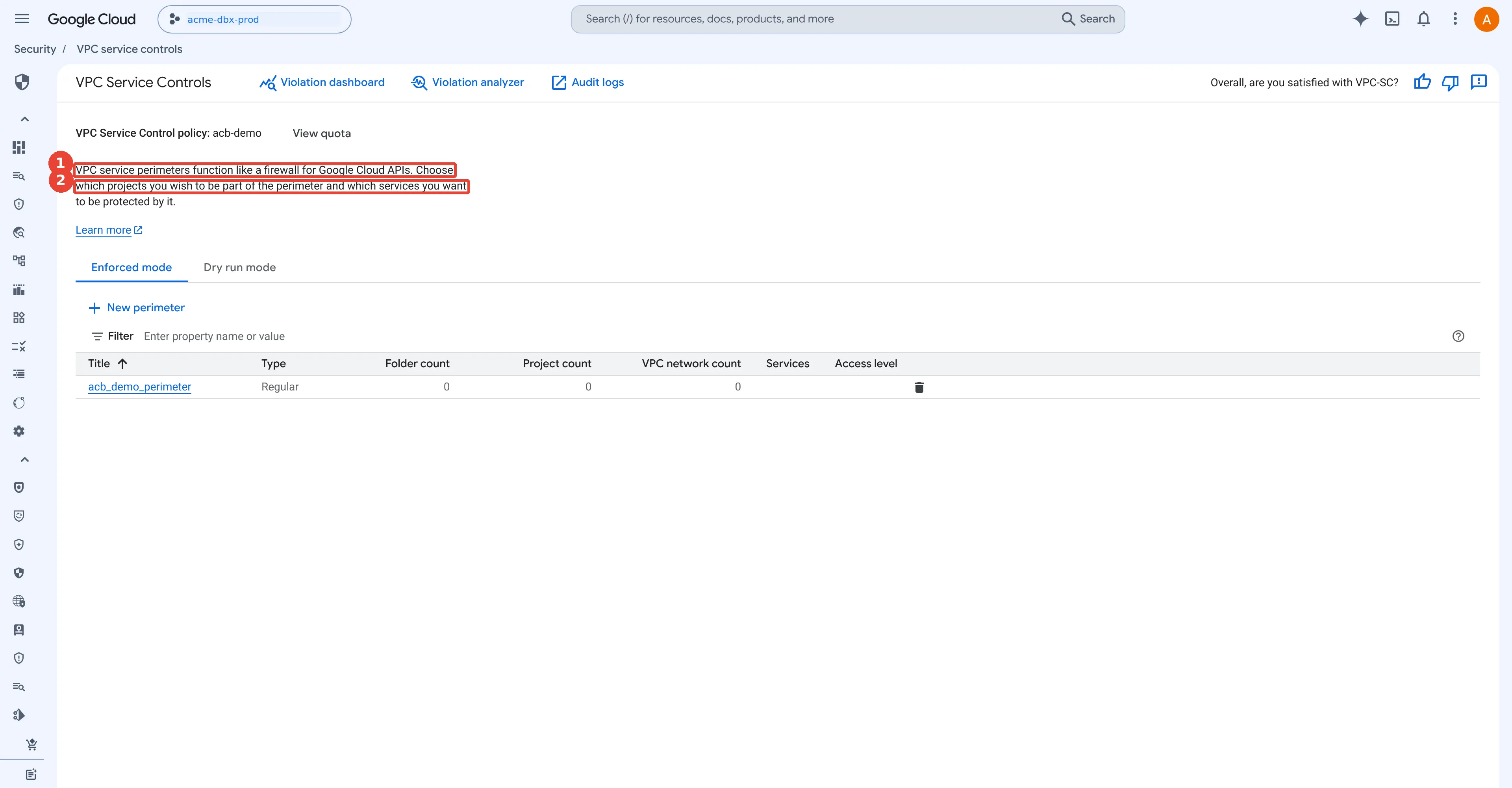
VPC Service Controls: a perimeter with no projects. 1: A regular service perimeter exists at organisation level; 2: It protects no projects, so this workspace is outside any perimeter.
How do you change a workspace’s subnet, or add PSC later?
You can swap a workspace’s subnet, or add Private Service Connect, in a maintenance window; you can never swap its VPC. In the car park picture from the sizing section, you can open a new, bigger car park next door and move every car across, but you cannot move the whole site to another town.
The VPC is fixed for life, but two things can change, both described on Update workspace network configuration.
Changing the IP range. Databricks documents one route: create a new subnet with the range you want, then point the workspace at it. You do not expand the old subnet in place. Google Cloud itself would allow that: you can expand a subnet’s primary IPv4 range by giving it a shorter prefix, as long as the larger range does not overlap another subnet, and you can never shrink it again. But Databricks documents only the new-subnet route, so that is the supported path. The steps, in order:
- Terminate all running clusters and jobs in the workspace.
- Create the new subnet, say
dbx-prod2-euw2at10.10.16.0/21, and a new network configuration object that references it. - Create the ingress rule
db-dbx-prod2-euw2-ingress(target network tagdatabricks-<workspace-id>, source the new range, all protocols) before the switch. - Grant the workspace service account Databricks Network Role v2 on the new subnet. “If you skip this step, all VM launches fail due to permission issues.” The easiest way is to copy the binding from the old subnet:
gcloud compute networks subnets get-iam-policy dbx-prod-euw2 \
  --region=europe-west2 --project=acme-net-host
# write the same role and member (db-<workspace-id>@prod-gcp-<region>.iam.gserviceaccount.com)
# into policy.json, then:
gcloud compute networks subnets set-iam-policy dbx-prod2-euw2 policy.json \
--region=europe-west2 --project=acme-net-host- Send
PATCH /api/2.0/accounts/{account_id}/workspaces/{workspace_id}?update_mask=network_idwith the newnetwork_id. The workspace showsPROVISIONINGand returns toRUNNINGwhen done. - Wait at least ten minutes, then restart clusters and jobs.
Adding PSC to an existing workspace. Create the endpoints, the private access settings and a
network configuration that lists the endpoints, then send the same PATCH with
update_mask=network_id,private_access_settings_id, configure DNS, and restart. Inbound PSC alone can
also be switched on from the workspace’s Advanced configurations page in the account console.
What about serverless compute?
Everything so far is about the classic compute plane: VMs that run in Acme’s own VPC, so Acme’s subnets, firewall rules, Cloud NAT and Private Service Connect endpoints decide where they can go. Serverless compute (serverless SQL warehouses, notebooks, jobs and Lakeflow pipelines) runs in Databricks’ account instead, in the same region as the workspace. None of the VPC controls in this post apply to it. Its network controls are Databricks account objects, and Part 4 covers them in depth. Here is the short version, so that this post gives the whole picture.
The serverless compute plane networking page sets out four paths:
- To Google APIs such as Cloud Storage and BigQuery. Traffic “routes over the Google Cloud backbone” through Private Google Access, and the networking costs page says in-region Google API access from serverless “is not charged by Databricks”.
- To Google resources inside a VPC Service Controls perimeter. You list Databricks’ serverless project numbers in an ingress rule, which the serverless firewall page marks Private Preview. A dedicated Private Service Connect endpoint to Google APIs is a second option, in Beta since October 2026.
- To anything else on the internet or in another region. Serverless uses outbound IP addresses that Databricks publishes, in Public Preview, which you add to the resource’s allowlist.
- To a private service in your VPC. A network connectivity configuration (NCC, a regional Databricks account object, unrelated to Google’s Network Connectivity Center) holds a private endpoint rule that points at your service attachment. Databricks creates the endpoint, you approve it, and serverless reaches the service privately. The Private Service Connect concepts page calls this generally available and adds “This does not include Google-managed services.”
To restrict where serverless can go, a network policy in restricted mode allows only Unity Catalog external locations in the same region, buckets and domains you list, and the workspace’s own APIs. The network policies page notes one exception you cannot remove: serverless “can always access the Google Cloud Storage bucket associated with your workspace, essential system tables, and sample datasets”.
Which Private Service Connect is which? The word now covers four different things. Only two of them, inbound and classic compute plane, appear earlier in this post.
the four kinds of Private Service Connect on Databricks on Google Cloud as of November 2026: inbound (front-end) for users, generally available; classic compute plane (back-end) for clusters, generally available; serverless to your own service attachment, generally available; serverless to Google APIs, in Beta; none of them gives a configurable private path to default storage
A worked example. Acme runs the same nightly job two ways. On a classic job cluster in
acme-prod-euw2-supply, it reads gs://acme-lake-supply through Private Google Access from Acme’s
subnet, and Acme’s egress firewall and perimeter decide what else it can reach. On serverless jobs
compute, the same read goes over Google’s backbone from Databricks’ project; Acme limits it with a
restricted network policy, and its perimeter admits it through the serverless project numbers. When
the job also needs orders-db, the PostgreSQL server in Acme’s Shared VPC, the classic cluster simply
routes to it inside the VPC, while serverless needs an NCC private endpoint rule to a service
attachment in front of the database.
And storage? Your own buckets are private in both cases. What differs is where the workspace’s own storage lives and which controls you use:
how storage traffic flows for classic and serverless compute: the workspace's own storage is three buckets in your project for classic and default storage in Databricks' account for serverless; your own buckets are private in both; classic is locked down in your network, serverless with a network policy and VPC Service Controls; serverless can always reach workspace storage, system tables and samples
Part 4 walks through each of these with Acme’s examples: the NCC rule for orders-db, the
allowlist file for the outbound addresses, and how to read system.access.outbound_network when a
network policy blocks something.
One picture: every path and every control
Databricks’ networking names are easy to mix up, so here is the whole post, and Part 4, on one page. The numbers trace every path for a classic workspace (with its classic compute plane and, optionally, serverless compute) and a serverless workspace (with default storage, and optionally catalog storage in your own bucket). Below the picture, each number is explained, each Databricks control is listed with the direction and the endpoints it governs, and the four setups show which paths apply to which customer.
every network path of Databricks on Google Cloud in one picture: users reach the control plane over the internet, filtered by private access settings, IP access lists and context-based ingress, or privately through a transit VPC and an inbound PSC endpoint; classic clusters in your VPC reach the control plane over Cloud NAT or back-end PSC and your buckets over Private Google Access; serverless compute in Databricks' account reaches your buckets over Google's backbone, private services through an NCC private endpoint, and default storage inside Databricks' account, governed by a network policy; BI tools download results over 1 MB from storage with Cloud Fetch; the account console is always public
Path 12 deserves one more sentence, because it surprises BI teams. The
ODBC driver page says Cloud Fetch
“only applies to query results larger than 1 MB”: smaller results come back through Databricks, and
larger ones are written as files to the workspace’s cloud storage and downloaded directly from
Cloud Storage with signed URLs, so the client must reach storage.googleapis.com. To switch it off,
set EnableQueryResultDownload=0; that is also the documented way around the default storage limit
with inbound Private Service Connect described in
Part 4.
Step by step: what each Databricks object does
The diagram has a lot of names on it. Here they are in the order Acme sets them up, with what each one is, where it lives, and which numbered path it controls. Steps 1 to 6 are for the classic compute plane and the front end; steps 7 to 9 are for serverless compute; step 10 is the account console.
- Network configuration (account console, Security > Networking > Classic network
configurations). A Databricks object that names Acme’s VPC, subnet and Google Cloud project for a
customer-managed VPC. Without one, Databricks creates a Databricks-managed VPC per workspace,
as in the screenshots above. It is what lets the clusters on paths 5, 6 and 8 run in a network Acme
controls. Example:
acme-prod-euw2-netpointing atacme-dbx-vpcand its subnet ineurope-west2. - Two back-end PSC endpoints in the compute VPC (Google Cloud). Acme creates two Private Service
Connect endpoints in
acme-dbx-vpc: one to Databricks’plproxy-psc-endpoint-all-portsattachment for the REST API, and one to thengrok-psc-endpointattachment for the secure cluster connectivity relay. An endpoint is the consumer side: a private IP in Acme’s VPC. An attachment is the producer side: the service Databricks publishes. This is path 6. - One inbound PSC endpoint in the transit VPC (Google Cloud). Acme creates one more endpoint, in
acme-transit-vpc, to the sameplproxyattachment, at10.20.0.2. This is path 3, the private front door for people and BI tools. - VPC endpoint registrations (account console, Security > Networking > VPC endpoints). Google Cloud does not tell Databricks which endpoints belong to Acme, so Acme registers each of the three with its name, region, project and PSC endpoint ID. A registered endpoint is the only kind a workspace will accept. The sandbox screenshot above shows this page empty.
- Private access settings (account console, Security > Networking > Private access settings),
attached to each workspace. It answers two questions about path 1 and path 3: may anyone reach the
workspace over the internet at all (public access enabled, true or false), and which
registered endpoints may connect (private access level: any endpoint in the account, or only
the ones listed). Acme sets public access to false for production once DNS works, so only
10.20.0.2gets in. - IP access lists and context-based ingress (workspace settings, and the account’s network policy, Ingress tab). For workspaces that keep public access on, these decide which public IP ranges, identities and request types reach the web app and APIs on path 1. They never filter PSC traffic. If clusters use Cloud NAT (path 5) instead of back-end PSC, the NAT addresses must be on the allow list.
- Network connectivity configuration (NCC) (account console, a regional object attached to
workspaces). The serverless counterpart of steps 2 and 4, pointing the other way. Acme publishes
orders-dbbehind an internal load balancer and a service attachment in its own project, then adds a private endpoint rule to the NCC with that attachment’s URI and the domain names to use. Databricks creates the PSC endpoint in its serverless network, Acme adds it to the attachment’s accept list, and the rule moves from PENDING to ESTABLISHED. This is path 10. An NCC rule can also target Google APIs (Beta), which is one of the options on path 9. - Network policy, Egress tab (account console, attached to workspaces). The serverless
egress firewall for paths 9 to 11: full access, or restricted to Unity Catalog external
locations in the region, listed FQDNs and buckets, and the NCC’s own domains. Acme runs it in dry
run first and reads the denials in
system.access.outbound_network. The workspace’s own storage, including default storage, stays reachable. - Storage credential and external location (Unity Catalog). Not a network object, but it is
what makes path 8 and path 9 work for Acme’s own buckets: a Databricks-generated service account
with roles on
gs://acme-lake-supply, registered asacme_lake. In a serverless workspace this is the only link to Acme’s project. - Account console IP access list (account console, Security > Policies). The only control for path 13, because the account console is not covered by private access settings or inbound PSC on Google Cloud.
Which do I need? A team with a classic workspace and no private networking needs steps 6, 9 and 10. A bank that wants no internet path at all needs steps 1 to 6 and 10. Any team whose serverless jobs must reach a private database adds step 7, and a team that must stop serverless from reaching the internet adds step 8.
What can go wrong?
Before the network even matters, a first workspace can fail on landing-zone settings: a project outside an organisation, domain restricted sharing without Databricks’ customer ID, a creator who lacks roles on both the workspace and the host project, or too little regional CPU quota. Part 1 covers those. Two network mistakes belong to the same first week:
- No egress path. Cluster virtual machines have no public IP addresses. Without Cloud NAT or Private Service Connect, they cannot reach the control plane and clusters fail to start.
- A subnet that is too small or in the wrong region. You cannot change a workspace’s VPC after creation, and changing its subnet means a new subnet and a maintenance window, so size the subnet for growth with the arithmetic above.
Once the workspace runs, the failures become network failures, and nearly all of them are DNS or one missing rule:
a troubleshooting table for classic workspace networking: each symptom, its most likely cause and where to look, from cluster start timeouts and missing Private Google Access to DNS mismatches after enabling Private Service Connect, endpoint quotas, IP access lists, subnet changes and blocked package repositories
Two Google Cloud tools save hours here. Connectivity Tests traces a path from a subnet to an address through routes and firewall rules without sending a packet, and says which rule drops it. Firewall Rules Logging and VPC Flow Logs on the workspace subnet show what was actually allowed or denied, and Cloud NAT logs show whether NAT ran out of ports.
What would I do now?
- Decide the plan first: a customer-managed VPC needs Premium, and any Private Service Connect needs Enterprise. Both decisions are much harder to make after the workspace exists.
- Create a customer-managed VPC with a custom-mode network, a regional subnet with Private Google Access, and Cloud NAT, unless you are going straight to Private Service Connect. Put it in a Shared VPC host project if a network team already runs one.
- Give every workspace its own subnet, sized at peak nodes times two with generous headroom; a
/22costs nothing inside10.0.0.0/8. - Write down the path table for your workspace before you write any firewall rule, then add the
deny-all egress rule at 1100 only after the allow rules, the restricted VIP routes and the DNS
zone are in place, and test with a cluster and
SELECT 1+1. - For production, add back-end PSC, then inbound PSC, then switch public access off, then put a VPC Service Controls perimeter around it in dry-run mode before enforcing it.
What did we learn?
- A classic workspace’s clusters live in a regional subnet of a VPC network in your project, and a customer-managed VPC (Premium) gives you control and lower Databricks privileges, but the VPC can never be changed after creation.
- Each node takes two IP addresses and each workspace needs its own subnet, so size for peak concurrent nodes with room to grow.
- Cluster nodes have no public IP addresses: they open an outbound tunnel to the secure cluster connectivity relay through Cloud NAT or Private Service Connect, commands come back down that tunnel, and Cloud Storage is reached through Private Google Access.
- Back-end Private Service Connect (Enterprise) replaces the internet path with two endpoints, one
for the REST API and one for the relay, and it only works when the private DNS zone points the
workspace,
dp-,pscand tunnel names at them. - Inbound PSC gives users a private path from a transit VPC, but only private access settings with public access disabled, an IP access list or context-based ingress actually block the internet.
- VPC Service Controls stops data leaving through Google APIs, and needs ingress and egress rules for the Databricks control plane projects plus a plan for libraries.
- Serverless compute runs in Databricks’ account, so none of these VPC controls apply to it: it reaches Google APIs over Google’s backbone, private services through an NCC private endpoint rule (generally available), and is restricted with a network policy rather than firewall rules.
What comes next?
Everything in this post works because the cluster VMs sit inside Acme’s own project and VPC. Databricks on Google Cloud, Part 4: Serverless networking and egress looks at the compute that does not: serverless SQL warehouses, notebooks, jobs and pipelines, how they reach Cloud Storage, BigQuery and Acme’s private services, and how network policies and network connectivity configurations control them. The series overview lists every part.
Sources
- Databricks: IP access lists for the account console
- Databricks (AWS): Inbound Private Link for account-level resources
- Databricks: Cloud Fetch in ODBC
- Google Cloud: Cloud VPN overview
- Google Cloud: Cloud Interconnect overview
- Databricks: Serverless compute plane networking
- Databricks: Private Service Connect concepts
- Databricks: Configure private connectivity to Google APIs
- Databricks: Serverless compute firewall configuration
- Databricks: Manage network policies for serverless egress control
- Databricks: Understand Databricks networking costs
- Databricks: Configure a customer-managed VPC
- Databricks: Classic compute plane networking (secure cluster connectivity)
- Databricks: Subnet sizing for a new workspace
- Databricks: Limit network egress for your workspace using a firewall
- Databricks: IP addresses and domains for Databricks services and assets
- Databricks: Enable Private Service Connect for your workspace
- Databricks: Configure inbound Private Service Connect for workspaces
- Databricks: Configure DNS for Google Cloud inbound Private Service Connect
- Databricks: Manage private access settings
- Databricks: Manage IP access lists
- Databricks: Configure IP access lists for workspaces
- Databricks: Context-based ingress control
- Databricks: Allow partner platforms in context-based ingress policies
- Databricks platform release notes, November 2026
- Databricks platform release notes, October 2026
- Databricks: Update workspace network configuration
- Databricks: Create a classic workspace
- Databricks: Required permissions for the workspace service account
- Databricks: SQL warehouse types
- Databricks: Supported regions on Google Cloud
- Databricks: Sign up through Google Cloud Marketplace
- Databricks: Customer-managed keys for encryption
- Terraform: databricks_mws_networks
- Terraform: databricks_mws_workspaces
- Terraform: databricks_mws_vpc_endpoint
- Terraform: databricks_mws_private_access_settings
- Google Cloud: Global locations, regions and zones
- Google Cloud: VPC networks
- Google Cloud: Subnets
- Google Cloud: Create and modify VPC networks (expand a primary IPv4 range)
- Google Cloud: Shared VPC and Provision Shared VPC
- Google Cloud: VPC firewall rules
- Google Cloud: Cloud NAT overview
- Google Cloud: Private Google Access and Configure Private Google Access
- Google Cloud: Private Service Connect
- Google Cloud: Access published services through endpoints
- Google Cloud: Cloud DNS server policies
- Google Cloud: Overview of VPC Service Controls
- Google Cloud: VPC Service Controls ingress and egress rules
- Google Cloud: VPC Service Controls dry-run mode
- Google Cloud: Artifact Registry remote repositories
- Google Cloud: Connectivity Tests overview
- Google Cloud: Firewall Rules Logging
- Google Cloud: VPC Flow Logs
- Google Cloud: Cloud NAT logging and monitoring
- Google Cloud: Cloud KMS resources
- Google Cloud: Cloud Audit Logs overview
- Google Cloud: Compute Engine machine families
- Google Cloud: Cloud Storage buckets
Opinions are my own. Every fact in this post comes from the public documentation linked above. Acme Consumer Brands and its data are fictional.